Ni8mare  -  Unauthenticated Remote Code Execution in n8n (CVE-2026-21858)

When a (Content)-Type Confusion bug leads to a full takeover

TL;DR

We discovered a critical vulnerability (CVE-2026-21858, CVSS 10.0) in n8n that enables attackers to take over locally deployed instances, impacting an estimated 100,000 servers globally.
No official workarounds are available for this vulnerability. Users should upgrade to version 1.121.0 or later to remediate the vulnerability.

What’s Exactly n8n?

Unless you’ve been living under a rock for the last year, you’ve probably heard of n8n.

n8n is the go-to platform for building automated workflows in the age of AI and AI agents. With over 100 million Docker pulls, millions of users, and thousands of enterprises using it, n8n has become the central nervous system of automation infrastructure, and there’s a good chance your organization uses it too. 

n8n offers a friendly drag-and-drop interface and countless integrations that give any user , even the least technical - the ability to create automations and offload tasks.
If you can imagine it, you can probably build it with n8n.

In addition, it has a huge community that shares out-of-the-box workflows for all kinds of use cases.

The Vulnerability (CVE-2026-21858)

Before we dive into the technical details, I want to give some credit to the security team at n8n. They maintain a strong security posture across the product and respond incredibly fast when it comes to addressing reported vulnerabilities.

This part is a little technical, so buckle up and enjoy the ride.

Webhooks
A Webhook is a component that helps services become event-driven. Instead of constantly poking other applications and services to check if an event has occurred, it simply listens and waits for specific messages that indicate it.

Fig. 1 - Webhooks 101

In n8n, Webhooks act as the starting point for workflows, letting you catch incoming data from Forms, Chat messages, WhatsApp notifications and more.

The execution flow for all Webhook nodes starts the same way, and that part isn’t really relevant to what we’re covering here, so let’s just call it the “Webhook Black Box.” 

After that, the flow calls a middleware function called parseRequestBody() and the only thing that changes between different Webhooks is the actual logic function that gets called at the very end.

To keep things clear, from now on, I’ll refer to
parseRequestBody() as  -  “the middleware”.

Fig. 2 — Webhook generic execution flow

The middleware
Let's take a closer look at the middleware function.
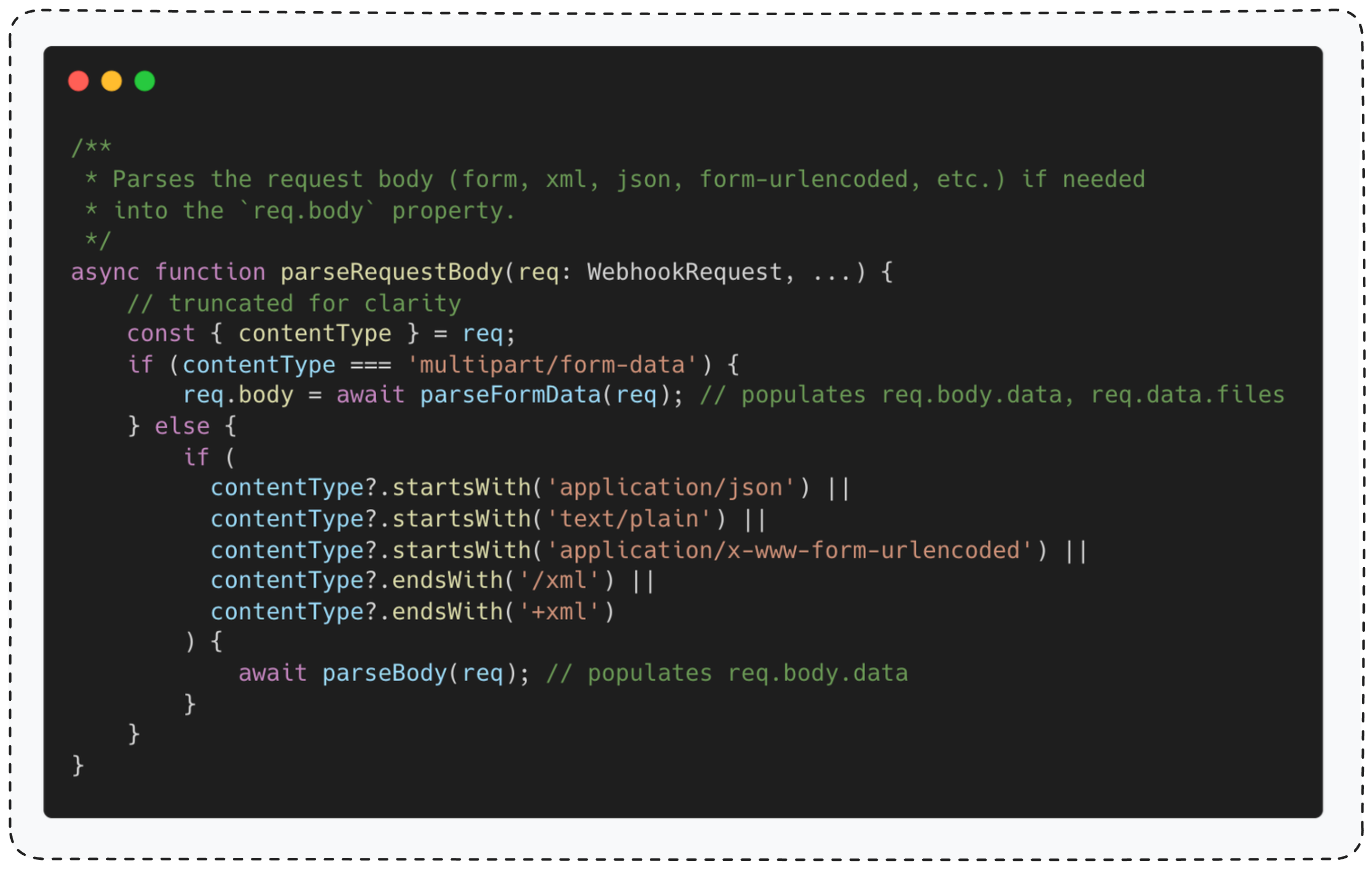
This function reads the Content-Type header to determine how to parse the request body.
For
multipart/form-data requests, it uses parseFormData() function. For all other content types, it uses parseBody()
From now on I’ll refer to
parseFormData() as the “file upload parser” and to parseBody() as the “regular body parser”.
To keep things focused, I won’t include the
regular body parser source code.

The key thing to understand is that this function parses the HTTP body based on the
Content-Type header, then stores the decoded result in the req.body global variable.
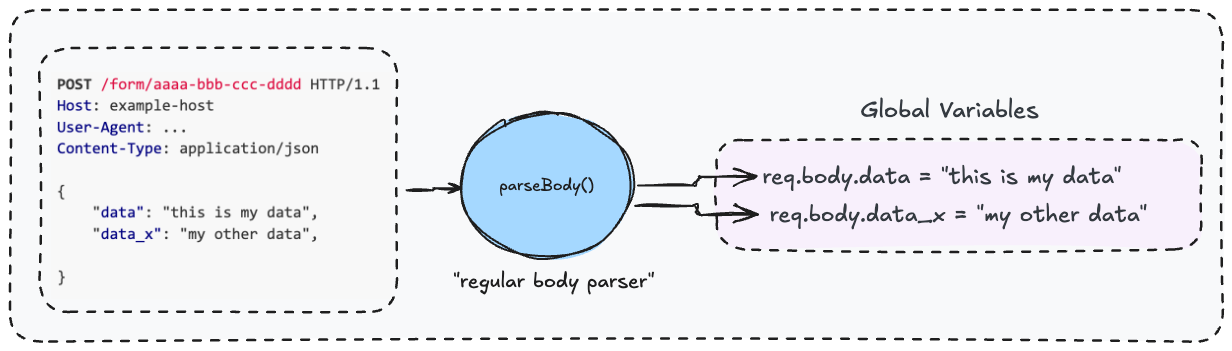
Fig. 3 — parseBody() and global variable assignment

Now let’s look at the file upload parser. This function is simply a wrapper around Formidable’s parse() function  -  and this detail is crucial for understanding the vulnerability.


Formidable (not the song)
Formidable is a Node.js library built for handling file uploads.
It parses
multipart/form-data requests and takes care of all the file upload mechanics  - including the security side of things. 
The security detail that matters here  -  when Formidable processes an uploaded file, it automatically saves it to a randomly generated path in a temp directory. This means users can’t control where files end up, which protects against path traversal attacks.

Here’s what matters: the file upload parser wraps Formidable’s parse() function. Unlike the regular body parser that populates req.body, this one populates req.body.files with the output from Formidable.

Fig. 4 — Full webhook execution flow, including globals variable assignment


Handling uploaded files in n8n
To understand the vulnerability, we first need to look at how n8n handles file uploads.
In n8n, the standard practice for any file-handling function is to fetch uploaded files directly from
req.body.files
The
ChatTrigger Webhook is a good example of this pattern.

This function first verifies that the Content-Type header is multipart/form-data, then calls handleFormData() to process the uploaded files. from now on I’ll refer to handleFormData() as the “file handler”. 

The question is  - why does the function verify the content type?

The reason is simple: the
file handler, like any other file-handling function in n8n, fetches data from req.body.files.
As we discussed earlier (
Figure 4), this variable is only populated by the file upload parser, which only runs when the content type is multipart/form-data.


Content-Type Confusion
Before we dive into the bug, let’s summarize what we know so far

Fig. 5 — Everything we know so far

The question is  - what happens if a file-handling function is called without verifying that the Content-Type is multipart/form-data
In the normal flow, the content type is still
multipart/form-data, so there’s no issue  -  legitimate users send the expected content type. 

But if an attacker changes the content type to something like
application/json, the middleware calls the regular body parser instead of the file upload parser.

This means
req.body.files won’t be populated  -  leading to an error.
But here’s the real question: is this ‘Content-Type Confusion’ exploitable? Remember what we discussed earlier about how the
regular body parser works?

“The key thing to understand is that this function parses the HTTP body based on the Content-Type header, then stores the decoded result in the req.body global variable.”

So, what happens if the HTTP request body looks like this:

Fig. 6 — overriding req.body.files global variable

As you’ve likely realized, req.body is populated with the decoded HTTP body content, and there’s nothing preventing req.body.files from being overridden.

What does this mean? If n8n has a flow where a file-handling function runs without verifying the content type is multipart/form-data, an attacker can override req.body.files and control it completely  -  potentially leading to a vulnerability.

So the big question: does such a flow exist? Spoiler alert  -  yes (otherwise you wouldn’t be reading this).


The Form Webhook Node 
The Form node is a useful node in n8n  -  it serves as the external interface for users to interact with workflows. 
You’ll find it in almost any workflow that needs user input. Think about HR systems where candidates upload their CVs, or customer support portals where users attach screenshots and error logs. File uploads are a core part of what makes it so flexible.

Fig. 7 — HR system where candidates upload CVs for AI-powered screening and processing

The function that handles Form submissions is formWebhook. It does a bunch of stuff we don’t need to worry about before calling prepareFormReturnItem.

As you can see, the form Webhook function calls prepareFormReturnItem() without verifying that the content type is multipart/form-data.

Now let’s see what this function actually does.

This is a file-handling function that calls copyBinaryFile() for each file in req.body.files.

The copyBinaryFile() function copies a file from its temp path (stored at req.body.files[id].filepath) to persistent storage -  either on disk or S3 object store, depending on the configuration.

Here’s the issue: since this function is called without verifying the content type is multipart/form-data, we control the entire req.body.files object.

That means we control the filepath parameter  - so instead of copying an uploaded file, we can copy any local file from the system.
The result? Any node after the Form node receives the local file’s content instead of what the user uploaded.

Now let’s see how to exploit this.

Exploitation

Organizational Knowledge-Base Use-Case
Imagine this: You’re the Chief AI Officer at a large enterprise drowning in disorganized data - product documentation spread across drives, HR policies no one can find, financial reports locked in different systems. You want to make life easier for your employees, so you decide to create a centralized knowledge-base powered by RAG (Retrieval-Augmented Generation) technology that brings it all together.

This use-case is far from fictional, as we see more and more organizations adopting this approach in their companies.
The architecture is simple: any one of your employees can upload relevant data to the knowledge-base through Form, and retrieve data through a chat-based interface.

Fig. 8 — Organizational knowledge-base implemented with RAG technology

To show you how the system would work, let’s pretend for a second you work as a Product Marketing Manager at a fictional company named BioSense Innovations and you’re uploading product specification file to the organizational knowledge-base
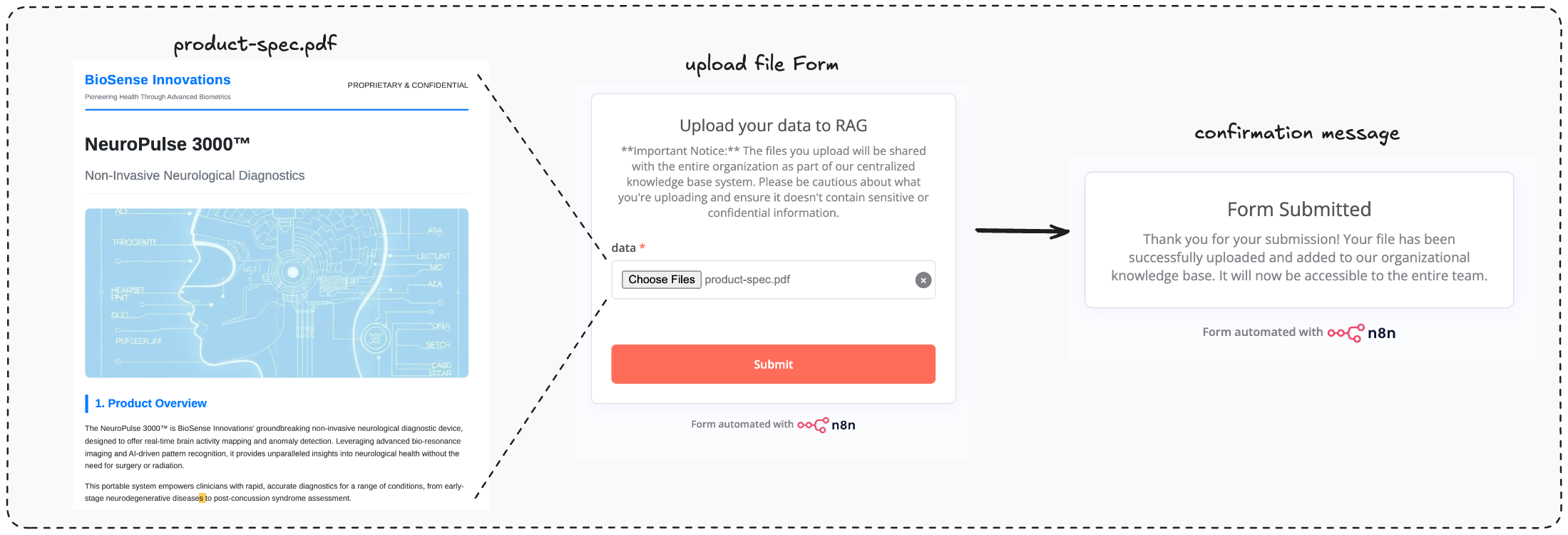
Fig. 9 — Loading data to the knowledge-base through Form

Now your teammates and colleagues can search and get information about the product you’re offering

Fig. 10 — Access knowledge-base through Chat

Arbitrary File Read Primitive
Now, let’s show how to exploit the ‘Content-Type confusion’ bug to read arbitrary files from the n8n instance.
To trigger the vulnerability, we need to intercept the HTTP request sent when uploading a file through the Form and change the content-type from
multipart/form-data to something else (like application/json). 

This forces the second parsing flow we discussed earlier (see Figure 4). Then, we craft the request body to control the req.body.files object (see Figure 6).

Fig. 11 — Invoking the content-type-confustion bug, overrding req.body.files

Once we control req.body.files[number].filepath, we’re essentially loading an internal file (in this example: /etc/passwd) into the organizational knowledge base instead of an uploaded one. 

To retrieve the content of that internal file, all we need to do is ask about it through the chat interface.

Fig. 11 — Reading /etc/passwd

As you can see, we were able to read /etc/passwd file from the n8n instance.

From Arbitrary Read to RCE
So now we know we can use this vulnerability to read arbitrary files from an n8n instance.
But can we escalate this primitive to code execution? Again, the answer is yes - but first, we need to understand how n8n manages sessions.

Session Management
To keep things simple, I won’t include the full code here, but I’ll explain how n8n’s authentication session works.
n8n stores the authentication session in a cookie called `
n8n-auth`.

After successful login, n8n generates this cookie value through a specific process.
First, it creates a dictionary containing key user details - the user ID and the first 10 characters of a SHA256 hash.

This hash is computed from a string that concatenates the user’s email and password.

Fig. 12 —auth-cookie payload dictionary creation

Next, n8n signs this payload dictionary with a secret key (which is unique for each instance for security reasons). Finally, the signed output is stored in the session cookie named `n8n-auth`.

Fig. 13 — auth-cookie JWT signing

Session Forgery
Now that we understand how session management works, can we forge a fake session cookie if we have an arbitrary file read primitive? 
Luckily for us, all the elements needed to forge a valid session exist in local files on the n8n instance. 

First, the entire user records are stored in n8n’s database, which is stored locally on disk in local deployments (Docker, installation from source).
For example, in Docker deployments, the database is located at
/home/node/.n8n/database.sqlite

Second, the encryption secret key is stored in a configuration file, also stored locally in local deployments. The configuration location is /home/node/.n8n/config.

Authentication Bypass
Let’s demonstrate how we can use this vulnerability to perform an authentication bypass and log in as the system admin. 
First, we’ll trigger the vulnerability to load the entire database into the knowledge base.

Fig. 14 — Loading n8n database using the vulnerability

Right after that, we’ll use the chat interface to extract the admin’s user ID, email, and hashed password. 

Fig. 15 — Extracting admin user record

Next, we’ll trigger the vulnerability again, but this time we’re loading the config file into the knowledge base.
Once again, we’ll extract the encryption secret using the chat interface.

Fig. 16 — Extracting encryption key, needed for signing

To finish the job, we’ll use the algorithm we showed above to create the JWT hash, then set its value in the `n8n-auth` cookie. 

Fig. 17 — Set the forged session, authentication bypass

And Voilà -  we’re logged in as admin. 

The Final Piece (Code Execution)
Now, to achieve code execution, all we need to do is create a new workflow with a totally innocent node called "Execute Command”. And just like that - we've got code execution. Easy.

Fig. 18 — Code Execution

Why Should You Care?

The blast radius of a compromised n8n is massive.
n8n connecting countless systems, your organizational Google Drive, OpenAI API keys, Salesforce data, IAM systems, payment processors, customer databases, CI/CD pipelines, and more.
It’s the central nervous system of your automation infrastructure. 

Imagine a large enterprise with 10,000+ employees with one n8n server that anyone uses. A compromised n8n instance doesn’t just mean losing one system -  it means handing attackers the keys to everything. 
API credentials, OAuth tokens, database connections, cloud storage - all centralized in one place. 

n8n becomes a single point of failure and a goldmine for threat actors.

Call To Action

  1. Update n8n to version 1.121.0 or later.
  2. Don’t expose n8n to the internet unless absolutely necessary.
  3. Require authentication for all Forms you create.

Responsible Disclosure Timeline

  • November 9, 2025: reported the vulnerability to n8n.
  • November 10, 2025: n8n acknowledged the report.
  • November 18, 2025: n8n published patched version
  • December 29, 2025: The researcher requested an update regarding the publication status of the vulnerability report.
  • January 6, 2026: n8n assigned CVE to the vulnerability: CVE-2026-21858.
  • January 7 , 2026: Cyera published this blog post.
Download Report

Ni8mare  -  Unauthenticated Remote Code Execution in n8n (CVE-2026-21858)

When a (Content)-Type Confusion bug leads to a full takeover

TL;DR

We discovered a critical vulnerability (CVE-2026-21858, CVSS 10.0) in n8n that enables attackers to take over locally deployed instances, impacting an estimated 100,000 servers globally.
No official workarounds are available for this vulnerability. Users should upgrade to version 1.121.0 or later to remediate the vulnerability.

What’s Exactly n8n?

Unless you’ve been living under a rock for the last year, you’ve probably heard of n8n.

n8n is the go-to platform for building automated workflows in the age of AI and AI agents. With over 100 million Docker pulls, millions of users, and thousands of enterprises using it, n8n has become the central nervous system of automation infrastructure, and there’s a good chance your organization uses it too. 

n8n offers a friendly drag-and-drop interface and countless integrations that give any user , even the least technical - the ability to create automations and offload tasks.
If you can imagine it, you can probably build it with n8n.

In addition, it has a huge community that shares out-of-the-box workflows for all kinds of use cases.

The Vulnerability (CVE-2026-21858)

Before we dive into the technical details, I want to give some credit to the security team at n8n. They maintain a strong security posture across the product and respond incredibly fast when it comes to addressing reported vulnerabilities.

This part is a little technical, so buckle up and enjoy the ride.

Webhooks
A Webhook is a component that helps services become event-driven. Instead of constantly poking other applications and services to check if an event has occurred, it simply listens and waits for specific messages that indicate it.

Fig. 1 - Webhooks 101

In n8n, Webhooks act as the starting point for workflows, letting you catch incoming data from Forms, Chat messages, WhatsApp notifications and more.

The execution flow for all Webhook nodes starts the same way, and that part isn’t really relevant to what we’re covering here, so let’s just call it the “Webhook Black Box.” 

After that, the flow calls a middleware function called parseRequestBody() and the only thing that changes between different Webhooks is the actual logic function that gets called at the very end.

To keep things clear, from now on, I’ll refer to
parseRequestBody() as  -  “the middleware”.

Fig. 2 — Webhook generic execution flow

The middleware
Let's take a closer look at the middleware function.

This function reads the Content-Type header to determine how to parse the request body.
For
multipart/form-data requests, it uses parseFormData() function. For all other content types, it uses parseBody()
From now on I’ll refer to
parseFormData() as the “file upload parser” and to parseBody() as the “regular body parser”.
To keep things focused, I won’t include the
regular body parser source code.

The key thing to understand is that this function parses the HTTP body based on the
Content-Type header, then stores the decoded result in the req.body global variable.

Fig. 3 — parseBody() and global variable assignment

Now let’s look at the file upload parser. This function is simply a wrapper around Formidable’s parse() function  -  and this detail is crucial for understanding the vulnerability.


Formidable (not the song)
Formidable is a Node.js library built for handling file uploads.
It parses
multipart/form-data requests and takes care of all the file upload mechanics  - including the security side of things. 
The security detail that matters here  -  when Formidable processes an uploaded file, it automatically saves it to a randomly generated path in a temp directory. This means users can’t control where files end up, which protects against path traversal attacks.

Here’s what matters: the file upload parser wraps Formidable’s parse() function. Unlike the regular body parser that populates req.body, this one populates req.body.files with the output from Formidable.

Fig. 4 — Full webhook execution flow, including globals variable assignment


Handling uploaded files in n8n
To understand the vulnerability, we first need to look at how n8n handles file uploads.
In n8n, the standard practice for any file-handling function is to fetch uploaded files directly from
req.body.files
The
ChatTrigger Webhook is a good example of this pattern.

This function first verifies that the Content-Type header is multipart/form-data, then calls handleFormData() to process the uploaded files. from now on I’ll refer to handleFormData() as the “file handler”. 

The question is  - why does the function verify the content type?

The reason is simple: the
file handler, like any other file-handling function in n8n, fetches data from req.body.files.
As we discussed earlier (
Figure 4), this variable is only populated by the file upload parser, which only runs when the content type is multipart/form-data.


Content-Type Confusion
Before we dive into the bug, let’s summarize what we know so far

Fig. 5 — Everything we know so far

The question is  - what happens if a file-handling function is called without verifying that the Content-Type is multipart/form-data
In the normal flow, the content type is still
multipart/form-data, so there’s no issue  -  legitimate users send the expected content type. 

But if an attacker changes the content type to something like
application/json, the middleware calls the regular body parser instead of the file upload parser.

This means
req.body.files won’t be populated  -  leading to an error.
But here’s the real question: is this ‘Content-Type Confusion’ exploitable? Remember what we discussed earlier about how the
regular body parser works?

“The key thing to understand is that this function parses the HTTP body based on the Content-Type header, then stores the decoded result in the req.body global variable.”

So, what happens if the HTTP request body looks like this:

Fig. 6 — overriding req.body.files global variable

As you’ve likely realized, req.body is populated with the decoded HTTP body content, and there’s nothing preventing req.body.files from being overridden.

What does this mean? If n8n has a flow where a file-handling function runs without verifying the content type is multipart/form-data, an attacker can override req.body.files and control it completely  -  potentially leading to a vulnerability.

So the big question: does such a flow exist? Spoiler alert  -  yes (otherwise you wouldn’t be reading this).


The Form Webhook Node 
The Form node is a useful node in n8n  -  it serves as the external interface for users to interact with workflows. 
You’ll find it in almost any workflow that needs user input. Think about HR systems where candidates upload their CVs, or customer support portals where users attach screenshots and error logs. File uploads are a core part of what makes it so flexible.

Fig. 7 — HR system where candidates upload CVs for AI-powered screening and processing

The function that handles Form submissions is formWebhook. It does a bunch of stuff we don’t need to worry about before calling prepareFormReturnItem.

As you can see, the form Webhook function calls prepareFormReturnItem() without verifying that the content type is multipart/form-data.

Now let’s see what this function actually does.

This is a file-handling function that calls copyBinaryFile() for each file in req.body.files.

The copyBinaryFile() function copies a file from its temp path (stored at req.body.files[id].filepath) to persistent storage -  either on disk or S3 object store, depending on the configuration.

Here’s the issue: since this function is called without verifying the content type is multipart/form-data, we control the entire req.body.files object.

That means we control the filepath parameter  - so instead of copying an uploaded file, we can copy any local file from the system.
The result? Any node after the Form node receives the local file’s content instead of what the user uploaded.

Now let’s see how to exploit this.

Exploitation

Organizational Knowledge-Base Use-Case
Imagine this: You’re the Chief AI Officer at a large enterprise drowning in disorganized data - product documentation spread across drives, HR policies no one can find, financial reports locked in different systems. You want to make life easier for your employees, so you decide to create a centralized knowledge-base powered by RAG (Retrieval-Augmented Generation) technology that brings it all together.

This use-case is far from fictional, as we see more and more organizations adopting this approach in their companies.
The architecture is simple: any one of your employees can upload relevant data to the knowledge-base through Form, and retrieve data through a chat-based interface.

Fig. 8 — Organizational knowledge-base implemented with RAG technology

To show you how the system would work, let’s pretend for a second you work as a Product Marketing Manager at a fictional company named BioSense Innovations and you’re uploading product specification file to the organizational knowledge-base

Fig. 9 — Loading data to the knowledge-base through Form

Now your teammates and colleagues can search and get information about the product you’re offering

Fig. 10 — Access knowledge-base through Chat

Arbitrary File Read Primitive
Now, let’s show how to exploit the ‘Content-Type confusion’ bug to read arbitrary files from the n8n instance.
To trigger the vulnerability, we need to intercept the HTTP request sent when uploading a file through the Form and change the content-type from
multipart/form-data to something else (like application/json). 

This forces the second parsing flow we discussed earlier (see Figure 4). Then, we craft the request body to control the req.body.files object (see Figure 6).

Fig. 11 — Invoking the content-type-confustion bug, overrding req.body.files

Once we control req.body.files[number].filepath, we’re essentially loading an internal file (in this example: /etc/passwd) into the organizational knowledge base instead of an uploaded one. 

To retrieve the content of that internal file, all we need to do is ask about it through the chat interface.

Fig. 11 — Reading /etc/passwd

As you can see, we were able to read /etc/passwd file from the n8n instance.

From Arbitrary Read to RCE
So now we know we can use this vulnerability to read arbitrary files from an n8n instance.
But can we escalate this primitive to code execution? Again, the answer is yes - but first, we need to understand how n8n manages sessions.

Session Management
To keep things simple, I won’t include the full code here, but I’ll explain how n8n’s authentication session works.
n8n stores the authentication session in a cookie called `
n8n-auth`.

After successful login, n8n generates this cookie value through a specific process.
First, it creates a dictionary containing key user details - the user ID and the first 10 characters of a SHA256 hash.

This hash is computed from a string that concatenates the user’s email and password.

Fig. 12 —auth-cookie payload dictionary creation

Next, n8n signs this payload dictionary with a secret key (which is unique for each instance for security reasons). Finally, the signed output is stored in the session cookie named `n8n-auth`.

Fig. 13 — auth-cookie JWT signing

Session Forgery
Now that we understand how session management works, can we forge a fake session cookie if we have an arbitrary file read primitive? 
Luckily for us, all the elements needed to forge a valid session exist in local files on the n8n instance. 

First, the entire user records are stored in n8n’s database, which is stored locally on disk in local deployments (Docker, installation from source).
For example, in Docker deployments, the database is located at
/home/node/.n8n/database.sqlite

Second, the encryption secret key is stored in a configuration file, also stored locally in local deployments. The configuration location is /home/node/.n8n/config.

Authentication Bypass
Let’s demonstrate how we can use this vulnerability to perform an authentication bypass and log in as the system admin. 
First, we’ll trigger the vulnerability to load the entire database into the knowledge base.

Fig. 14 — Loading n8n database using the vulnerability

Right after that, we’ll use the chat interface to extract the admin’s user ID, email, and hashed password. 

Fig. 15 — Extracting admin user record

Next, we’ll trigger the vulnerability again, but this time we’re loading the config file into the knowledge base.
Once again, we’ll extract the encryption secret using the chat interface.

Fig. 16 — Extracting encryption key, needed for signing

To finish the job, we’ll use the algorithm we showed above to create the JWT hash, then set its value in the `n8n-auth` cookie. 

Fig. 17 — Set the forged session, authentication bypass

And Voilà -  we’re logged in as admin. 

The Final Piece (Code Execution)
Now, to achieve code execution, all we need to do is create a new workflow with a totally innocent node called "Execute Command”. And just like that - we've got code execution. Easy.

Fig. 18 — Code Execution

Why Should You Care?

The blast radius of a compromised n8n is massive.
n8n connecting countless systems, your organizational Google Drive, OpenAI API keys, Salesforce data, IAM systems, payment processors, customer databases, CI/CD pipelines, and more.
It’s the central nervous system of your automation infrastructure. 

Imagine a large enterprise with 10,000+ employees with one n8n server that anyone uses. A compromised n8n instance doesn’t just mean losing one system -  it means handing attackers the keys to everything. 
API credentials, OAuth tokens, database connections, cloud storage - all centralized in one place. 

n8n becomes a single point of failure and a goldmine for threat actors.

Call To Action

  1. Update n8n to version 1.121.0 or later.
  2. Don’t expose n8n to the internet unless absolutely necessary.
  3. Require authentication for all Forms you create.

Responsible Disclosure Timeline

  • November 9, 2025: reported the vulnerability to n8n.
  • November 10, 2025: n8n acknowledged the report.
  • November 18, 2025: n8n published patched version
  • December 29, 2025: The researcher requested an update regarding the publication status of the vulnerability report.
  • January 6, 2026: n8n assigned CVE to the vulnerability: CVE-2026-21858.
  • January 7 , 2026: Cyera published this blog post.
Download Report

Experience Cyera

To protect your dataverse, you first need to discover what’s in it. Let us help.

Get a demo  →
Decorative