Hidden and Enabled: The Long-Lived Risk of Malicious OAuth Applications - A Practical Threat Hunting Guide for M365
.avif)

Enterprise Microsoft 365 environments are increasingly well-hardened against direct account compromise. Controls such as multi-factor authentication, conditional access policies, and user-centric monitoring have significantly raised the bar for traditional intrusion techniques. At the same time, these environments continue to store large volumes of sensitive data, making them high-value targets. Yet this defensive maturity has created an adjacent and less scrutinized attack surface: application identities.
Malicious Microsoft 365 applications do not exhibit the behavioral signals typically associated with active attackers. They authenticate legitimately, inherit trust by design, and operate within expected platform boundaries. Once consented, these applications often persist for extended periods with minimal reassessment, limited visibility, and no equivalent enforcement of identity safeguards such as MFA. As a result, they blend into normal tenant activity rather than triggering investigation - not due to sophistication, but because they conform too closely to expected behavior.
While the broader security community has recently highlighted OAuth application abuse, our investigation focused on operational impact and practical hunt strategy. During proactive tenant reviews, we identified malicious Microsoft 365 applications that had remained enabled in customer environments for years, retaining access to sensitive data. Upon discovery, we immediately notified the affected organizations and shared the relevant findings, allowing time for remediation prior to publication.
Key Findings from our Investigation
- No exploitation required - attackers leveraged standard OAuth consent and application identity mechanisms rather than vulnerabilities or zero-day techniques.
- Long-lived exposure - previously documented malicious application campaigns from as early as 2019 remained enabled in customer tenants during our analysis, prompting us to alert customers and validate their immediate removal.
- Structural blind spot - application identities are rarely subject to continuous review, revocation hygiene, or risk-based scrutiny comparable to user accounts.
Why M365 Applications Are a Blind Spot
Microsoft 365 applications represent a long-lived and low-visibility attack surface that is frequently overlooked during security investigations.
Unlike users or endpoints, applications operate under their own identities - typically without MFA, infrequent review, and long-lived access.
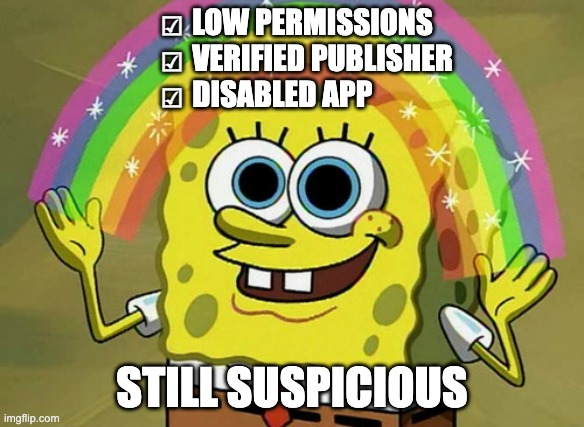
This risk persists because of familiar assumptions: that low permissions imply low risk, that disabled applications are effectively removed, or that application identities are subject to the same scrutiny as user identities. In practice, none of these assumptions hold true - and attackers know it.
What We Found in Real Customer Environments
We began our investigation by reviewing publicly documented malicious M365 application campaigns across customer environments. Using this as a starting point, we identified two previously reported campaigns: one originating in 2025, and another dating back to 2020, both of which still had enabled applications present in customer tenants.
First Known Campaign
In a customer environment, we identified two applications of interest: “Excel4Enabler” and “SettingsEnabler”. The primary signal that prompted deeper investigation was their configured reply URL: https[:]//iwljzmwhres67fh[.]com/office
This URL is flagged as malicious in VirusTotal and is associated with a phishing campaign documented
by SANS in 2020: https://www.youtube.com/watch?v=KZ3gcFe4_rE
Both applications were installed on July 2020 and were granted a broad and highly sensitive set of permissions, including:
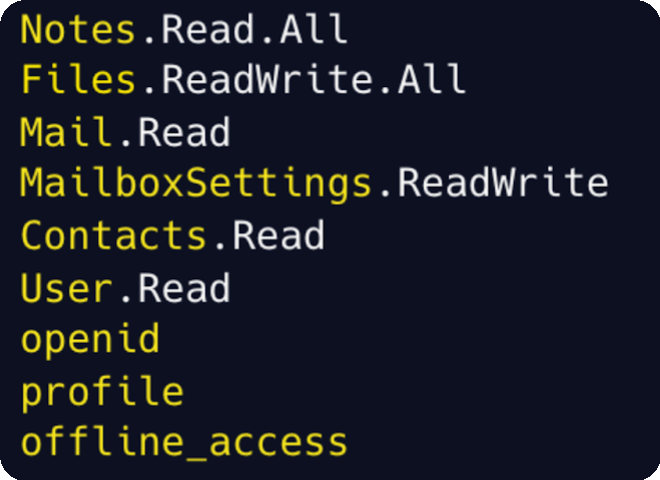
The presence of offline_access was particularly notable, as it enables long-lived access without ongoing user interaction.
Despite being part of a publicly documented phishing campaign, one of these applications was still enabled at the time of our investigation. Using Cyera’s classification engine, we determined that these applications had access to over one million sensitive records, including large volumes of PII and passwords. Upon this discovery, we rapidly notified the affected organizations and worked with them to validate the revocation and removal of these high-risk applications.
This illustrates how application-based threats can persist quietly over time, even when the underlying campaign is well known.
Second known campaign(s)
Across multiple customer environments, we identified another set of applications associated with malicious infrastructure:
- Docusign
- Adobe
- sharedoc
- OneDrive-2025
In this case, the application names were intentionally familiar and unlikely to raise immediate concern. The signal that triggered further investigation was, once again, the configured reply URLs:
- https://accposteamworkspace.myclickfunnels.com/home
- https://nmcunhasteamworkspace.myclickfunnels.com/secured-sharepoint-document
- https://cleansbeauty.com/lost/apc.html
- https://projectfilesteamworde93a.myclickfunnels.com/rfp
Three of these URLs are flagged as malicious in VirusTotal. The fourth exhibits patterns consistent with known phishing infrastructure.
Here, the attackers made a clear effort to appear legitimate. Not only through naming, but also by requesting minimal permissions:
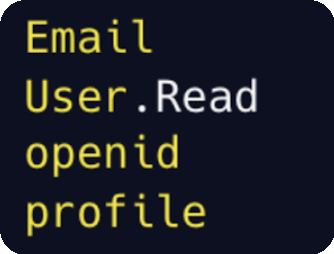
Despite the low permission footprint, these applications still leveraged OAuth as a high-trust identity entry point. Even with identity-only scopes, a malicious M365 application can validate victim identities, collect tenant and user context, and redirect users into AiTM or credential-harvesting infrastructure.
In this scenario, OAuth was not primarily used for data access, but as a phishing enablement mechanism that significantly increases MFA bypass success.
While it is difficult to definitively attribute all of these applications to a single coordinated campaign, their behavior closely aligns with activity described in Proofpoint’s research on OAuth app impersonation campaigns:
A Long-Lived and Underreported Campaign
Identifying known campaigns is an important foundation - but it often depends on how “known” is defined. In practice, many campaigns leave partial traces in public sources without ever being fully documented, analyzed, or operationalized by defenders.
To explore under the radar campaigns that could be surfaced more effectively, we used an LLM as a signal-amplification tool, focusing exclusively on application names. The goal was not automated classification, but prioritization - highlighting applications that warranted deeper investigation.
Among the results, the model surfaced applications using Cyrillic Unicode homoglyph characters, visually resembling legitimate Microsoft services:
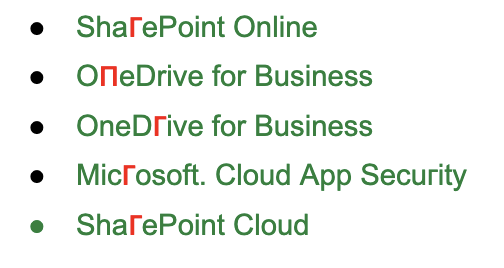
At a glance, these differences are nearly indistinguishable - making them easy to overlook during routine reviews.

Further investigation revealed that these applications were installed across several customer environments, with some instances still enabled. Because all installations occurred within a narrow timeframe during November-December 2019, it strongly suggested a coordinated deployment. We proactively engaged the impacted customers to highlight these deeply hidden homoglyph applications and verified their permanent deletion.
Additional indicators reinforced this assessment:
- OneDгive for Business and Мicгoѕоft. Сloud App Ѕесuгity shared the same reply URL.
- ShaгePoint Online and ShaгеPoint Cloud shared the same reply URL.
- OneDгive for Business, ОпeDrive for Business and ShaгеPoint Cloud shared the same publisher organization ID.
Some instances were granted an extensive set of permissions, including:
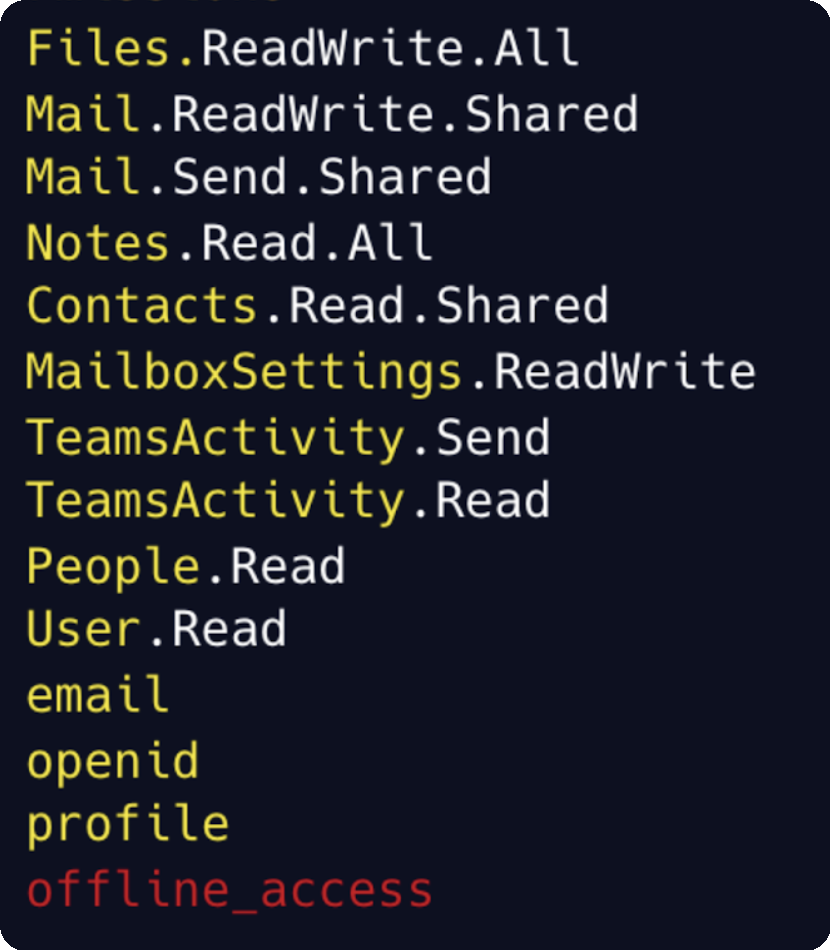
Taken together, these signals reveal a campaign that was visible in fragments but never fully connected - allowing it to persist quietly across customer environments for more than five years.
Malicious vs. Suspicious: An Investigation Model
Investigating malicious M365 applications falls into two scenarios: identifying applications that are already publicly documented as malicious, and uncovering new malicious applications that have not yet been classified by the security community.
A malicious application can be identified with high confidence based on publicly available intelligence. A single high-confidence indicator - such as confirmed malicious infrastructure or a known-bad publisher - is sufficient to justify immediate action.
A suspicious application, by contrast, cannot be conclusively classified based on public data alone. These applications may appear benign at first glance, but when examined in aggregate, multiple weaker signals can form a compelling case that the application poses risk.
Here, the goal is not to find a single “smoking gun”, but to identify patterns that make the application’s presence difficult to justify.
How to Get Metadata on M365 Applications (and What to Look At)
To collect the metadata about the applications, you should perform GET request to Microsoft Graph API:
https://graph.microsoft.com/v1.0/servicePrincipals?$filter=servicePrincipalType eq 'Application'
This returns a list of service principals representing applications that exist in the tenant. For threat hunting, a small number of fields tend to be disproportionately useful:
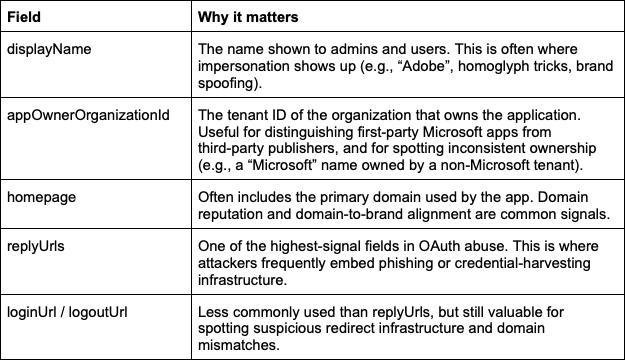
How We Hunt Malicious and Suspicious M365 Applications
Our approach is intentionally metadata-first. While audit logs are valuable, they often surface only after abuse has already occurred. In contrast, many malicious and suspicious M365 applications can be identified earlier through careful analysis of application configuration, ownership, and prevalence - before clear malicious activity is visible.
Finding Known Campaigns
Identifying known malicious campaigns is usually the fastest path to high-confidence findings. While this represents the most basic form of application threat hunting, it remains critically important.
In practice:
- Review application metadata for known malicious URLs
- Compare application and publisher IDs against public intelligence
- Identify infrastructure reuse across tenants, such as shared publisher identifiers
These signals are deterministic. A single strong indicator is often sufficient.
Discovering Unknown Campaigns
Uncovering unknown malicious applications requires a different mindset. Here, we rely on a reputation-based model that aggregates multiple weak signals into a single assessment. There are many indicators that can be used to implement this approach. Below are representative examples, not an exhaustive list.
Metadata
- Suspicious naming patterns (e.g., use of Cyrillic or Greek characters, homoglyphs, or misleading characters).
- Indicators of impersonation of legitimate applications
- For example, an application using the same name as a well-known service but with a different appOwnerOrganizationId, and installed in only a small number of customer environments.
- Mutually exclusive branding under a single publisher (e.g., both “OneDrive” and “Slack”).
- Domain mismatches between homepage and reply URLs
- Permission-purpose misalignment
- Unjustified offline_access
- Publishers associated with multiple suspicious apps
You can also use Access Logs or even perform an active validation:
- In the access logs, we can search for unusual access spikes or known malicious IP addresses
- As an active validation step, we can search for reply URLs returning phishing-like content via HTTP GET (for example, a web page that looks like Microsoft authentication under a non-Microsoft URL)
Individually, these signals might be weak. Together, they are often decisive.
Common Investigation Pitfalls
To effectively investigate M365 applications, it is equally important to avoid common mistakes that can lead to missed detections or false confidence:
- Over-trusting the verified publisher label
- Treating unknown publisher as a strong signal on its own
- Ignoring disabled applications
- Assuming a disabled application is equivalent to a deleted one
Avoiding these pitfalls helps ensure both malicious and suspicious applications receive appropriate scrutiny.
Summary
Malicious M365 applications are not always new, sophisticated, or noisy. In our investigations, some of the most impactful threats were long-lived applications that blended into legitimate environments by exploiting trust, familiarity, and review gaps. Attackers don’t always need new tricks when old ones still work.
IOCs Table
https://github.com/Cyera-Research-Labs/m365-malicious-app-iocs


.svg)