
Google Workspace is where collaboration happens. Teams create, share, comment, and move files continuously across My Drive and Shared Drives, often across organizational boundaries.
That constant activity generates a lot of events. And somewhere in that volume are the ones that matter, a sensitive file shared with an external user, an ownership transfer on a document containing PII, a bulk download from a Shared Drive the week before an employee leaves.
The challenge isn't that the events don't exist. It's that without data context, every event looks the same.
The gap between activity data and security context
Google Workspace produces detailed audit logs. Security teams can access them. But raw activity data answers the wrong question.
Knowing that a file was downloaded doesn't tell you whether that file contained sensitive data. Knowing that permissions changed doesn't tell you whether the affected documents include credentials, customer records, or regulated information. Knowing that an ownership was transferred doesn't tell you whether the new owner should have that access at all.
The result is a familiar problem for security teams: an enormous volume of access events, and no efficient way to focus on the ones that actually carry risk.
What changes when Access Trail covers Google Workspace
Cyera's Access Trail now ingests audit events from the Google Workspace Reports API across My Drive and Shared Drives, and cross-correlates them with Cyera's DSPM data, enriching every event with data classification, sensitivity, and identity context.
The difference is significant. Security teams are no longer looking at raw activity. They are looking at activity on sensitive data, with the context needed to investigate, prioritize, and act.
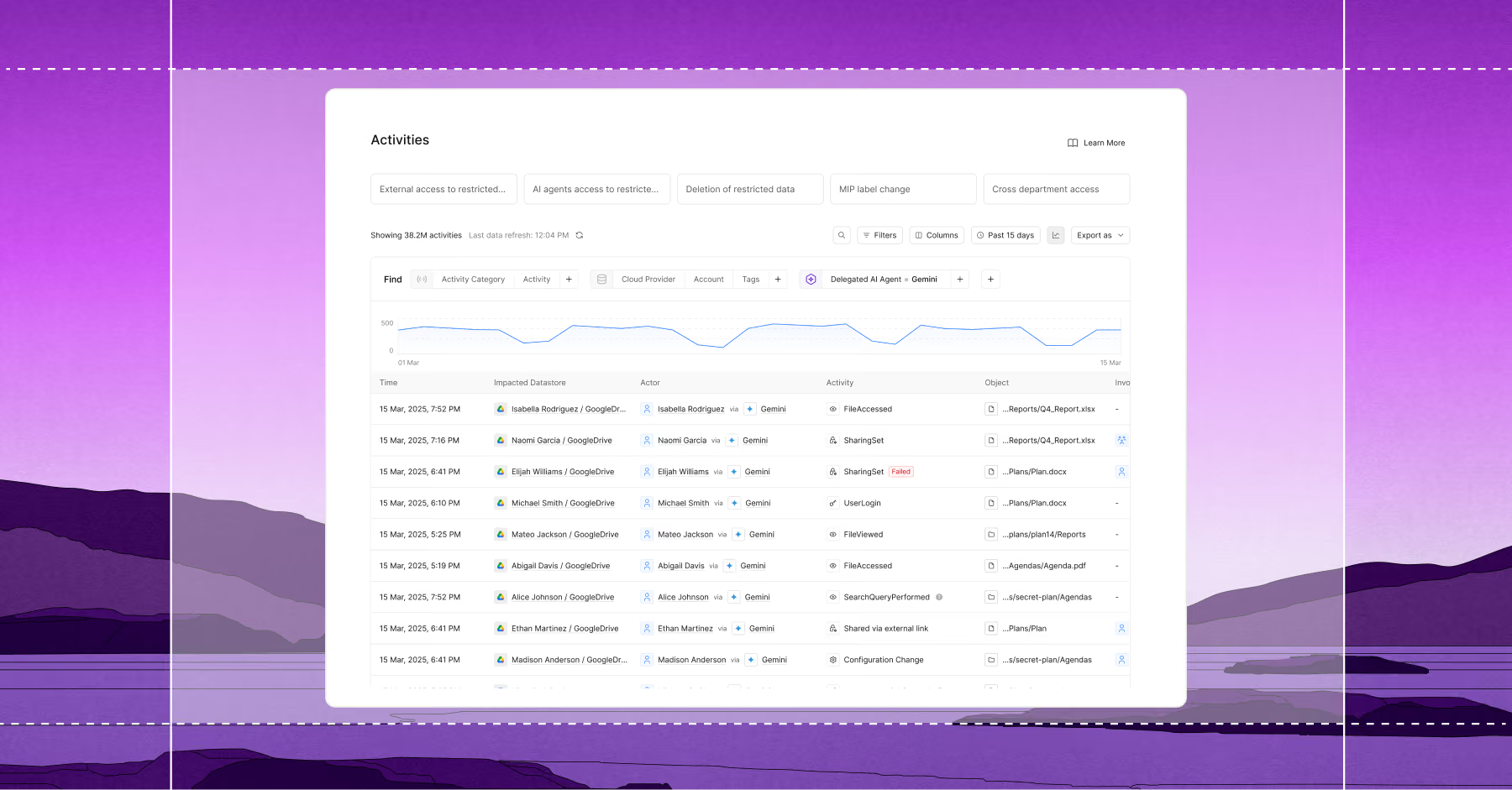
Here is what that enables in practice.
1) Know when sensitive data was accessed, not just when a file was touched
Without enrichment, a file view is a file view. With Cyera, it becomes clear which access events involve files classified as PII, PCI, credentials, or other sensitive data categories.
This shifts the operational question from "what happened in Google Workspace?" to "what happened to our sensitive data in Google Workspace?" which actually drives investigation and response.
2) Investigate across the full range of access, sharing, and movement events
Access Trail for Google Workspace ingests a broad set of event types, including:
- Access events: document views, previews, downloads, exports, print activity
- Modification events: file creation, edits, and uploads
- Movement and deletion events: file moves, copies, trash, and permanent deletion
- Permission and sharing changes: access updates, ownership transfers, Shared Drive membership changes
- Collaboration and AI activity: comments, approvals, and Connected Sheets queries, including queries that route Google Workspace data to external AI tools and APIs
Every one of these events is enriched with Cyera classification and sensitivity context, so teams can investigate across the full surface area of Google Workspace activity without manually correlating logs to data.
As organizations embed AI tools into everyday workflows, Google Workspace increasingly becomes the bridge between sensitive internal data and external systems. Connected Sheets activity, for example, can surface when data from Drive is being queried by or shared with AI applications. Access Trail makes that visible in the same place as every other access event, with the same classification context applied.
3) Surface high-risk patterns faster with predefined filters and saved workflows
Investigations often start from the same questions. Who has been exporting sensitive files externally? Where have permissions changed on documents containing regulated data? What deletion activity has touched sensitive content recently?
Access Trail includes predefined high-risk activity filters, including External Movements, Permission Changes, Sensitive Deletions, Organization-Wide Sharing, and Sensitivity Label Changes, that jump directly to the patterns security and compliance teams care about most.
Teams can also save custom filter configurations as Saved Filters, making it straightforward to return to recurring monitoring workflows, compliance reviews, and audit evidence collection without rebuilding filter sets each time.
4) Close the loop with access revocation from inside Cyera
When investigation surfaces a risk such as an overshared file, an exposed document, an inappropriate permission, security teams can revoke Google Workspace file and folder permissions for offending identities directly from Cyera issues.
The platform tracks the number of impacted files and folders, shows remediation progress in real time, and logs every action in the Events feed. Investigation and response stay in a single place, without switching to the Google Admin Console to act on what Cyera found.
5) Understand what AI tools are accessing in your environment
AI is becoming native to Google Workspace. Tools like Gemini for Workspace can summarize documents, generate content from Drive files, and assist across Docs, Sheets, and Slides, all of which means AI is increasingly touching sensitive data that lives in Drive.
Access Trail for Google Workspace gives security teams visibility into that activity alongside every other access event. When AI tools interact with Drive content, those interactions are captured, enriched with the same classification and sensitivity context, and available for investigation through the same filters and workflows used for any other access pattern.
The result: organizations can answer not just "who accessed sensitive data in Google Drive?" but "what is accessing it and what did it see?"
Google Workspace activity data is only useful when it's in context
The gap between having activity logs and being able to act on them is the gap between knowing something happened and knowing whether it matters.
With Access Trail for Google Workspace, Cyera closes that gap. Every access event across My Drive, Shared Drives, human users, and AI tools, is enriched with DSPM context, so security teams can focus investigation on what actually carries risk and respond before exposure becomes a problem.
To see how Access Trail for Google Workspace works alongside the rest of your data security program, request a demo.

Get your AI Security Assessment
.jpg)
.jpg)

.svg)