


Sensitive data has a way of showing up where security teams least expect it. Inside support tickets, buried in email threads, and sitting in shared drives and operational systems that were never designed to store regulated or high risk information. What starts as everyday business activity often turns into untracked exposure.
For security teams, finding that data is only the first step. The harder problem is understanding it in context, knowing who can access it across systems, and acting quickly enough to reduce exposure before it turns into an incident or an audit finding. Without that context and speed, visibility alone does not meaningfully reduce risk.
Cyera’s latest product updates are focused on closing those gaps by expanding coverage into the systems where more sensitive data lives, providing clearer ways to understand what that data represents to the business, and introducing even more controls to turn insight into action. Below are the key capabilities that help teams move from visibility to control.
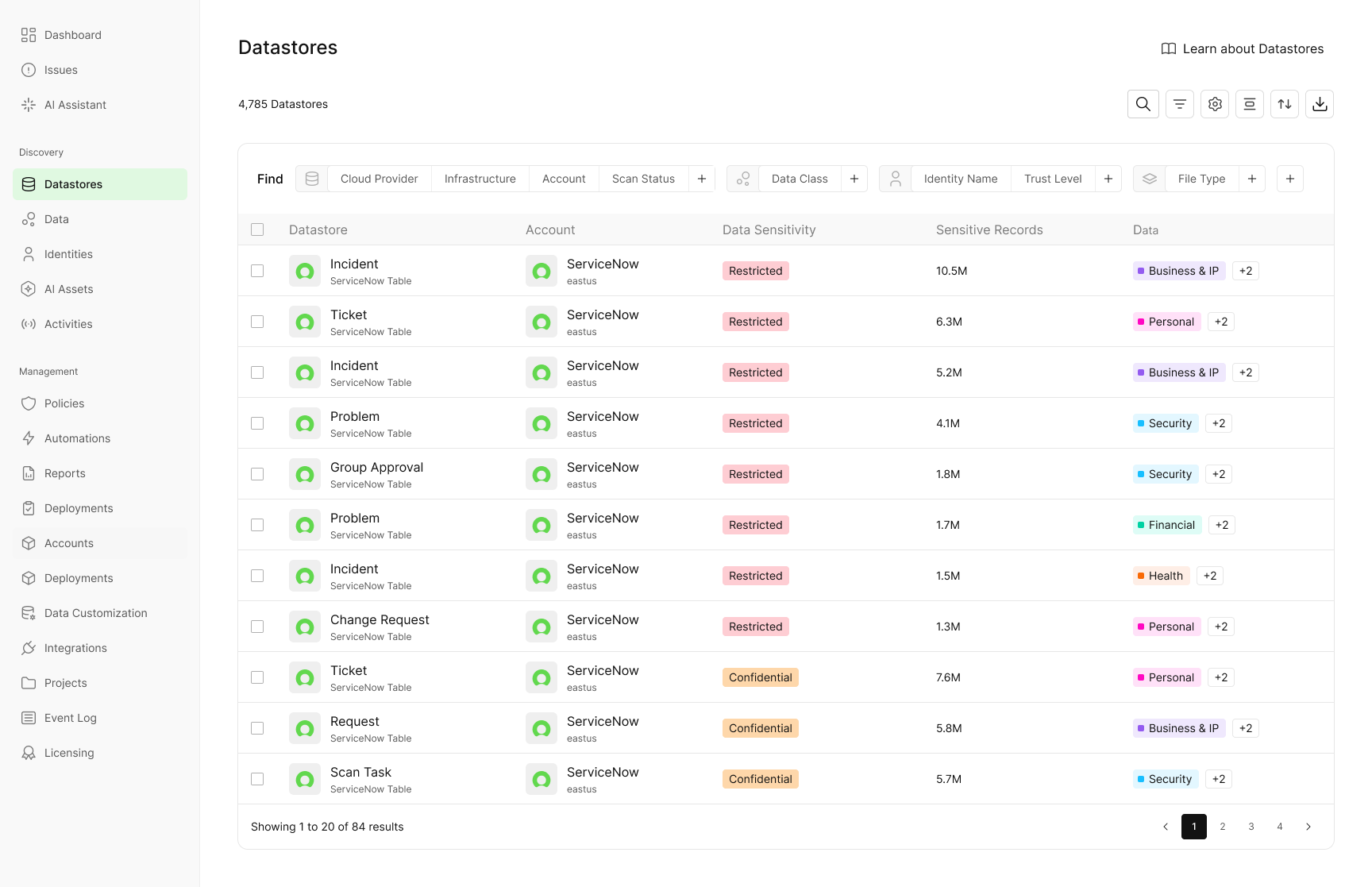
Data Security Visibility for ServiceNow ITSM
ServiceNow is mission critical to day to day operations and one of the easiest places for sensitive data to accumulate unnoticed. Support tickets, incident records, attachments, and free text fields routinely contain customer and employee PII, credentials, financial details, and other regulated information. Because this data is created as part of operational workflows, it often escapes traditional data security controls and grows without visibility.
Cyera now extends discovery and classification into ServiceNow ITSM, giving security teams visibility into a system that has historically been a blind spot. Teams can scan millions of tickets at scale, including records and attachments, at record speed.
With this visibility, teams can:
- Identify customer or employee PII accidentally shared in tickets
- Find credentials stored in plain text
- Ensure regulated data is handled appropriately inside ServiceNow
ServiceNow can now be treated as a first class part of the data security program, not an exception.
Exchange Online Coverage for Email and Attachments
Email remains one of the highest risk data surfaces in the enterprise. Sensitive information is constantly accumulated in mailboxes, including customer records, financial documents, legal files, health information, and internal reports. Unlike purpose built storage systems, email was never designed to enforce data governance, which makes it easy for sensitive data to spread, persist, and go unnoticed for years.
Cyera now brings deep data discovery and classification to Exchange Online, scanning mailboxes, email bodies, and attachments to identify sensitive data with high accuracy. This gives security teams visibility into an area that has historically been difficult to inspect at scale and even harder to control. Instead of relying on assumptions or reactive searches, teams can finally understand what sensitive data actually exists inside their email environment.
With this visibility, teams can answer critical questions that were previously out of reach, including:
- Which mailboxes contain regulated or high risk data
- Where sensitive attachments are stored, forwarded, or shared
- Whether email is being used as long term storage for data that should not live there
For many customers, this capability addresses concrete operational needs they have struggled to solve, such as identifying and periodically deleting old sensitive emails, enforcing retention policies more consistently, and reducing long-term data exposure in mailboxes that have grown unchecked. Exchange Online often holds some of an organization’s most sensitive data, yet remains one of the least governed. Bringing clarity and control to email enables compliance investigations, supports retention enforcement, and helps customers proactively reduce risk by cleaning up data that no longer needs to exist.

Topic Exploration for Business Aligned Data Understanding
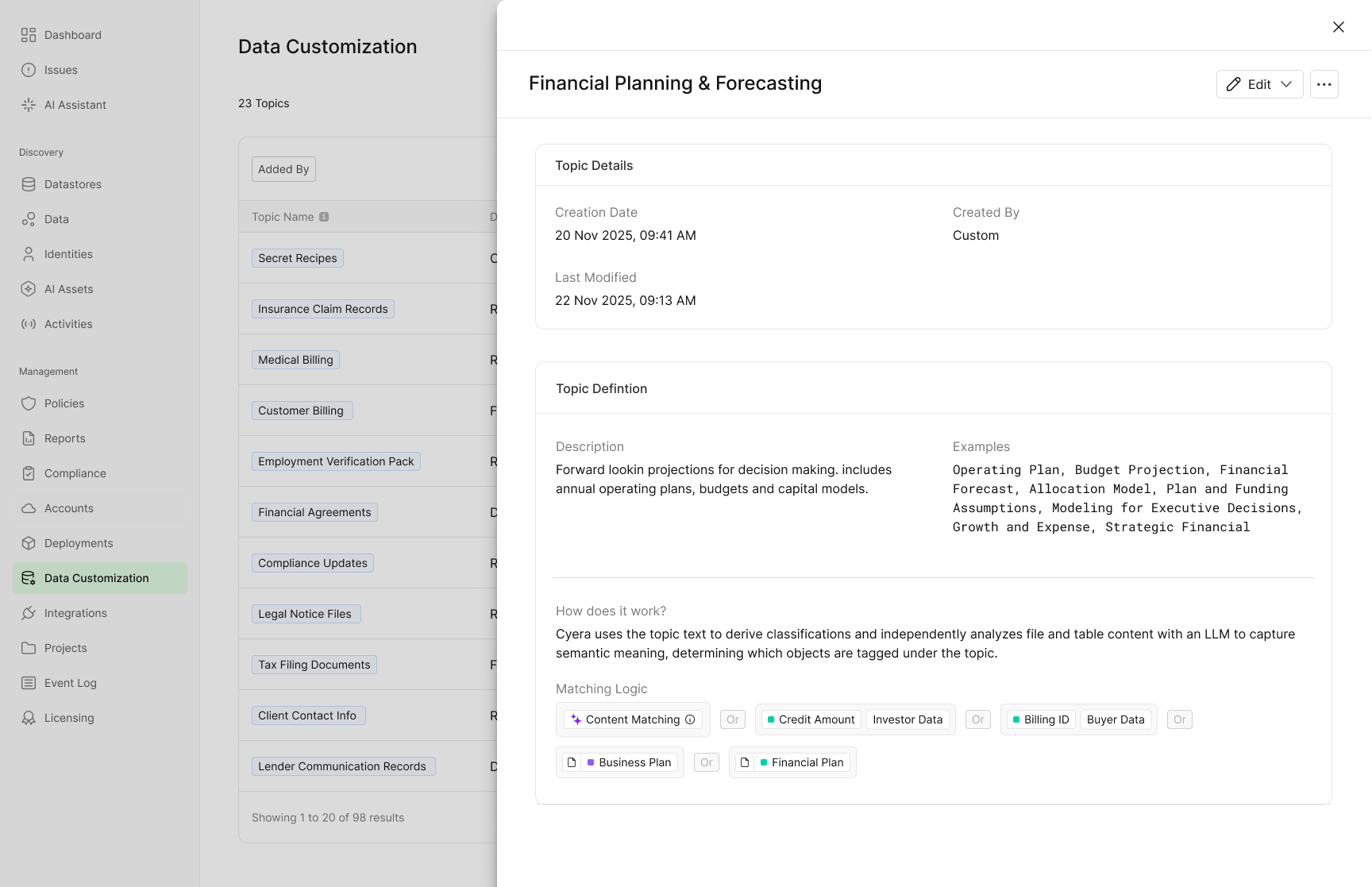
Finding sensitive data is only the first step. The harder challenge is prioritizing it, explaining risk to the business, applying relevant controls, and taking action in a way that aligns with how teams operate. When data is organized only by technical classifications, security teams are left translating risk instead of reducing it.
Topic Exploration changes how teams understand and act on their data by grouping multiple classifications into business aligned concepts. Instead of navigating long lists of data types, teams work with topics that reflect real business context, industry risk, and operational priorities. Each topic rolls up multiple underlying classifications, making it easier to drive policies, automation, and remediation at scale.
Examples of how teams use topics in practice include:
- Business specific topics, such as Proprietary Recipes, which group together related classifications like product formulas, ingredient ratios, and internal specifications. This allows teams to protect high value intellectual property as a single concept, without needing to track or remediate each underlying data class individually.
- Industry specific topics, such as Clinical Trials in healthcare, which automatically group data like regulatory submissions, trial protocols, and participant enrollment records. This helps teams focus controls and remediation on data that carries the highest regulatory and business risk within their industry.
- Customer defined and learned topics, including rule-based topics, fully custom topics defined by the customer, and learned topics Cyera generates using fine-tuned LLMs based on the organization’s industry and data patterns. Topics evolve automatically as new data is discovered, keeping policies and controls aligned without constant manual tuning.
A dedicated Topics view in the Data Explorer shows where each topic lives, how it is distributed, and which files are associated with it. Because topics map directly to underlying classifications, they can be used consistently across reporting, policy creation, and automated remediation workflows.
By shifting from technical labels to business aligned topics, teams can prioritize faster, automate with confidence, and communicate risk in terms the business understands. Topic Exploration turns data discovery into something teams can actually act on.
Automation Center to Standardize Remediation at Scale
Discovery is critical, but without action, risk isn’t mitigated. Many security tools stop at alerts, leaving teams to manually coordinate remediation across tickets, emails, and scripts.
The Automation Center is designed to close that gap by turning data security findings into consistent, automated action. It provides a centralized, tenant-wide hub where teams define and manage remediation workflows across the platform, with the ability to scope automations using filters and conditions. Automations can be applied broadly or targeted to specific policies or environments as needed.
Automation Center also supports projects, allowing teams to align remediation workflows with how access and ownership are structured in the organization. Projects create logical groupings of datastores and users, often based on department, team, or purpose, so automations and actions are applied only where they are relevant. This helps teams maintain segregated access, reduce unnecessary exposure, and enable more focused collaboration without slowing down response.
Instead of relying on manual follow up, teams can automatically trigger remediation actions such as:
- Creating ServiceNow incidents or Jira tickets with the right context and ownership when high risk data exposure is detected
- Applying Microsoft sensitivity labels to sensitive files as soon as they are classified, without human intervention
- Flagging sensitive data that is unencrypted, stale, or broadly accessible and delegating remediation to the appropriate data owner, who can review context and take action directly from the remediation portal as part of data sprawl reduction efforts
- Revoking excessive access from sensitive data
Because automations can span multiple policies and conditions, teams can standardize how risk is handled across the organization. Clear visibility into active automations shows what is running, why it was triggered, and what action was taken, reducing confusion and increasing trust in automated response.
This is not just orchestration. It is how teams reduce manual effort, shorten time to remediation, and enforce data security controls consistently at scale as data and risk continue to grow.

Access Trail for Activity Monitoring, Audits and Incident investigations
Understanding where sensitive data exists is critical. Understanding who accessed it, when they accessed it, and what they did with it is essential for activity monitoring, audits, incident investigations, and real risk decisions. Without access context, teams are left with static findings and incomplete answers when it matters most.
Access Trail provides near real-time visibility into file access and activity wherever sensitive data lives. It captures key actions, including creation, sharing, copying, movement, and exposure over time, and ties each event to the actor, whether a human user, an application, or an AI agent.
With one year of retention, Access Trail enables continuous monitoring and a complete chain of custody for sensitive files. This allows teams to investigate complex incidents, validate long term access patterns, and support audit requirements with a defensible activity history rather than a point in time snapshot.
This activity level visibility turns static discovery into actionable evidence. Security teams can investigate potential data exposure, validate access during audits, and support insider risk reviews using clear timelines instead of assumptions. With full context available, teams can act quickly and confidently when sensitive data is involved.

Identity Visibility for On-prem File Shares
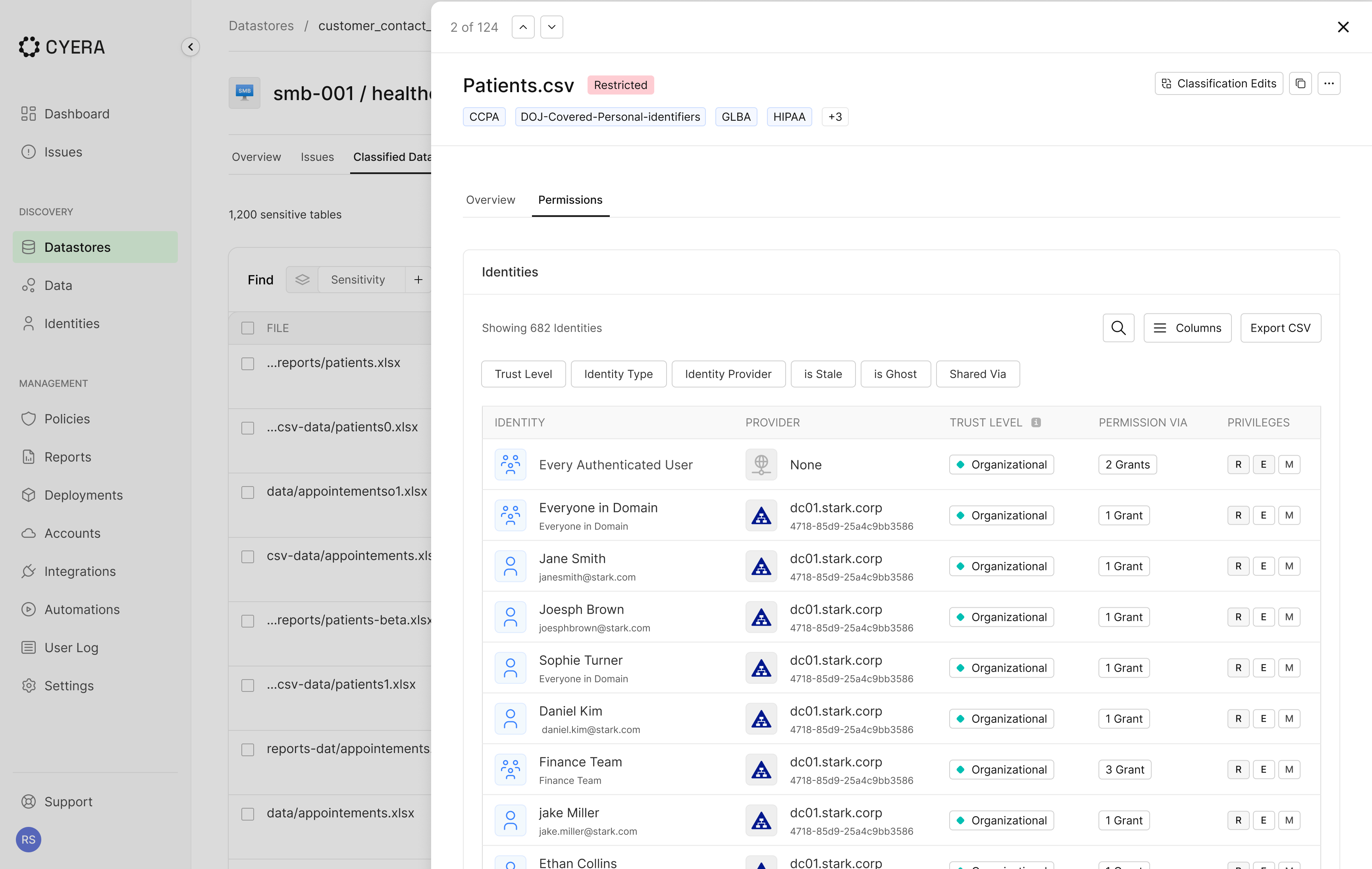
On-prem environments remain some of the hardest areas for security teams to manage. Permissions are complex, deeply inherited, and often poorly understood, especially as file shares have grown over years and access has expanded beyond its original intent. As a result, sensitive data can be broadly accessible without teams realizing it.
Cyera now extends identity visibility into on-prem, including SMB File Shares, NetApp, and Dell PowerScale, by mapping access directly from on-prem Active Directory. This gives teams an accurate view of which real users and groups can access sensitive files.
With identity context tied to classified data, teams can clearly see:
- Who can access sensitive files across on-prem file shares
- How access was granted, through inherited permissions, group membership, or direct assignment
- Where sensitive data is broadly exposed and presents unnecessary risk
This visibility enables faster investigations, more effective access governance, and remediation focused on root causes instead of individual files. By understanding access paths end to end, teams can reduce exposure in on-prem environments that have historically been the most difficult to secure.
Doing More Where Customers Need it Most
These updates reflect how data security teams are expected to operate today. Sensitive data is spread across systems, risk changes over time, and context determines whether teams can act quickly or fall behind. Visibility matters, but without understanding and action, it does not reduce exposure.
By expanding coverage into ServiceNow and Exchange Online, introducing business-aligned Topic Exploration, centralizing remediation through the Automation Center, strengthening activity visibility with Access Trail, and extending identity insight into on-prem environments, Cyera helps teams reduce risk with clarity, control, and actions across their entire data estate.
Together, these capabilities help bring more consistency and coordination across data security efforts as environments continue to grow. If you want to see how they work together in your environment, request a demo to explore what stronger data security with Cyera looks like in practice.

Get your AI Security Assessment
.jpg)


.svg)